7
EN
GETTING STARTED
1. Remove all packaging.
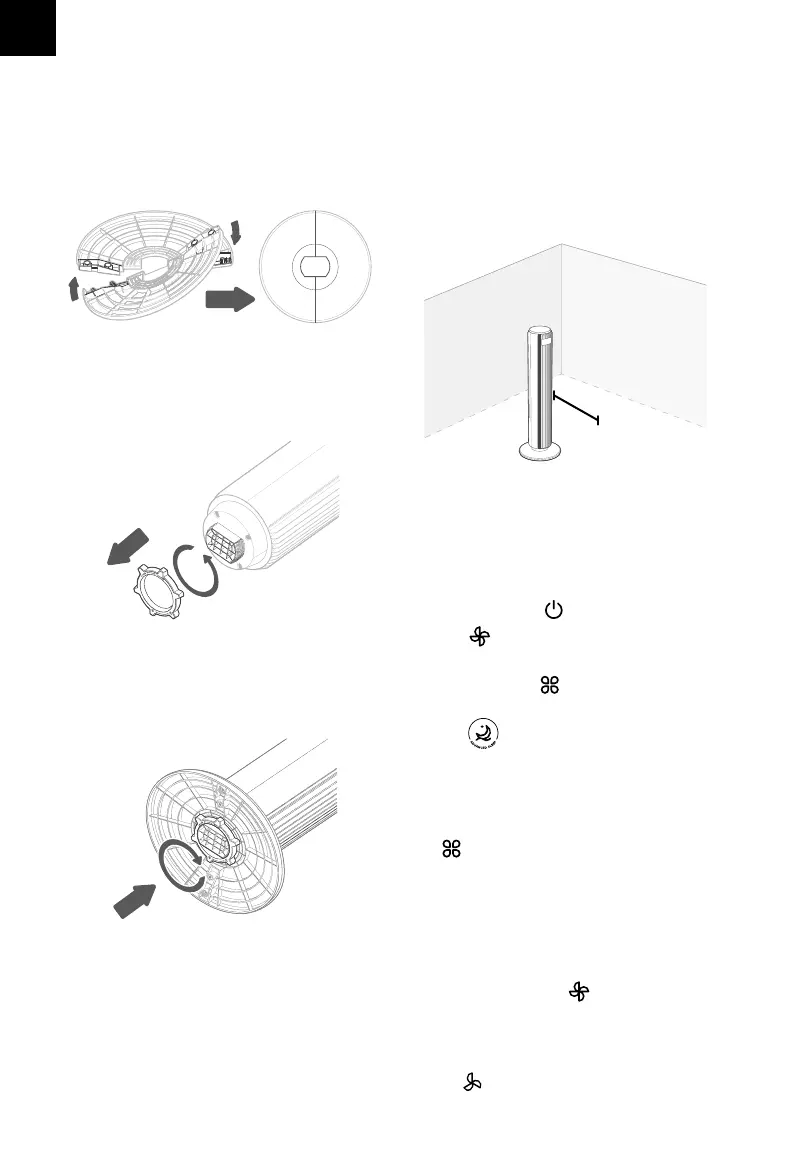
2. Snap the two pieces of the base
together. [Figure 1.1]
Figure 1.1
Figure 1.2
Figure 1.3
3. Unscrew the plastic nut from underneath
the tower fan. [Figure 1.2]
4. Secure the base to the tower fan with the
plastic nut. [Figure 1.3]
5. Place the tower fan on a at, stable
surface such as the oor.
Figure 1.4
Tap to cycle through fan modes: Normal,
Turbo, and Auto.
• This is the tower fan’s default mode.
• will show on the display.
Fan Modes
Normal Mode
USING YOUR TOWER FAN
1. Plug in and tap to turn on the tower fan.
2. Tap to change fan speed from 1 (low) to 5
(high).
3. Optionally, tap to select a dierent fan
mode.
4. Tap to turn Advanced Sleep Mode on/o.
Use Normal Mode to manually control the
tower fan’s speed. Tap to change fan
speed from 1 (low) to 5 (high).
6. When using the tower fan, allow at least 38
cm / 15 inches of clearance from the front
of the tower fan. Keep away from anything
that would block air ow, such as curtains.
[Figure 1.4]
38 cm /
15 in


 To Next Page