ENGLISH
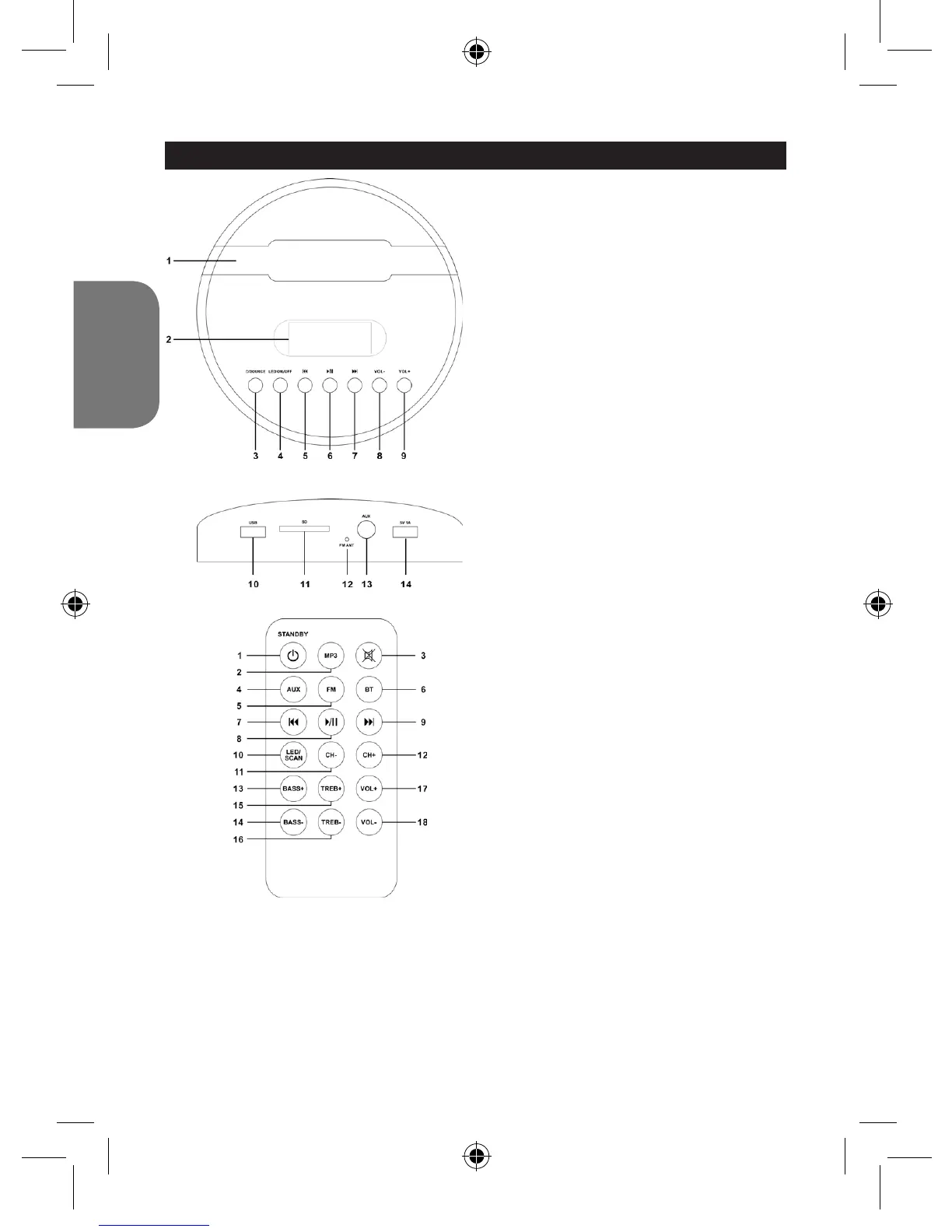
LOCATION OF CONTROLS
Top
1. Groove for holding tablets,
smartphones, MP3 and other audio
devices
2. LED display
3. Power/Source Button
4. LED ON/OFF Button
5. Skip Backward
6. Play/Pause/Pairing
7. Skip Forward
8. Volume –
9. Volume +
Back
10. USB port (for playback)
11. SD port (for playback)
12. FM antenna
13. AUX-in
14. 5V, 1A (USB port for charging)
Remote control
1. Power/Standby
2. MP3 mode
3. Mute
4. Aux In
5. FM radio
6. Bluetooth®
7. Skip Backward
8. Play/Pause
9. Skip Forward
10. LED/Scan
Press to turn the LED lamps on/off
In FM mode, long press to scan the
FM radio stations.
11. CH-
12. CH+
13. Bass+
14. Bass-
15. Treb+
16. Treb-
17. Volume+
18. Volume-
BT2000SW_IM1225_V05.indb 18 28/05/2015 17:34



 To Next Page