EMPLACEMENT DES TOUCHES
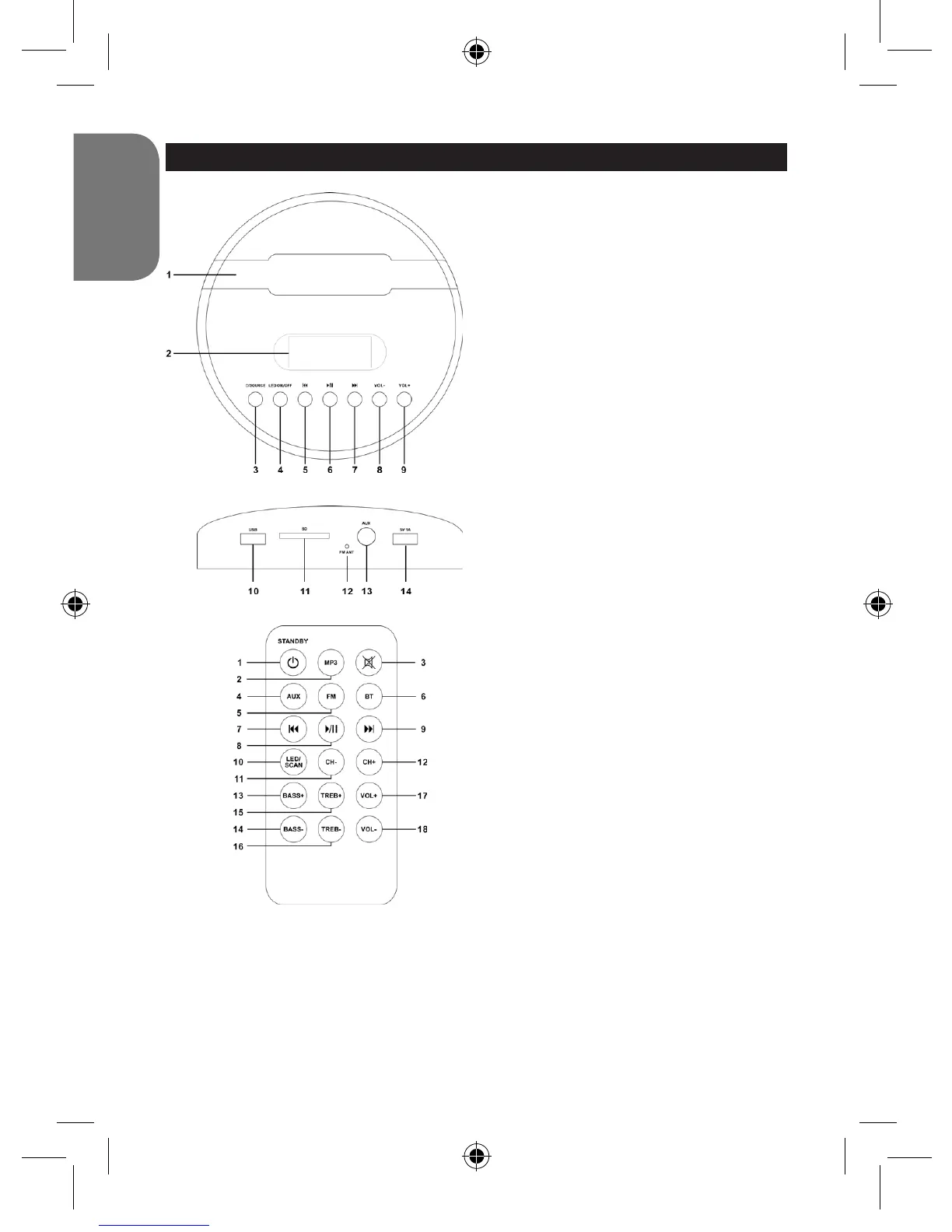
Haut
1. Rainure où placer la tablette, le
smartphone, le MP3 ou appareil de
même type
2. Ecran LED
3. Bouton Power/Source
4. Bouton LED ON/OFF
5. Bouton précédent
6. Play/Pause/Pairing (lecture/pause/
appairage)
7. Bouton suivant
8. Volume –
9. Volume +
Arrière
10. Port USB (pour chiers MP3)
11. Port SD (pour chiers MP3)
12. Antenne
13. Prise AUX-in
14. Port USB 5V 1A (pour charger votre
appareil)
Télécommande
1. Power/Standby (Mise en marche/veille)
2. Mode MP3
3. Mute (couper le son)
4. Aux In
5. Radio FM
6. Bluetooth®
7. Saut en arrière
8. Play/Pause (Lecture/Pause)
9. Saut en avant
10. LED/Scan
Appuyez pour pour allumer/éteindre
les lampes à LED
En mode “FM”, maintenez enfoncé
pour lancer le scan des stations de
radio
11. Chaîne-
12. Chaîne+
13. Graves+
14. Graves-
15. Aigus+
16. Aigus-
17. Volume+
18. Volume-
BT2000SW_IM1225_V05.indb 6 28/05/2015 17:34



 To Next Page