Copyright © Lexibook 2005
8
Outdoor Temperature Alert function:
n Press “ALERT” button to set the Outdoor Temperature Alert function on or off ( “ ” appears
on the LCD if this function is on).
n Hold “ALERT” button for 3 seconds to enter the Alert setting. Outdoor temperature flashes.
n Press “ +” or “-” button to select the channel for the temperature alert.
n Press ”ALERT” button to confirm the settings.
n Press “ +” or “-” button to set the upper ” ” and lower “ ” limit of the temperature.
n After setting up, reading for weather forecasts should be discarded for the next 12-24 hours.
This will allow sufficient time for the Weather Station to operate at a constant altitude and
therefore result in a more accurate forecast.
n Common to weather forecasting, absolute accuracy cannot be guaranteed.
The weather forecasting feature is estimated to have an accuracy level of about 75% due to
the varying areas the Weather Station has been designed for use in.
n If the Weather Station is moved to another location significantly higher or lower than its
initial standing point (e.g from ground floor to 1st floor of a house), remove the batteries and
reinsert them after about 30 seconds. By doing this, the Weather Station will not make
mistake of new location being a possible change in air pressure. Again, discard the weather
forecasts for the next 12-24 hours as this allow time for operation at a constant altitude.
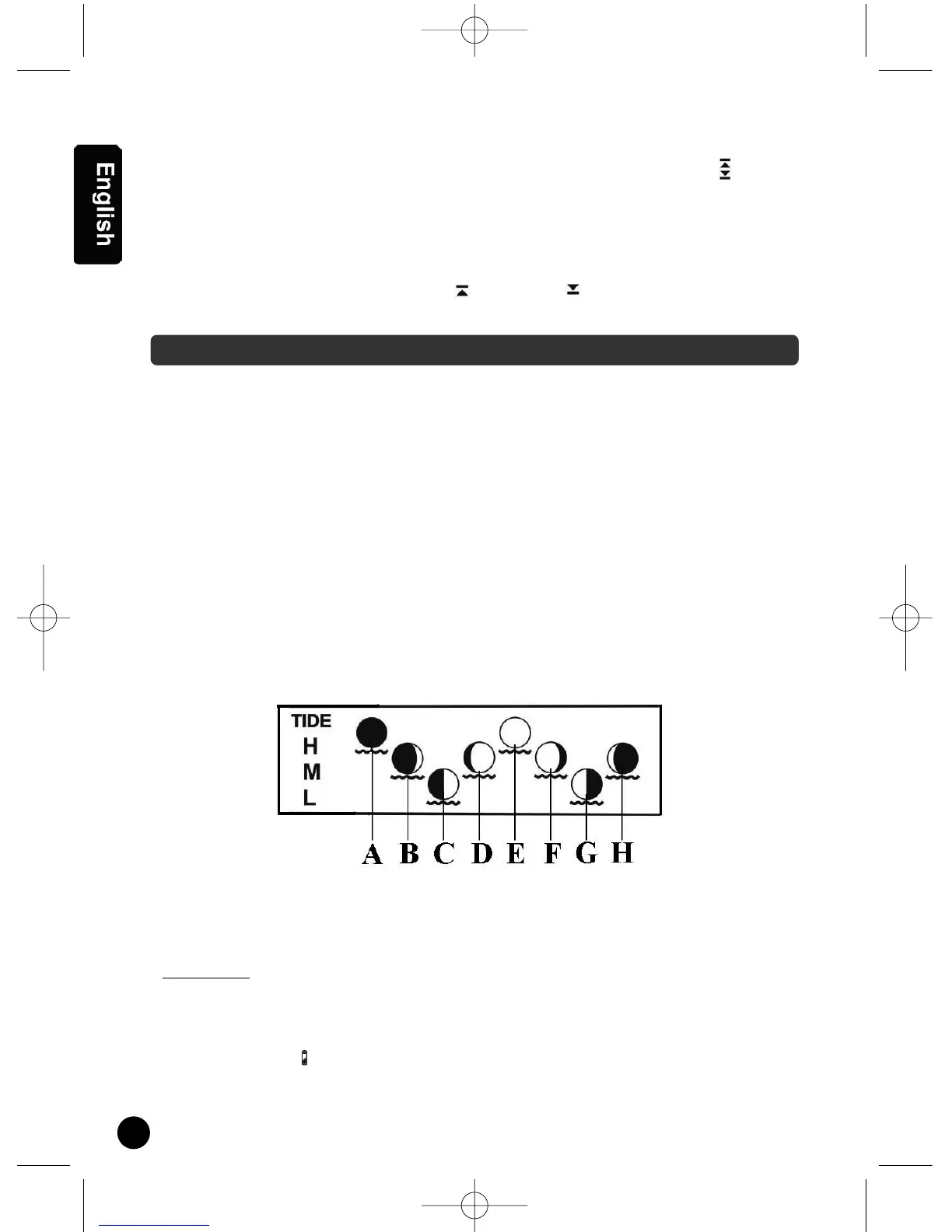
Moon Phase and Tide Indication
The Moon Phase of each day is shown on the LCD.
Low batteries indicator:
n Low battery icon “ “ appear at outdoor temperature row in particular channel indicating the
external transmitter of the channel in low battery status.
A : New Moon
B : Waxing Crescent
C : First Quarter
T
ide Status :
H : High Tide
D : Waxing Gibbous
E : Full Moon
F : Waning Gibbous
M : Medium Tide
G : Last Quarter
H : Waning Crescent
L : Low Tide
WEATHER DISPLAY
SM880GB.qxd 16/02/2005 10:44 Page 8


 To Next Page