Installation warning: When replacing the control panel, ensure that all cables are properly reconnected.
Control panel removal (MX81x)
Warning—Potential Damage: When replacing the control panel, control panel board, or controller board, replace
only one component at a time. Replace the required component and perform a POR before replacing a second
component. If this procedure is not followed, the printer will be rendered inoperable. Never replace both the control
panel and the controller board without a POR after installing each one or the printer will be rendered inoperable.
Never install or remove these components as a method of troubleshooting while operating in normal user mode.
See
“Controller board/control panel replacement” on page 372.
Warning—Potential Damage: When a component has been installed in a machine and has been powered up in
normal user mode, it cannot be used in another machine; it must be returned to the manufacturer. The machine
must be powered up in Diagnostic mode or the controller board, control panel boards, or control panel will become
locked.
1 Remove the controller board access cover. See “Controller board access cover removal” on page 423.
2 Remove the rear door. See “Rear door removal” on page 549.
3 Remove the left cover. See “Left cover removal (MX81x)” on page 418.
4 Open the front door.
5 Open the cartridge door.
6 Remove the column left front cover. See “Column left front cover removal (MX81x)” on page 414.
7 Remove the left scanner cover. See “Flatbed scanner left cover removal topic” on page 633.
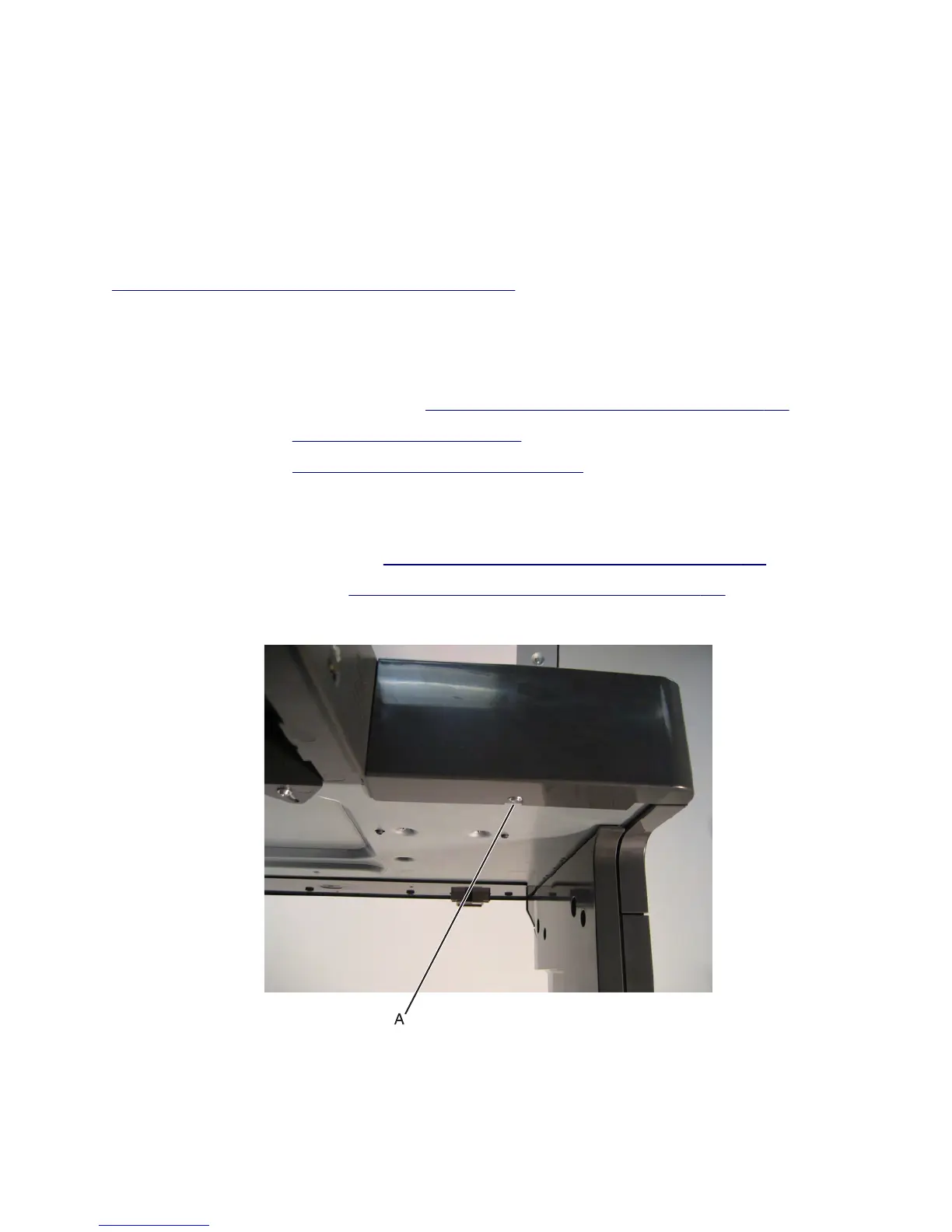
8 Remove the screw (A) securing the front scanner cover to the machine.
7463
Repair information
491



 To Next Page