Home
Lexmark
All in One Printer
MX71 Series
Page 448
Lexmark MX71 Series - Page 448
510 pages
Manual
Save Page as PDF
To Next Page
To Next Page
To Previous Page
To Previous Page
Loading...
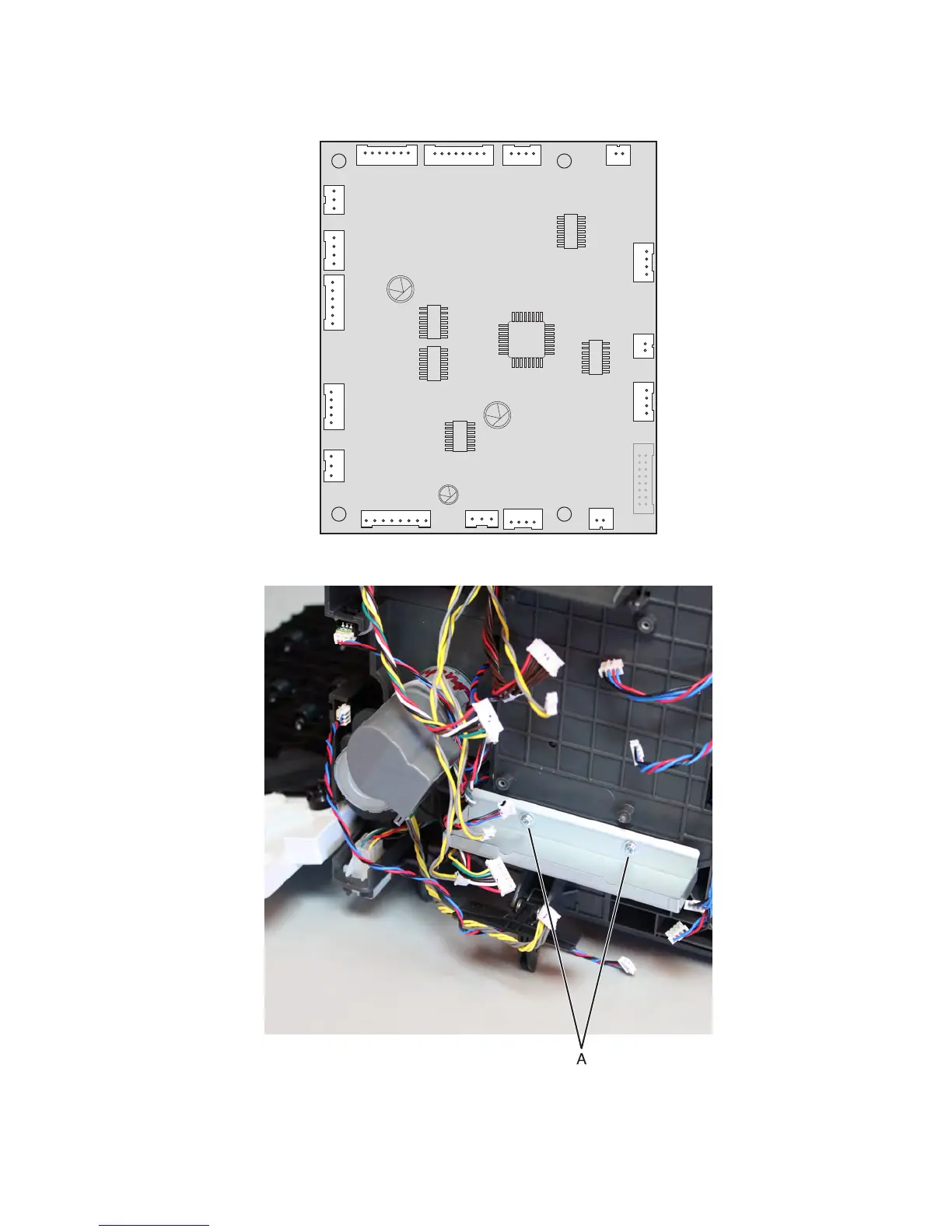
4
Discon
nect all ca
bles (J
1B, J5, J4D, J2
A,
J4C, J2B, J4B, J2C, J4A,
J8, J1A, J3B, J7, J6, J12,
an
d J3T
) from
the co
ntro
ller
boar
d.
5
Remove the two
screws (A
), then remove
the shie
ld.
7463
Rep
air
inf
orma
tio
n
818
447
449
Related product manuals
Lexmark MX721
315 pages
Lexmark MX710
364 pages
Lexmark MX722
315 pages
Lexmark MX717
360 pages
Lexmark MX711de
5 pages
Lexmark MX710de
111 pages
Lexmark MX711de 3
834 pages
Lexmark MX711de 4
834 pages
Lexmark MX710 Series
360 pages
Lexmark MX310
260 pages
Lexmark MX331
238 pages
Lexmark MX610
349 pages



 To Next Page