Bluetooth
®
SWC 173
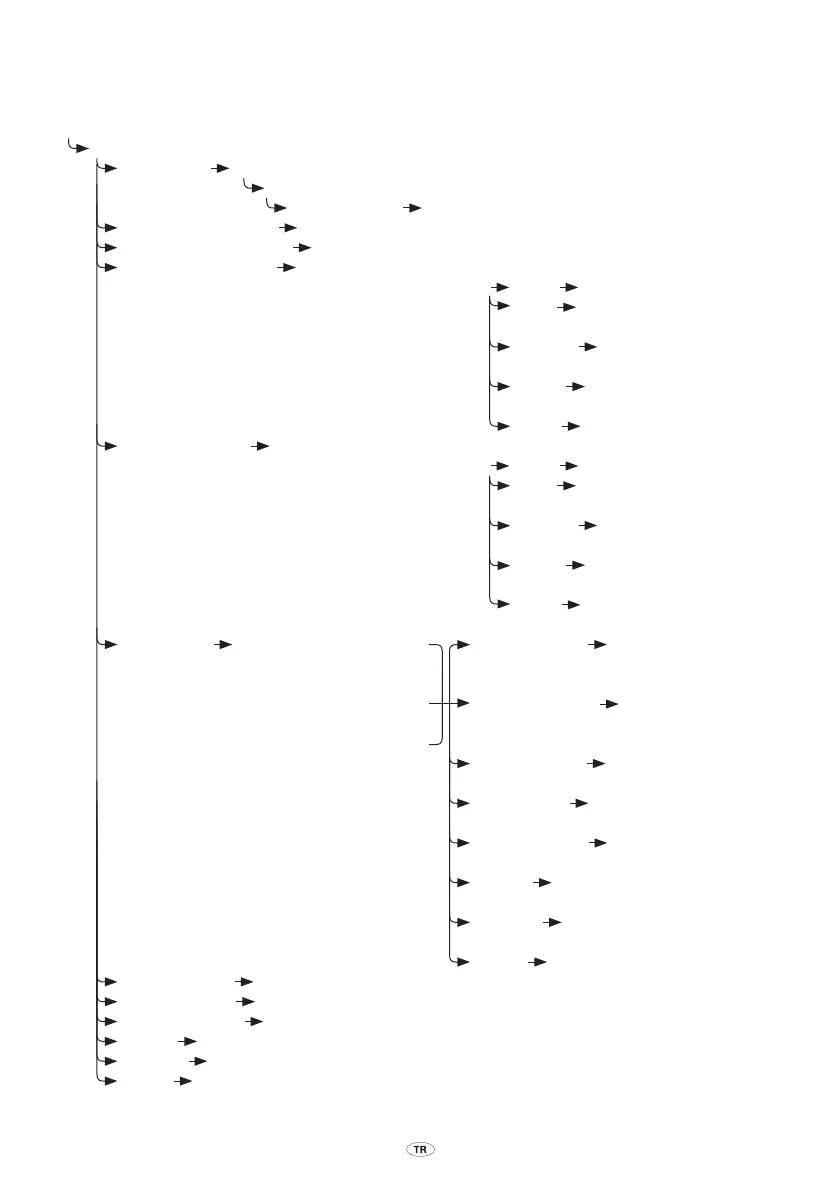
Kurulum menüsü
∑ Press and hold Mode button
¥
Setup menu. {Say a command}
µ ”P
air Device” ¥ Set your device in search mode and enter 0000 if prompted for the passcode
¥ P
airing complete. Please say a friendly name for the device
µ ”<devic
e name>” ¥ <device name> added
µ ”
Connect <device name>” ¥ Connecting <device name>… Connection complete
µ ”Disc
onnect <device name>” ¥ Disconnecting <device name>… Disconnection complete
µ ”R
emove <device name>” ¥ Removing <device name>
Are you sure?
µ ”Yes” ¥ Device removed
µ ”No
” ¥ Cancelled. Setup menu.
{Say a command}
µ ”R
epeat” ¥ Removing <device name>.
Are you sure?
µ ”Help
” ¥ Say yes to remove the
device…
µ ”Exit
” ¥ Goodbye
µ ”R
emove all Devices” ¥ Are you sure you want to
remove all devices
µ ”Yes” ¥ All devices removed
µ ”No
” ¥ Cancelled. Setup menu.
{Say a command}
µ ”R
epeat” ¥ Are you sure you want to
remove all…
µ ”Help
” ¥ Say yes to remove all the
devices…
µ ”Exit
” ¥ Goodbye
µ ”List
Devices” ¥ First device <device name A> µ ”Connect Device” ¥ Connecting
<device name>
Or
¥ Ne
xt device <device name B> µ ”Disconnect Device” ¥ Disconnecting
<device name>
Or
¥ Last
device <device name D> µ ”Remove Device” ¥ Removing <device name>.
Are you…
µ ”Ne
xt Device” ¥ Next device
<device name>…
µ ”P
revious Device” ¥ Previous device
<device name>…
µ ”Help
” ¥ You can say ”Next device”,
”Previous…
µ ”
Cancel” ¥ Cancelled. Setup menu.
{Say a command}
µ ”Exit
” ¥ Goodbye
µ ”Exper
t Mode on” ¥ Expert Mode On
µ ”Exper
t Mode o” ¥ Expert Mode O
µ ”
Call Announce o” ¥ Call Announce O
µ ”Help
” ¥ Setup menu. You can say ”Pair device”…
µ ”
Cancel” ¥ Cancelled. Phone menu. {Say Command}*
µ ”Exit
” ¥ Goodbye * Sadece bir eller-serbest cihazı bağlıysa.
TR_BT_SWC_IHF1700_OM_Lex2.indd 173 5/22/08 9:40:58 AM



 To Next Page