EasyManua.ls Logo

LG 22BK55WP - User Manual

LG 22BK55WP
8 pages
Print Icon
To Next Page IconTo Next Page
Loading...
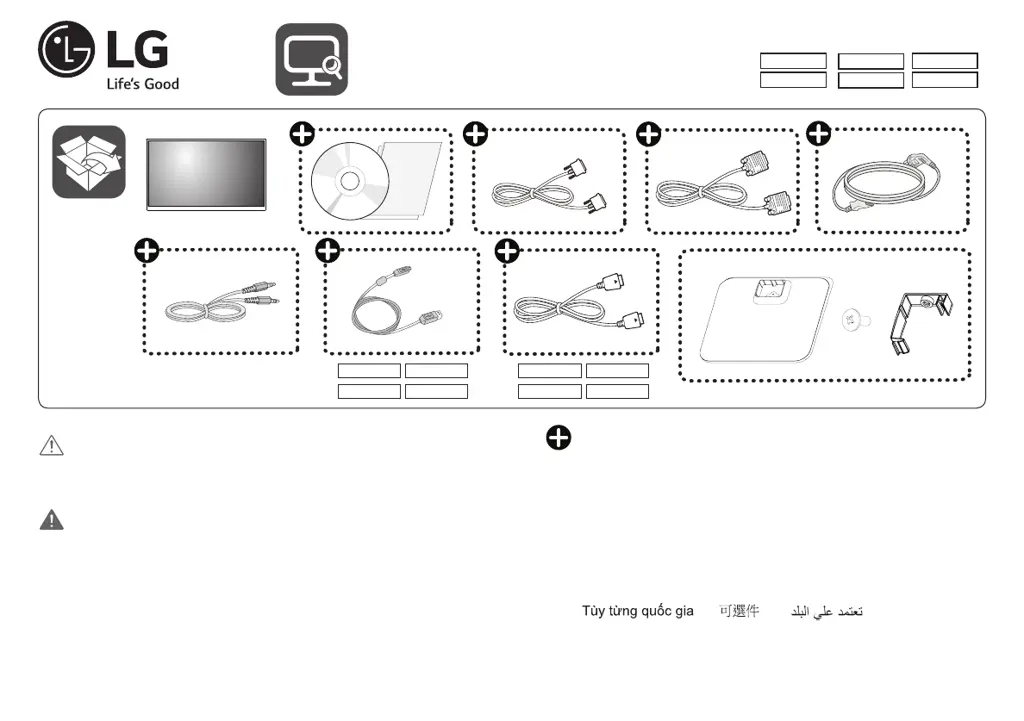
LED LCD Monitor (LED Monitor)
*MBM65461109*
(2211-REV04)
注意事項
•使用30分鐘請休息10分鐘。
•未滿2歲幼兒不看螢幕,2歲以上每天看螢幕不要超過1小時。
警告
•使用過度恐傷害視力。
Depending on country / Selon les pays /
En función del país /Dependendo do país /
Abhängig vom Land / Závisí na zemi /
Zależnie od kraju/ Zavisno od zemlje /
Závisí od krajiny / A seconda del Paese
/
Ülkeye bağlı
/
Afhænger af landet/Avhengig av landet /
Beroende på land / Maasta riippuen / В зависимости от страны
Залежно від країни / Mamlakatga bog’liq ravishda / În funcţie de ţară
/
/
/
/
www.lg.com
22BK55WY
22BK55WD
24BK55WY
24BK55WD
22BK55WP
24BK55WP
22BK55WY 24BK55WY 22BK55WY 24BK55WY
22BK55WP 24BK55WP 22BK55WP 24BK55WP

Questions and Answers

  • D
    Duane MendozaSep 9, 2025
    What does "OSD LOCKED" message mean on LG 22BK55WP and how to unlock it?
    • P
      Peter DonaldsonSep 9, 2025
      If you see an "OSD LOCKED" message on your LG Monitor, you can unlock the OSD controls by pushing the MENU button for several seconds until the message “OSD UNLOCKED” appears.
  • A
    Anne RossSep 12, 2025
    Why is the screen color on my LG 22BK55WP Monitor mono or abnormal?
    • D
      davidwalkerSep 12, 2025
      If the screen color on your LG monitor is mono or abnormal, check if the signal cable is properly connected, using a screwdriver to fasten it if necessary. Also, ensure that the video card is properly inserted in its slot. Finally, set the color setting higher than 24 bits (true color) in the Control Panel settings.
  • B
    Bryan AllenSep 13, 2025
    What to do if my LG 22BK55WP Monitor shows 'Unrecognized monitor, Plug&Play (VESA DDC) monitor found'?
    • E
      evangonzalezSep 14, 2025
      If your LG monitor displays an 'Unrecognized monitor, Plug&Play (VESA DDC) monitor found' message, be sure to install the display driver. Also, make sure that your video card supports the Plug&Play function.
  • C
    Christine McfarlandSep 16, 2025
    How to unlock OSD on LG 22BK55WP?
    • S
      Steve HorneSep 16, 2025
      If you see an "OSD LOCKED" message on your LG monitor, you can unlock the OSD controls by pushing the MENU button for several seconds until the message “OSD UNLOCKED” appears.

LG 22BK55WP Specifications

General IconGeneral
Screen Size21.5 inches
Resolution1920 x 1080 (Full HD)
Panel TypeIPS
Aspect Ratio16:9
Brightness250 cd/m²
Response Time5ms (GTG)
Refresh Rate60 Hz
Contrast Ratio1000:1
Built-in SpeakersNo
VESA Mount100 x 100 mm
Viewing Angle178°(H) / 178°(V)
ConnectivityHDMI, DisplayPort
VESA Mount CompatibleYes

Related product manuals