EasyManua.ls Logo

LG 22LD350-CB - TV SPEAKERS ON; OFF SETUP

LG 22LD350-CB
97 pages
Print Icon
To Next Page IconTo Next Page
To Previous Page IconTo Previous Page
Loading...
61
SOUND & LANGUAGE CONTROL
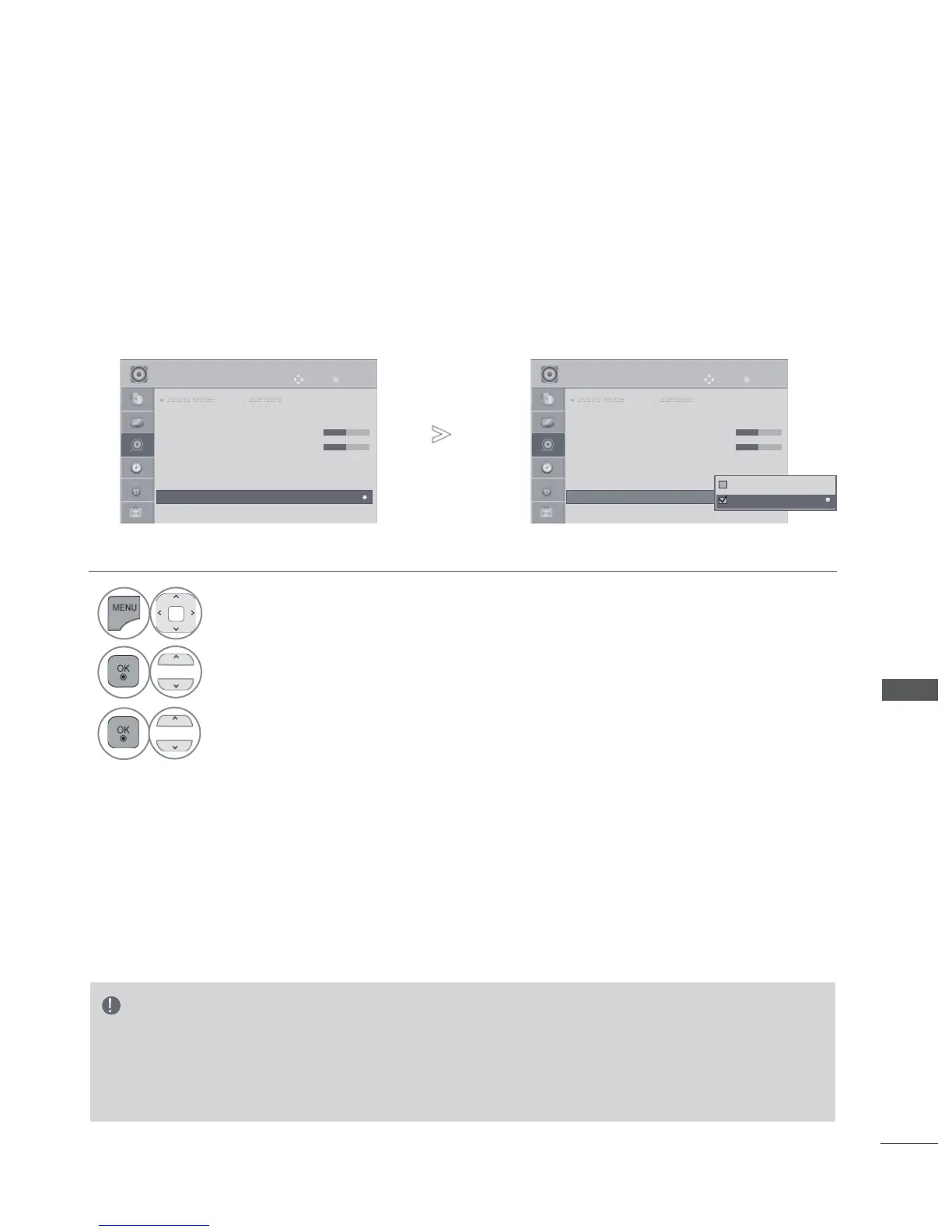
TV SPEAKERS ON/ OFF SETUP
You can adjust the TV internal speaker status.
In AV, COMPONENT, RGB and HDMI1/2/3 with HDMI to DVI cable, the TV speaker can be operational
even when there is no video signal.
If you wish to use an external Hi-Fi system, turn off the TV’s internal speakers.
• Press the MENU/EXIT button to return to normal TV viewing.
• Press the BACK button to move to the previous menu screen.
NOTE
► When the TV speaker is turned off while the Simplink home theater is operating, the sound output automati-
cally switches to the Home theater speaker, but when the TV speaker is turned on, the sound output the
TV speaker.
► Some menus in AUDIO are disabled when TV Speaker is set to Off.
1
Select AUDIO.
2
Select TV Speaker.
3
Select On or Off.
OK
Move

●
●
●
●
S
Soun
Soun
Soun
Soun
Soun
d M
d Mo
d Mo
d Mo
d Mo
d Mo
d
de :
de :
de :
de :
de :
St
Sta
Sta
Sta
Sta
Sta
d
ndar
ndar
ndar
ndar
ndar
d
d
d
d
d
d
• Infinite Sound : Off
• Treble 50
• Bass 50
• Reset
● Digital Audio Out : PCM
● TV Speaker : On
● DTV Audio Setting : Auto
AUDIO
● TV Speaker : On
►
►
OK
Move
●
●
●
●
S
Soun
Soun
Soun
Soun
Soun
d M
d Mo
d Mo
d Mo
d Mo
d Mo
d
de :
de :
de :
de :
de :
St
Sta
Sta
Sta
Sta
Sta
d
ndar
ndar
ndar
ndar
ndar
d
d
d
d
d
d
• Infinite Sound : Off
• Treble 50
• Bass 50
• Reset
● Digital Audio Out : PCM
● TV Speaker : On
● DTV Audio Setting : Auto
AUDIO
● TV Speaker : On
►
►
Off
PCM
On
►
SOUND & LANGUAGE CONTROL

Table of Contents