PARENTAL CONTROL / RATINGS
PARENTAL CONTROL / RATINGS
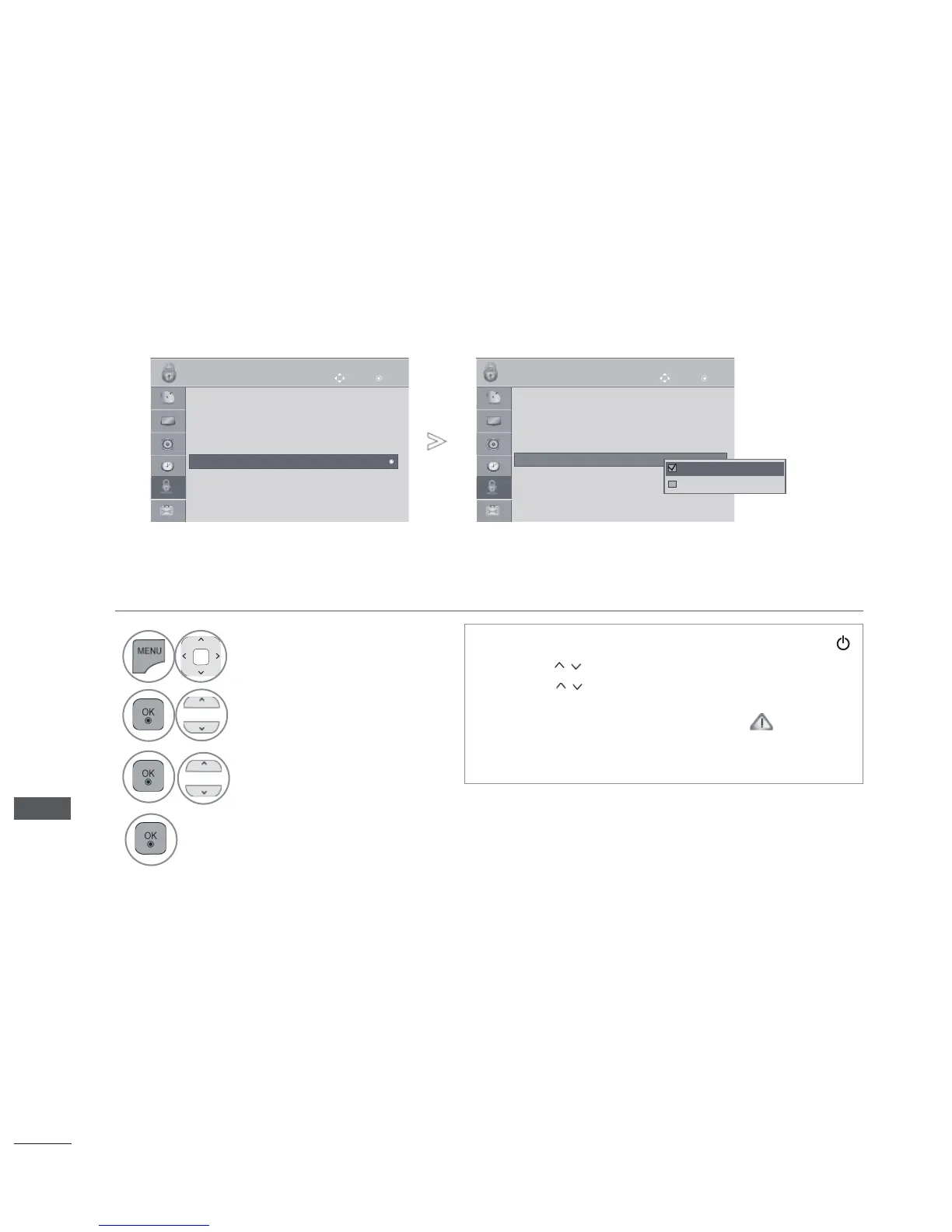
KEY LOCK
The TV can be set so that the remote control is required. This feature can be used to pre-
vent unauthorized viewing.
• Press the MENU/EXIT button to return to normal TV viewing.
• Press the BACK button to move to the previous menu screen.
•
In Key Lock ‘On’, if the TV is turned off, press the ,
INPUT, P
button on the TV or POWER
INPUT, P
or NUMBER buttons on the remote
control then the set will be turned on.
• With the Key Lock On, the display ‘
Key
Lock On ’ appears on the screen if any button on
the front panel is pressed while viewing the TV.
1
Select LOCK.
2
Select Key Lock.
3
Select On or Off.
4
Save.
OK
Move
● Set Password
● Lock System : Off
● Block Programme
● Input Block
● Key Lock : Off
LOCK
OK
Move
● Set Password
● Lock System : Off
● Block Programme
● Input Block
● Key Lock : Off
LOCK
● Key Lock : Off
Off
On
Off
● Key Lock : Off
►



 To Next Page