EasyManua.ls Logo

LG 22LD350C - Page 115

LG 22LD350C
134 pages
Print Icon
To Next Page IconTo Next Page
To Previous Page IconTo Previous Page
Loading...
APPENDIX
115
RS-232C Configurations
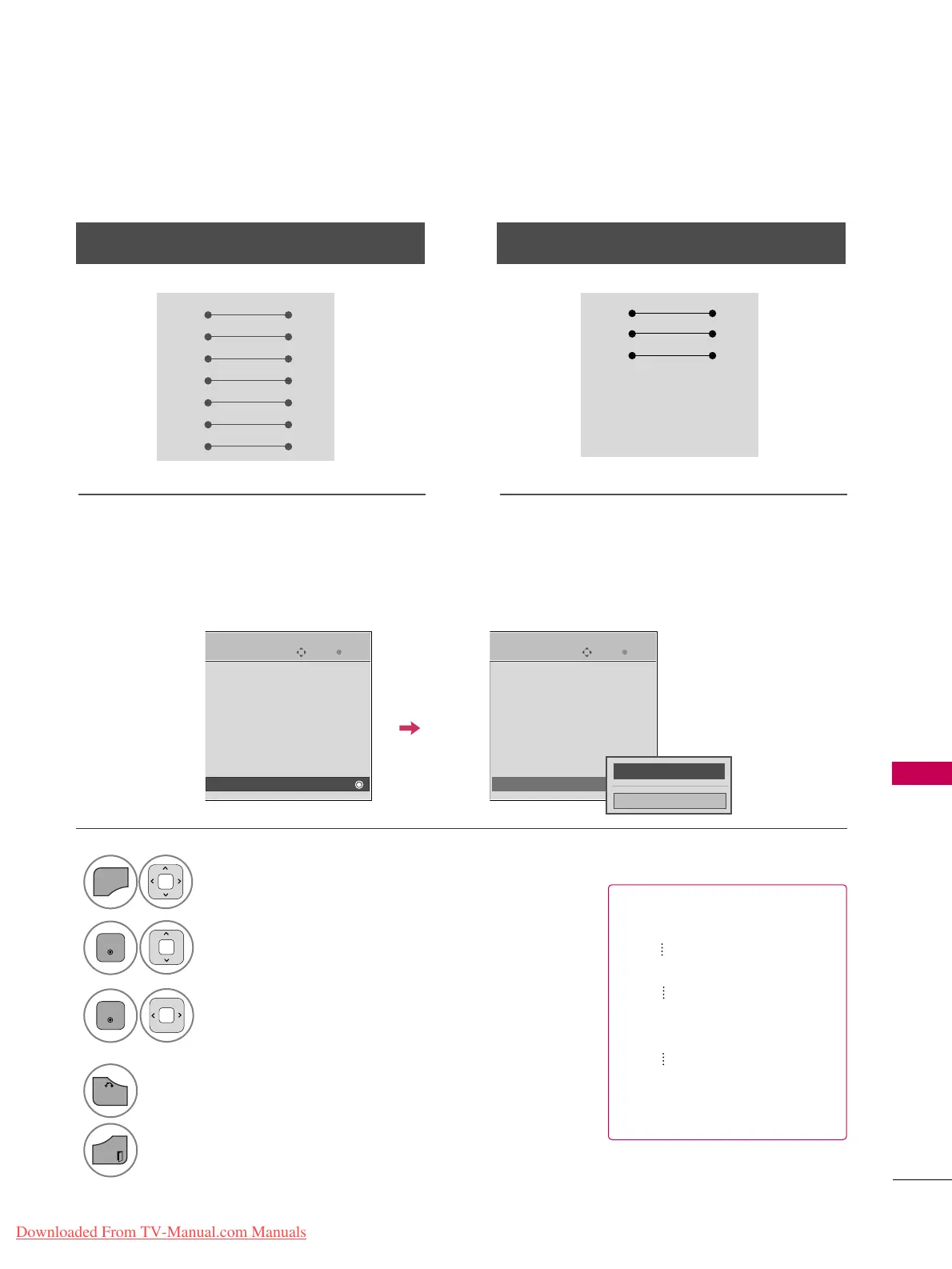
Use this function to specify a TV ID number.
Refer to ‘Real Data Mapping’.
Either cable below can be used.
Set ID
PC TV
RXD 2 3 TXD
TXD 3 2 RXD
GND 5 5 GND
DTR 4 6 DSR
DSR 6 4 DTR
RTS 7 8 CTS
CTS 8 7 RTS
D-Sub 9 D-Sub 9
PC TV
RXD 2 3 TXD
TXD 3 2 RXD
GND 5 5 GND
DTR 4 6 DTR
DSR 6 4 DSR
RTS 7 7 RTS
CTS 8 8 CTS
D-Sub 9 D-Sub 9
7-Wire Configuration
(
Serial female-female NULL modem cable
)
3-Wire Configurations
(
Not standard
)
Select
OOPPTTIIOONN
.
Select
SSeett IIDD
.
Choose the desired TV ID number.
The adjustment range of Set ID is
1~99.
1

MENU
3
2
ENTER
ENTER
4
BACK
Return to the previous menu.
EXIT
Return to TV viewing.
Enter
Move
OPTION
Menu Language : English
Audio Language : English
Input Label
SIMPLINK : On
Key Lock : Off
Simple Manual
Caption : Off
Set ID : 1
Enter
Move
OPTION
Menu Language : English
Audio Language : English
Input Label
SIMPLINK : On
Key Lock : Off
Simple Manual
Caption : Off
Set ID : 1
EE EE
FF
1
GG
Close
Real data mapping
0 : Step 0
A : Step 10 (SET ID 10)
F : Step 15 (SET ID 15)
10 : Step 16 (SET ID 16)
63 : Step 99 (SET ID 99)
64 : Step 100
Downloaded From TV-Manual.com Manuals

Table of Contents

Other manuals for LG 22LD350C

Related product manuals