SOUND & LANGUAGE CONTROL
81
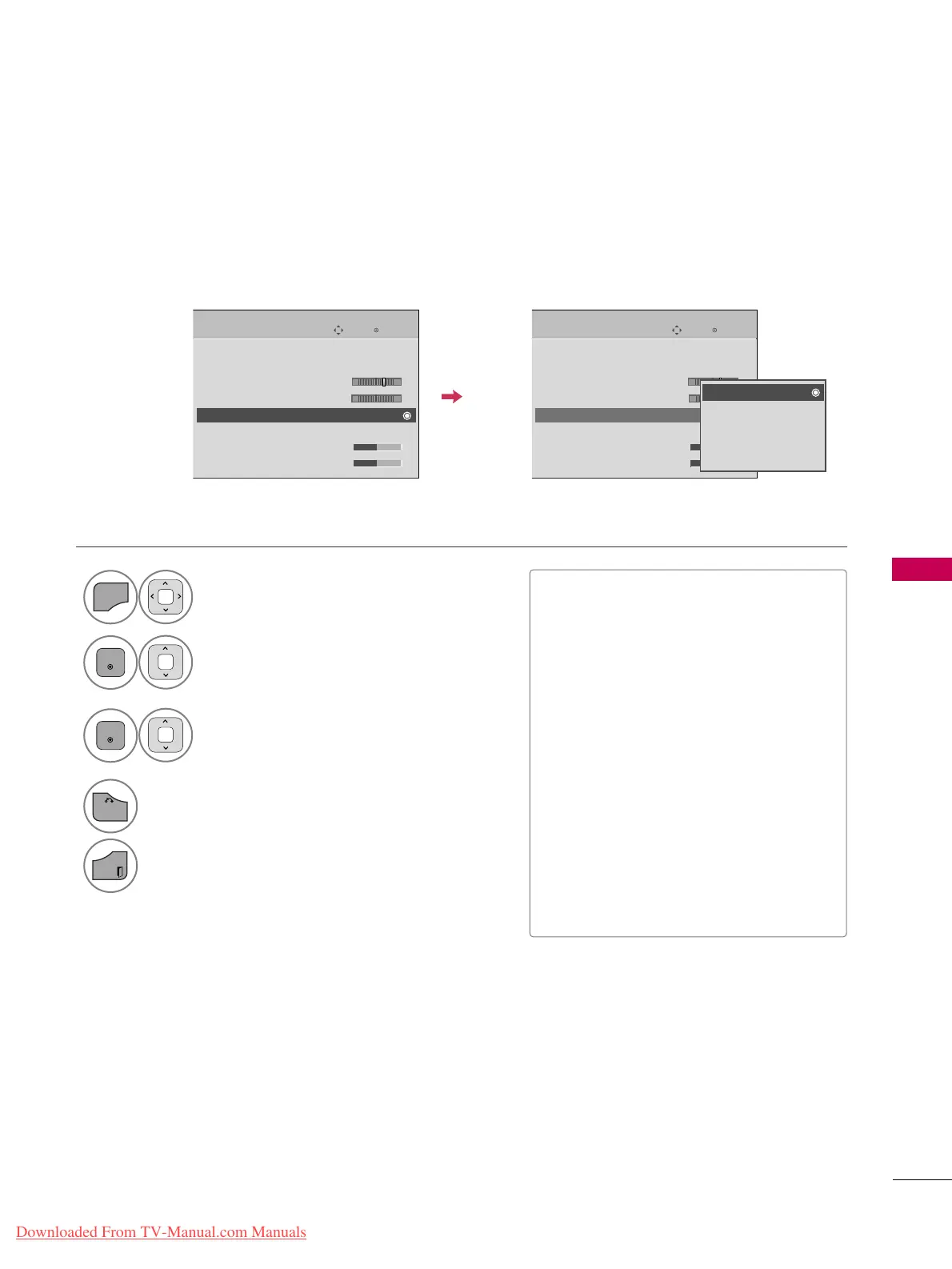
PRESET SOUND SETTINGS (SOUND MODE)
Sound Mode lets you enjoy the best sound without any special adjustment as the TV sets the appropriate
sound options based on the program content.
Enter
Move
AUDIO
Auto Volume : Off
Clear Voice II : Off
• Level 3
Balance 0
Sound Mode : Standard
•
Infinite Sound :
Off
• Treble 50
• Bass 50
Enter
Move
AUDIO
Auto Volume : Off
Clear Voice II : Off
• Level 3
Balance 0
Sound Mode : Standard
•
Infinite Sound :
Off
• Treble 50
• Bass 50
E
LR
E
LR
Select
AAUUDDIIOO
.
Select
SSoouunndd MMooddee
.
Select
SSttaannddaarrdd
,
MMuussiicc
,
CCiinneemmaa
,
SSppoorrtt
, or
GGaammee
.
1
Return to the previous menu.
Return to TV viewing.
■
SSttaannddaarrdd
,
MMuussiicc
,
CCiinneemmaa
,
SSppoorrtt
,
and
GGaammee
are preset for optimum
sound quality at the factory.
■
You can also adjust
SSoouunndd MMooddee
in
the
QQ..MMEENNUU
.
■
SStt aa nnddaa rr dd
: Offers standard-quality
sound.
■
MMuussiicc
: Optimizes sound for listening to
music.
■
CCiinneemmaa
: Optimizes sound for watching
movies.
■
SSppoorrtt
: Optimizes sound for watching
sports events.
■
GGaa mmee
: Optimizes sound for playing
games.
-+
-+
Standard
Music
Cinema
Sport
Game
Downloaded From TV-Manual.com Manuals



 To Next Page