8
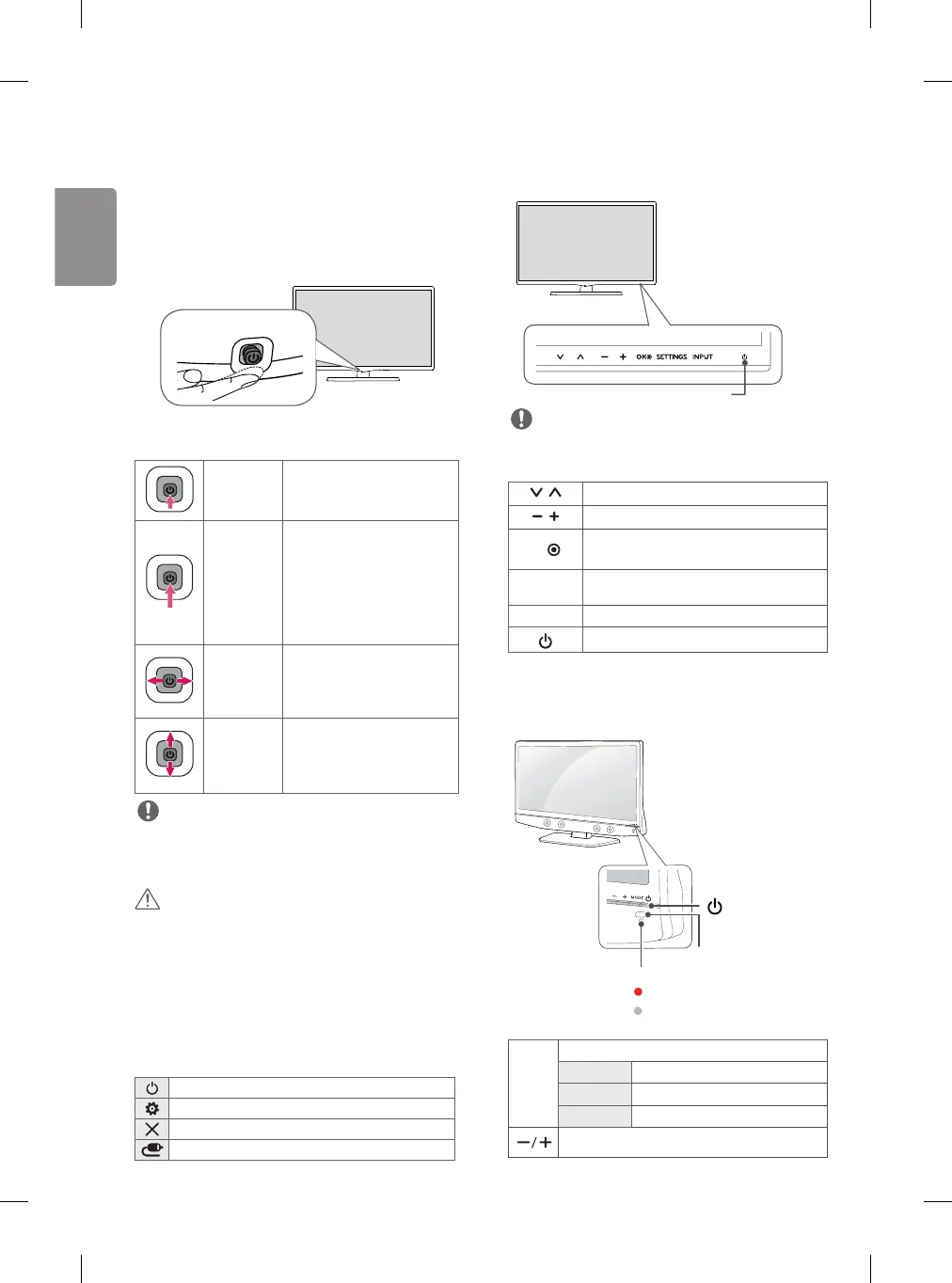
Using the joystick button
(Only 20/22/24/28MT48AF)
You can simply operate the TV functions, pressing or moving the
joystick button up, down, left or right.
• Image shown may differ from your TV.
Joystick Button
Basic functions
Power On
When the TV is turned off, place your
finger on the joystick button and
press it once and release it.
Power Off
When the TV is turned on, place your
finger on the joystick button, press
it once for a few seconds and release
it. (However, if the menu button is
on the screen, pressing and holding
the joystick button will let you exit
the menu.)
Volume
Control
If you place your finger over the
joystick button and move it left or
right, you can adjust the volume
level you want.
Programmes
Control
If you place your finger over the
joystick button and move it up or
down, you can scroll through the
saved programmes you want.
NOTE
• If you press the joystick button first, you may not adjust the
volume level and saved programmes.
CAUTION
• When your finger over the joystick button and push it to the up,
down, left or right, be careful not to press the joystick button.
Adjusting the menu
When the TV is turned on, press the joystick button one time. You
can adjust the menu items moving the joystick button up, down,
left, or right.
Turns the power off.
Accesses the main menu.
Clears on-screen displays and returns to TV viewing.
Changes the input source.
Using the touch buttons
(Only 29MT48AF)
Touch buttons
NOTE
• All of the buttons are touch sensitive and can be operated through
simple touch with your finger.
Scrolls through the saved programmes.
Adjusts the volume level.
OK
Selects the highlighted menu option or confirms
an input.
SETTINGS
Accesses the main menus, or saves your input and
exits the menus.
INPUT Changes the input source.
Turns the power on or off.
Using the buttons
(Only 22/24MT48AN, 22/24MT48AM)
Power Indicator
• Red : When the power is turned off
•
Off : When the power is turned on
Remote Control Sensor
(Power Button)
MODE Selects the mode. (Programme → Volume → INPUT)
Programme Scrolls through the saved programmes.
Volume Adjusts the volume level.
INPUT Changes the input source.
Adjusts the mode button level.



 To Next Page