14
Entertainment
(Depending on model)
• Image shown may differ from your TV.
Connecting USB storage devices
CAUTION
• Do not turn the TV off or remove a USB storage device while the
USB storage device is connected to the TV, as this could result in
loss of files or damage to the USB storage device.
• Back up your files saved on a USB storage device frequently, as you
may lose or damage the files and this may be not covered by the
manufacturer’s warranty.
Connect USB storage devices (USB memory) to the TV and use
multimedia features. Connect a USB flash memory or USB memory
card reader to the TV. To disconnect a USB storage device, make sure
to end the connection properly to prevent damages to the TV or files.
1 Press Q.MENU to access the quick menus.
2 Press the Navigation buttons to scroll to Eject and press OK .
3 Disconnect the USB storage device only when the message says
that it is safe to remove.
Tips for using USB storage devices
• Only a USB storage device is recognizable.
• If the USB storage device is connected through a USB hub, the
device is not recognizable.
• A USB storage device using an automatic recognition programme
may not be recognized.
• A USB storage device which uses its own driver may not be
recognized.
• The recognition speed of a USB storage device may depend on
each device.
• Please do not turn off the TV or unplug the USB device when
the connected USB storage device is working. When such device
is suddenly separated or unplugged, the stored files or the USB
storage device may be damaged.
• Please do not connect the USB storage device which was
artificially manoeuvred on the PC. The device may cause the
product to malfunction or fail to be played. Never forget to use
only a USB storage device which has normal music files, image
files or movie files.
• Please use only a USB storage device which was formatted as a
FAT16, FAT32, NTFS file system.
• Please connect a USB storage device with the cable offered by the
device maker.
• Some USB storage devices may not be supported or operated
smoothly.
• Be sure to back up important files since data stored in a USB
memory device may be damaged. We will not be responsible for
any data loss.
• If a USB memory device is connected to a USB multi-card reader,
its volume data may not be detected.
• If the USB memory device does not work properly, disconnect and
reconnect it.
• How fast a USB memory device is detected differs from device to
device.
• The recommended capacity is 1 TB or less for a USB external hard
disk and 32 GB or less for USB memory.
• Any device with more than the recommended capacity may not
work properly.
• USB storage devices below USB 2.0 are supported as well. But they
may not work properly in the movie list.
• Maximum of 999 folders or files can be recognized under one
folder.
• If there are a lot of folders or files all within one folder, the device
may not be able to access these properly.
• For external USB HDDs, it is recommended that you use devices
with a rated voltage of less than 5 V and a rated current of less
than 0.5 A.
Browsing files
Access the photo, music, or movie lists and browse files.
1 Connect a USB storage device.
2 Press SETTINGS to access the main menus.
3 Press the Navigation buttons to scroll to ENTERTAINMENT and
press OK .
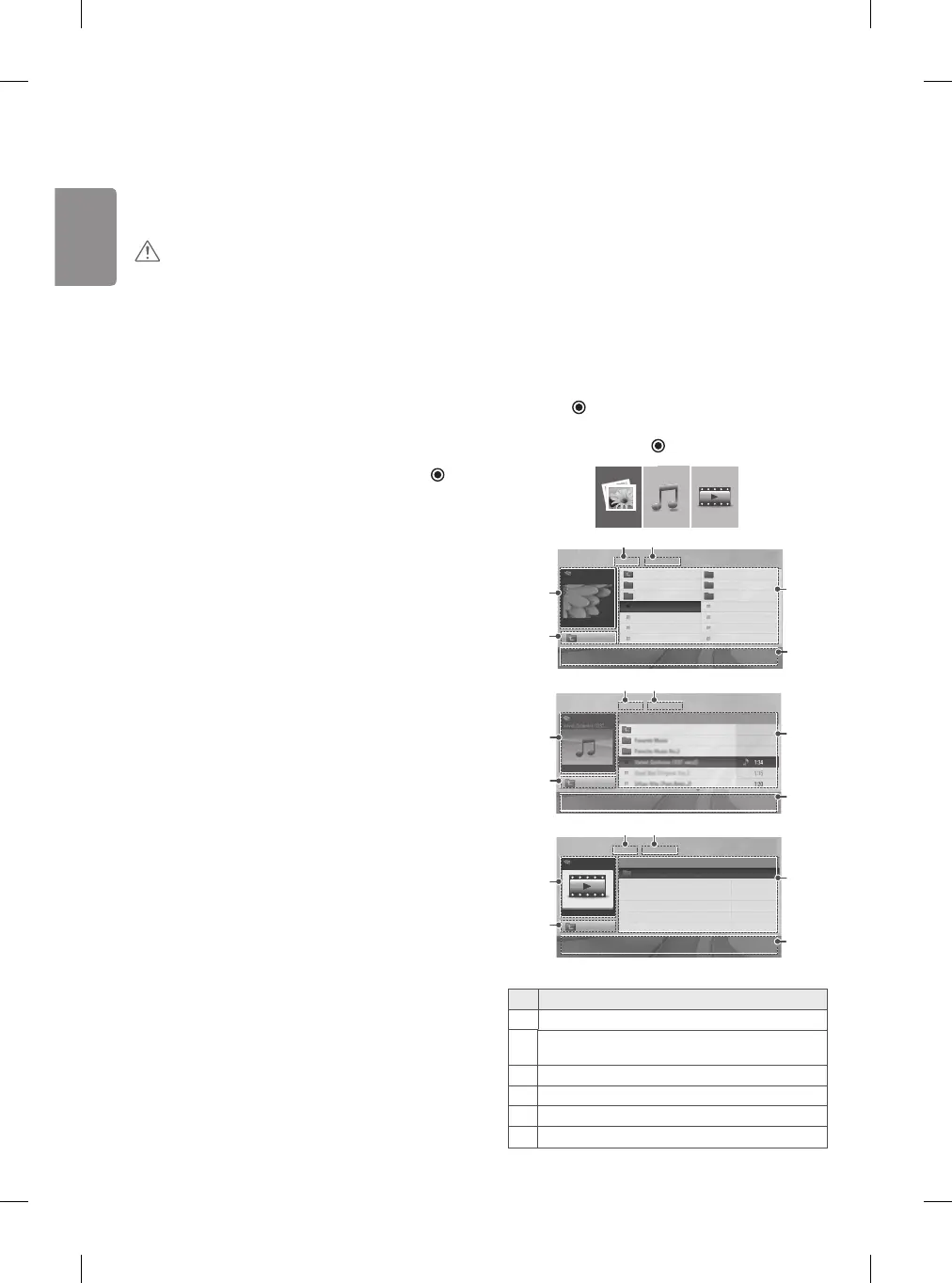
4 Press Navigation buttons to scroll to PHOTO LIST, MUSIC LIST or
MOVIE LIST and press OK .
PHOTO LIST MUSIC LIST MOVIE LIST
PHOTO LIST
Page1/1 No Marked
Up Folder KY103 09/15/2014
KY101
04/03/2014
KY104 10/12/2014
KY102
09/03/2014
KY105 11/27/2014
GUU
11/27/2014
JMJ005 11/27/2014
JMJ002
11/27/2014
JMJ006 11/27/2014
JMJ003
11/27/2014
JMJ007 11/27/2014
Up Folder
JMJ004
11/27/2014
JMJ008 11/27/2014
Move
PopUp Menu
Move Page
Mark Exit
43
5
2
6
1
4
1
6
3
2
5
ꔂ Move ꔉ PopUp Menu
Move Page
ꘂ Mark
Option Exit
3
1
5
4
2
6
MOVIE LIST
Page1/1 No Marked
Top Folder
Up Folder
Move
PopUp Menu
Move Page
Mark Exit
No. Description
1 Moves to the upper level folder.
2
Preview: Displays the thumbnail/folder name of the file in
the selected folder.
3 Current page/Total pages.
4 Total number of marked files.
5 Contents under the folder focused on 1.
6 Available buttons on the remote control.


 To Next Page