EasyManua.ls Logo

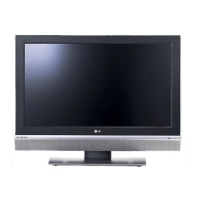
LG 32CS410-TB - User Manual

LG 32CS410-TB
54 pages
Print Icon
To Next Page IconTo Next Page
Loading...
OWNER’S MANUAL
LCD TV / LED LCD TV
Please read this manual carefully before operating
your set and retain it for future reference.
P/NO : MFL67452105 (1211-REV04)
Printed in Korea
www.lg.com
CS41**
LS310*
LS311*
LS315*
LS33**
LS30**

Other manuals for LG 32CS410-TB

Questions and Answers

  • O
    obowersSep 15, 2025
    What to do if my LG 32CS410-TB LCD TV has no sound but picture is displaying?
    • T
      thompsoncathySep 15, 2025
      If your LG LCD TV displays images but produces no sound, try pressing the + or - button to adjust the volume. Also, check if the sound is muted by pressing the MUTE button. You may also want to scroll to other channels because there might be a problem with the broadcast. Ensure that the audio cables are connected properly.
  • T
    Thomas SanchezAug 25, 2025
    How to fix lines or streaks on LG 32CS410-TB images?
    • R
      Raven OconnorAug 25, 2025
      If lines or streaks appear on images, check the antenna or aim the antenna in the proper direction.
  • B
    Brian MorenoAug 25, 2025
    How to fix LG 32CS410-TB remote control not working?
    • C
      Calvin DanielsAug 26, 2025
      If you cannot control your LG LCD TV with the remote, check the remote control sensor on the TV and try again. Also, make sure there are no obstacles between the remote and the TV. Finally, check if the batteries in the remote are working and properly installed.
  • B
    Billy ParksAug 27, 2025
    What to do if my LG 32CS410-TB shows no signal?
    • K
      Kimberly AustinAug 27, 2025
      If “No Signal” appears on the screen, check if the signal cable is properly connected between the TV and other devices. Also, check the selected input source by pressing the INPUT button.
  • J
    James ThompsonSep 16, 2025
    What to do if my LG LCD TV says no signal?
    • G
      Gregory FerrellSep 16, 2025
      If your LG LCD TV displays a “No Signal” message, verify that the signal cable is properly connected between the TV and other devices. Also, check the selected input source by pressing the INPUT button on your remote.
  • A
    april62Sep 23, 2025
    Why does my LG LCD TV have thin lines in the background?
    • W
      wfosterSep 23, 2025
      If thin lines appear in the background of the screen on your LG LCD TV, check the video cable connections.
  • T
    Thomas ScottSep 8, 2025
    How to fix display offset on LG 32CS410-TB?
    • D
      Dawn GonzalezSep 8, 2025
      If the display offset is wrong, adjust the position setting in the PICTURE menu. Check if the video card resolution and frequency are supported by the product. If the frequency is out of range, set to the recommended resolution using the display settings on the external device.
  • D
    Daniel CaldwellSep 9, 2025
    How to improve poor reception on some LG LCD TV channels?
    • K
      Kenneth MorganSep 9, 2025
      If the reception on some channels is poor, try switching to other channels as there may be a problem with the broadcast. The station signal may be weak, so try aiming the antenna in the proper direction. Also, check for local interference from electrical appliances or power tools.
  • M
    Mark JonesSep 2, 2025
    Why does my LG 32CS410-TB have horizontal or vertical bars or blurry images?
    • J
      Jennifer LewisSep 3, 2025
      If you are seeing horizontal or vertical bars, or blurry images on your LG LCD TV, check for local interferences from electrical appliances or power tools.
  • B
    Blake TravisAug 31, 2025
    What does it mean when “No Signal” appears on LG 32CS410-TB?
    • T
      tammy32Sep 1, 2025
      If you see a “No Signal” message on your LG LCD TV, verify that the signal cable is correctly connected between the TV and other devices. Also, check the selected input source by pressing the INPUT button.

Summary

Safety Instructions and Precautions

Critical Safety Warnings

Critical safety precautions and environments to avoid for the TV.

Power and Cable Safety

Important safety advice for handling the power plug and cables.

General Usage Safety Guidelines

Safety advice on electrical connections, children, and foreign objects.

Product Maintenance and Storage Safety

Safety guidelines for disassembly, repairs, and long-term storage.

Installation and Environmental Cautions

Cautions regarding installation location, vibration, and battery usage.

Usage and Handling Safety Advice

Safety advice on ventilation, cord protection, and panel care.

Product Handling and Display Phenomena

Precautions for moving the TV and explanations of display phenomena.

Installation and Assembly Procedures

Lifting and Moving the TV Safely

Safe procedures for lifting and moving the television set.

TV Stand Setup Guide

Step-by-step guide for assembling the TV stand.

Mounting the TV on a Table

Guide for placing the TV on a table and ensuring stability.

Securing the TV to a Wall

Procedures for securely mounting the TV to a wall.

Wall Mounting Bracket Guidelines

Guidelines for attaching an optional wall mount bracket to the TV.

Making External Connections

Antenna Connection Guide

How to connect the TV to a wall antenna socket with an RF cable.

HDMI Connection for Video and Audio

Guide for connecting external devices via HDMI for video and audio.

Component Connection for Analog Signals

Connecting external devices using component cables for analog signals.

Composite Connection for Analog Signals

Connecting external devices using composite cables for analog signals.

USB Connection for Multimedia

How to connect USB storage devices for multimedia features.

Remote Control Operations

Remote Control Button Functions

Explanation of the functions of each button on the remote control.

Watching TV and Program Management

Initial TV Setup Guide

Initial setup process including language and basic settings.

Manual Program Tuning

Step-by-step guide for manually tuning and arranging TV channels.

Entertainment Features and USB Usage

Customizing TV Settings

Picture Settings Adjustments

Adjusting image settings like Aspect Ratio, Energy Saving, and Picture Mode.

Audio Settings Configuration

Adjusting sound settings like Sound Mode, Treble, Bass, Auto Volume, and Balance.

Maintenance and Troubleshooting

Common Troubleshooting Issues and Solutions

Common problems and their solutions for TV control and display.

Video Troubleshooting Solutions

Solutions for video issues like black and white display, blur, or dark screen.

LG 32CS410-TB Specifications

General IconGeneral
Screen Size32 inches
Resolution1366 x 768
Display TypeLCD
HDMI Ports2
USB Ports1
Aspect Ratio16:9
Refresh Rate60 Hz
Built-in TunerYes
Sound Output10W x 2

Related product manuals