A-11
PREPARATION
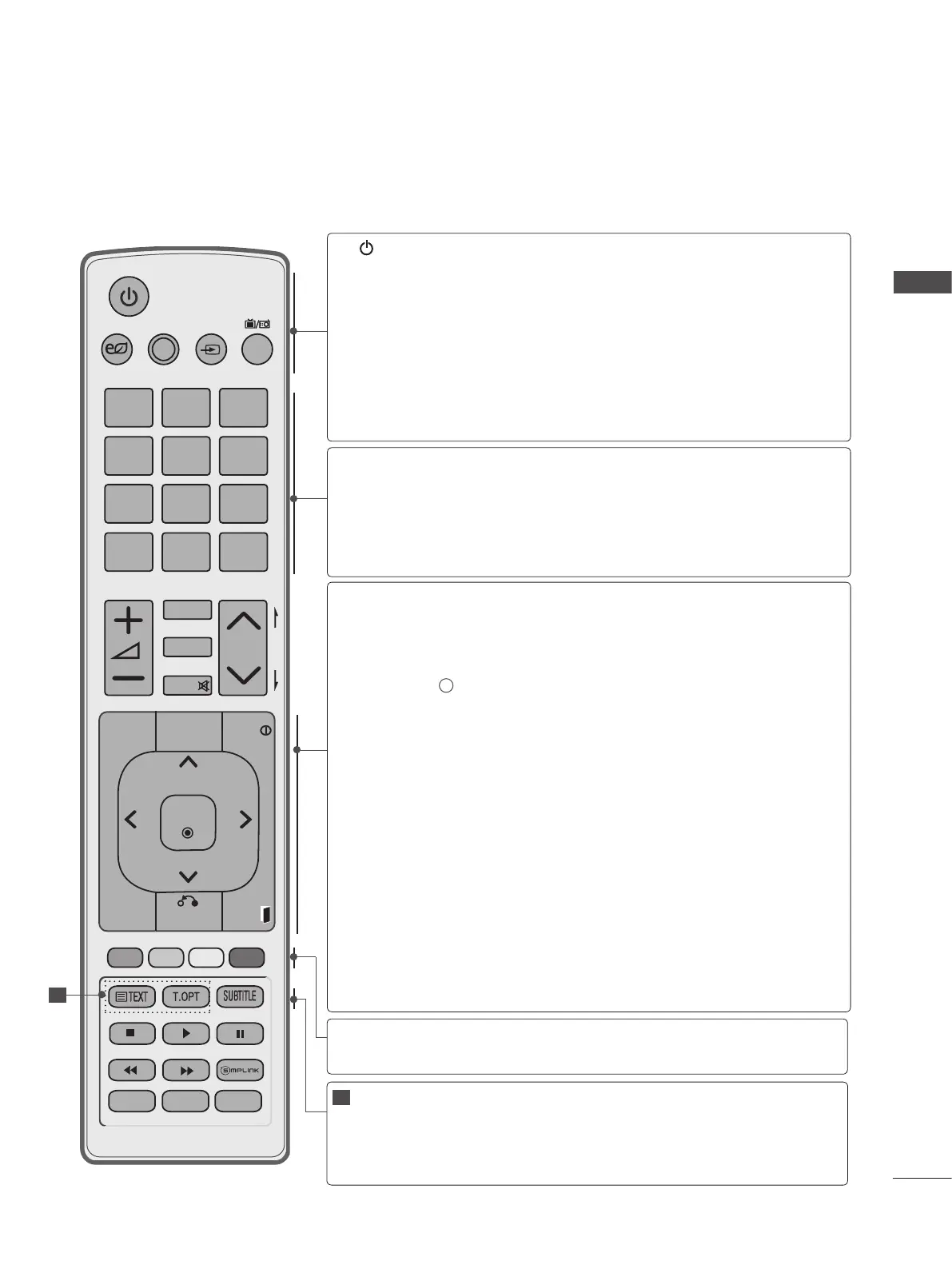
REMOTE CONTROL KEY FUNCTIONS
When using the remote control, aim it at the remote control sensor on the TV.
(POWER)
ENERGY
SAVING
AV MODE
INPUT
TV/RAD
Switches the TV on from standby or off to standby.
Adjust the Energy Saving mode of the TV.(► p.80)
It helps you select and set images and sounds
when connecting AV devices.(► p.42)
External input mode rotate in regular sequence.
(
►
p.36)
Selects Radio, TV and DTV channel.
0 to 9 number
button
LIST
Q.VIEW
Selects a programme.
Selects numbered items in a menu.
Displays the programme table.
(
►
p.33)
Returns to the previously viewed programme.
Shows Contents List in EzSign mode. (EzSign V1.5 or
Later)
Displays the EzSign content on a TV Screen.
Shows or hides the information on TV remote con-
trol buttons in EzSign mode.
Allows you to navigate the on-screen menus and
adjust the system settings to your preference.
Accepts your selection or displays the current
mode.
Selects a menu.
Clears all on-screen displays and returns to TV
viewing from any menu.
(
►
p.17)
Allows the user to move return one step in an inter-
active application, EPG or other user interaction
function.
Clears all on-screen displays and returns to TV
viewing from any menu.
Coloured
buttons
These buttons are used for teletext (on TELETEXT
models only), Programme edit.
TELETEXT
BUTTONS
SUBTITLE
These buttons are used for teletext.
For further details, see the ‘Teletext’ section.(►
p.113)
Recalls your preferred subtitle in digital mode.
1
GUIDE
PORTAL
INFO i
THUMBSTICK
(Up/Down/Left/Right)
OK
MENU
BACK
EXIT
P
A
G
E
P
1 2 3
4 5
0
6
7 8 9
LIST
Q.VIEW
AV MODE INPUT
TV/
RAD
ENERGY
SAVING
MARK
RATIO
MUTE
Q.MENU AD ALARM
OK
GUIDE
PORTAL
MENU BACK
INFO
EXIT
1


 To Next Page