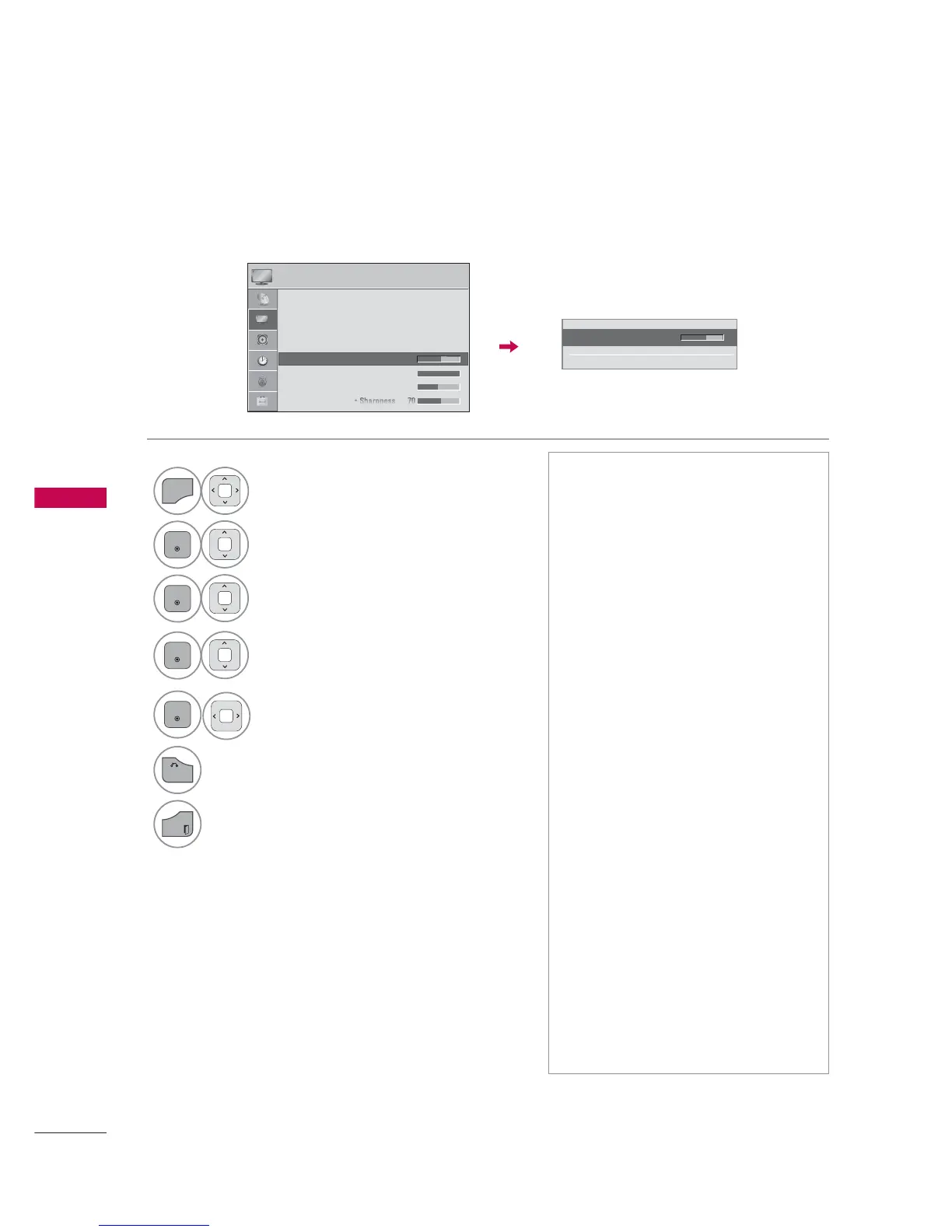
Select Backlight, Contrast, Brightness,
Sharpness, Color, Tint, Color Temp., or
Advanced Control.
5
ᯫ
Backlight: This function adjusts the
brightness of LCD panel, to control
the brightness of the screen.
Adjusting the backlight is recom-
mended when setting the brightness
of the set. When decreasing the
backlight, the brightness of the black
becomes darker without any loss in
video signal and the power con-
sumption is reduced.
ᯫ
Backlight can only be adjusted in "
Energy Saving - Off, Minimum, or
Medium".
ᯫ
Contrast: Increase or decrease the
gradient of the video signal. You may
use Contrast when the bright part of
the picture is saturated.
ᯫ
Brightness: Adjusts the base level of
the signal in the picture. You may use
Brightness when the dark part of the
picture is saturated.
ᯫ
Sharpness: Adjusts the level of crisp-
ness in the edges between the light
and dark areas of the picture. The
lower the level, the softer the image.
ᯫ
Color: Adjusts intensity of all colors.
ᯫ
Tint: Adjusts the balance between
red and green levels.
ᯫ
Color Temp.: Set to warm to enhance
hotter colors such as red, or set to
cool to enhance cooler colors such
as blue.



 To Next Page