15
PREPARATION
22/26LE5300, 22/26LE6500
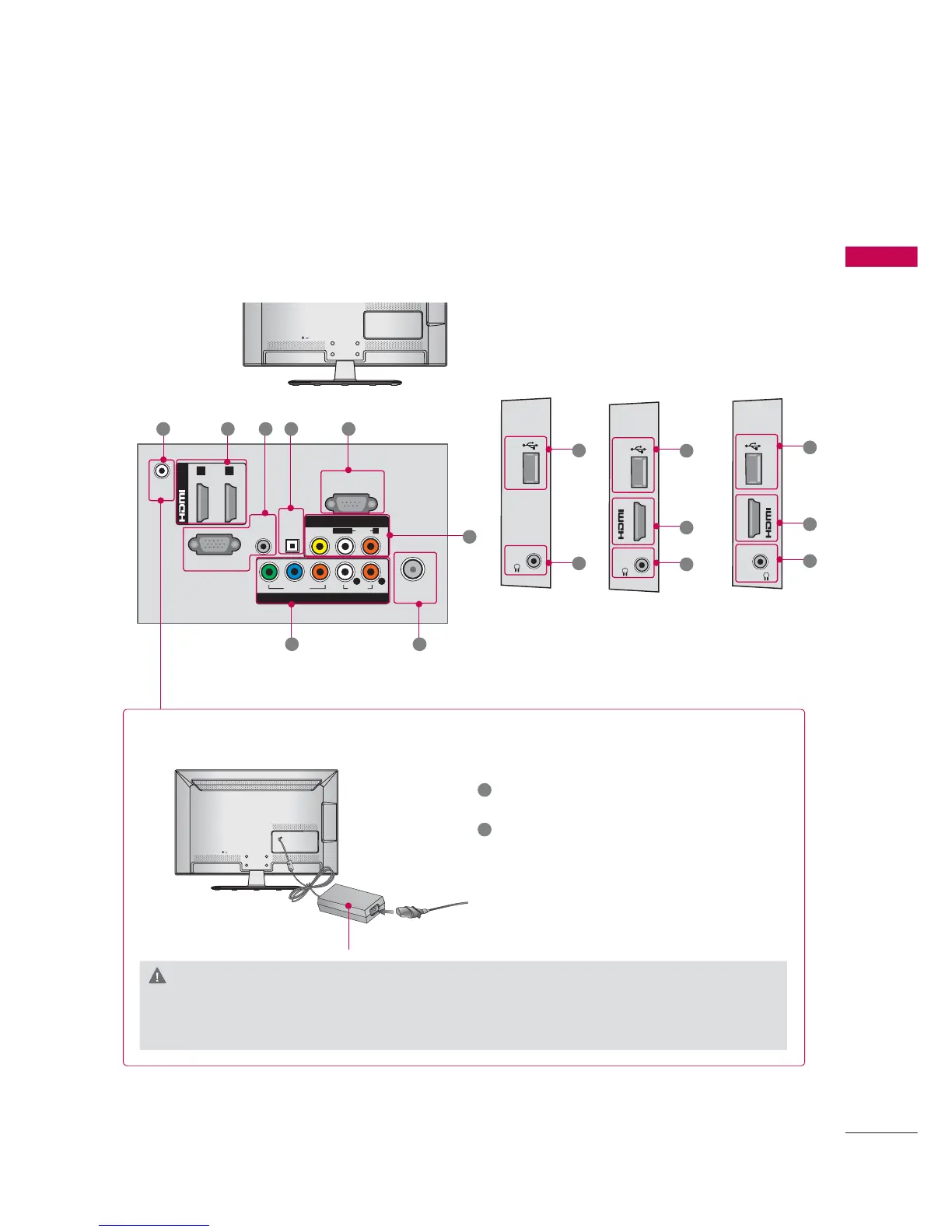
22LE5300
26LE5300
H/P USB IN
H/P USB IN
IN 3
8
8
9
1
9
ANTENNA/
CABLE IN
DC-IN
RGB IN (PC)
AUDIO IN
RGB/DVI
(DVI)
OPTICAL
DIGITAL
AUDIO OUT
/DVI IN
VIDEO
AUDIO
L(MONO)
R
VIDEO
AUDIO
YPB PR
L R
COMPONENT IN
AV IN
RS-232C IN
(
CONTROL&SERVICE)
1 2
11 1 32 4
5
67
Power Connection
1
Connect the AC/DC adapter plug to the
power input jack on the TV.
2
Connect the power cord to the AC/DC
adapter first, then plug the power cord into
the wall power outlet.
CAUTION
► Please be sure to connect the TV to the AC/DC power adapter before connecting the TV’s
power plug to a wall power outlet.
DC IN



 To Next Page