BLUETOOTH
82
BLUETOOTH
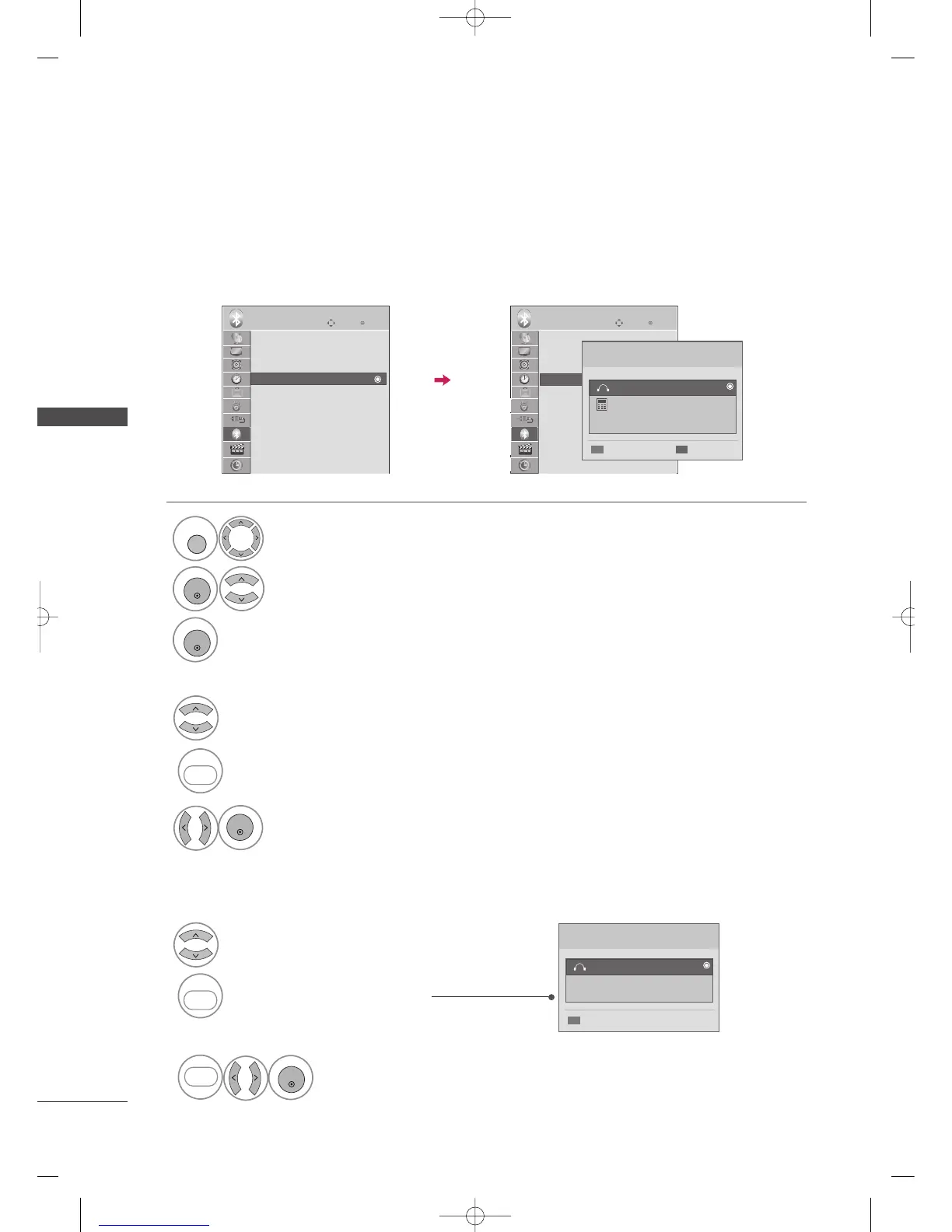
MANAGING REGISTERED BLUETOOTH DEVICE
Enter
Move
BLUETOOTH
Enter
Move
BLUETOOTH
E
If there are no devices registered, Registered Bluetooth Device menu will be deactivated and cannot be used.
When 12 devices are registered, you cannot register any more devices, and the external device will no longer be
able to pair up with the TV. In this case, you should delete one (disconnect first if a device is connected to the
TV) and then you can register another device.
Select
BBLLUUEETTOOOOTTHH
.
Select
RReeggiisstteerreedd BBlluueettooootthh DDeevviiccee
.
Check the registered Bluetooth device.
1
Deleting the registered Bluetooth device
Select the connected Bluetooth device.
3
Select
YYeess
.
1
1
Select the registered Bluetooth device you want.
2
Connect the bluetooth device.
BLUE
BLUE
REPEAT
RED
RED
Registered Bluetooth Device
00:0e:b2:27:1e:d8
Disconnect
FreePulse_Wireless
Connecting the registered Bluetooth device
3
Select
YYeess
.
2
Disconnect the bluetooth device.
BLUE
BLUE
REPEAT
Bluetooth : On
TV PIN : 0000
Bluetooth Headset: Disconnected
Registered Bluetooth Device
My Bluetooth Info.
Bluetooth : On
TV PIN : 0000
Bluetooth Headset: Disconnected
Registered Bluetooth Device
My Bluetooth Info.
Registered Bluetooth Device
00:0e:b2:27:1e:d8
DeleteConnect
LG L600V
FreePulse_Wireless
A
Disconnecting the registered Bluetooth device
A
Deleting the registered Bluetooth device
MFL59166615-Edit2-en 12/2/09 6:55 PM Page 82


 To Next Page