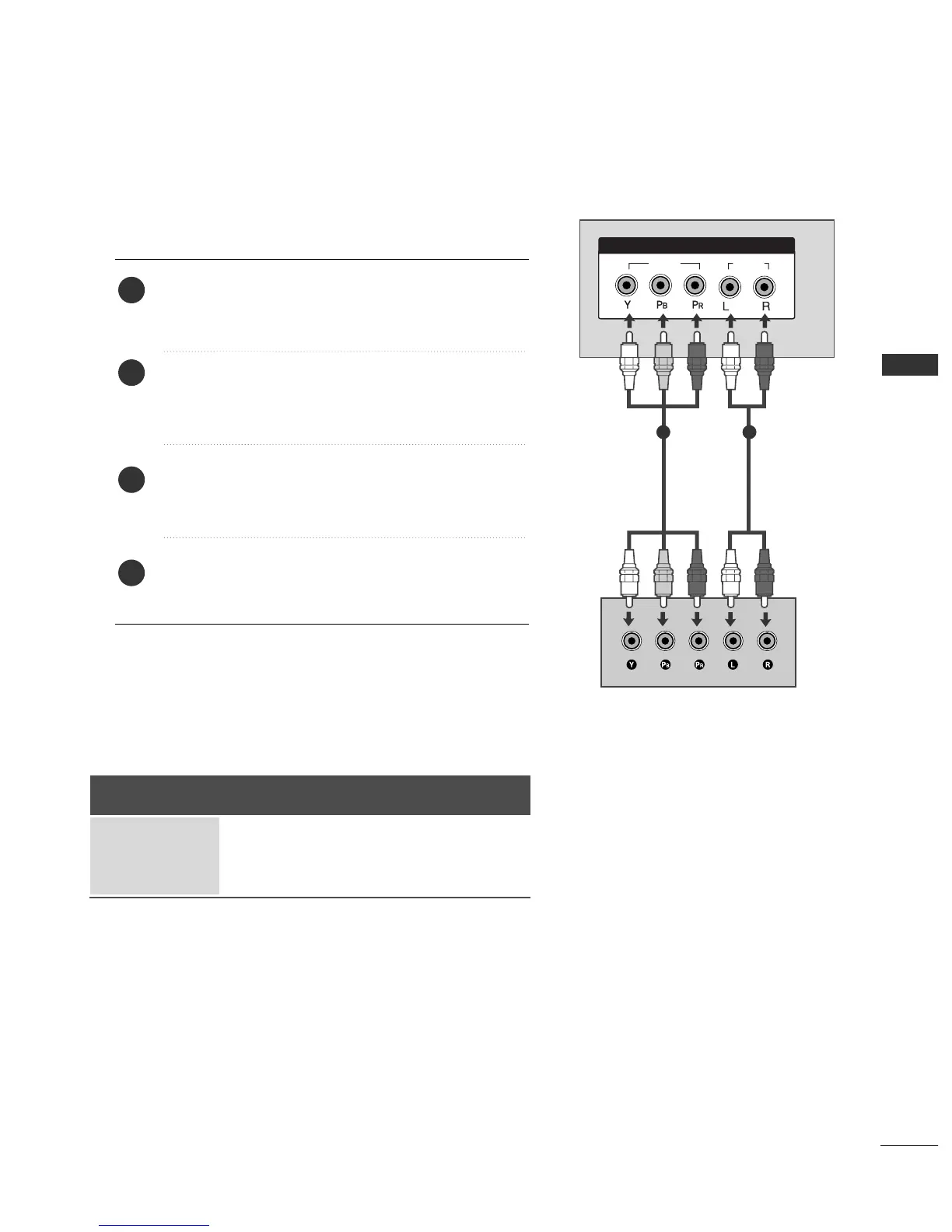
When connecting with a component cable
Connect the video outputs
(
Y, PB
, PR
)
of the digital set
top box to the
CCOOMMPPOONNEENNTT IINN VVIIDDEEOO
jacks on the
set.
Connect the audio output of the digital set-top box to
the
CCOOMMPPOONNEENNTT IINN AAUUDDIIOO
jacks on the set.
Turn on the digital set-top box.
(
Refer to the owner’s manual for the digital set-top box.
)
Select
Component input source with using the
IINNPPUUTT
button on the remote control.
2
3
4
1
1 2
■
To prevent the equipment damage, never plug in any power cords until you have finished connecting all equipment.
Signal
480i/576i
480p/576p
720p/1080i
Component
Yes
Yes
Yes
HDMI1/2
No
Yes
Yes



 To Next Page