36
WATCHING TV / PROGRAMME CONTROL
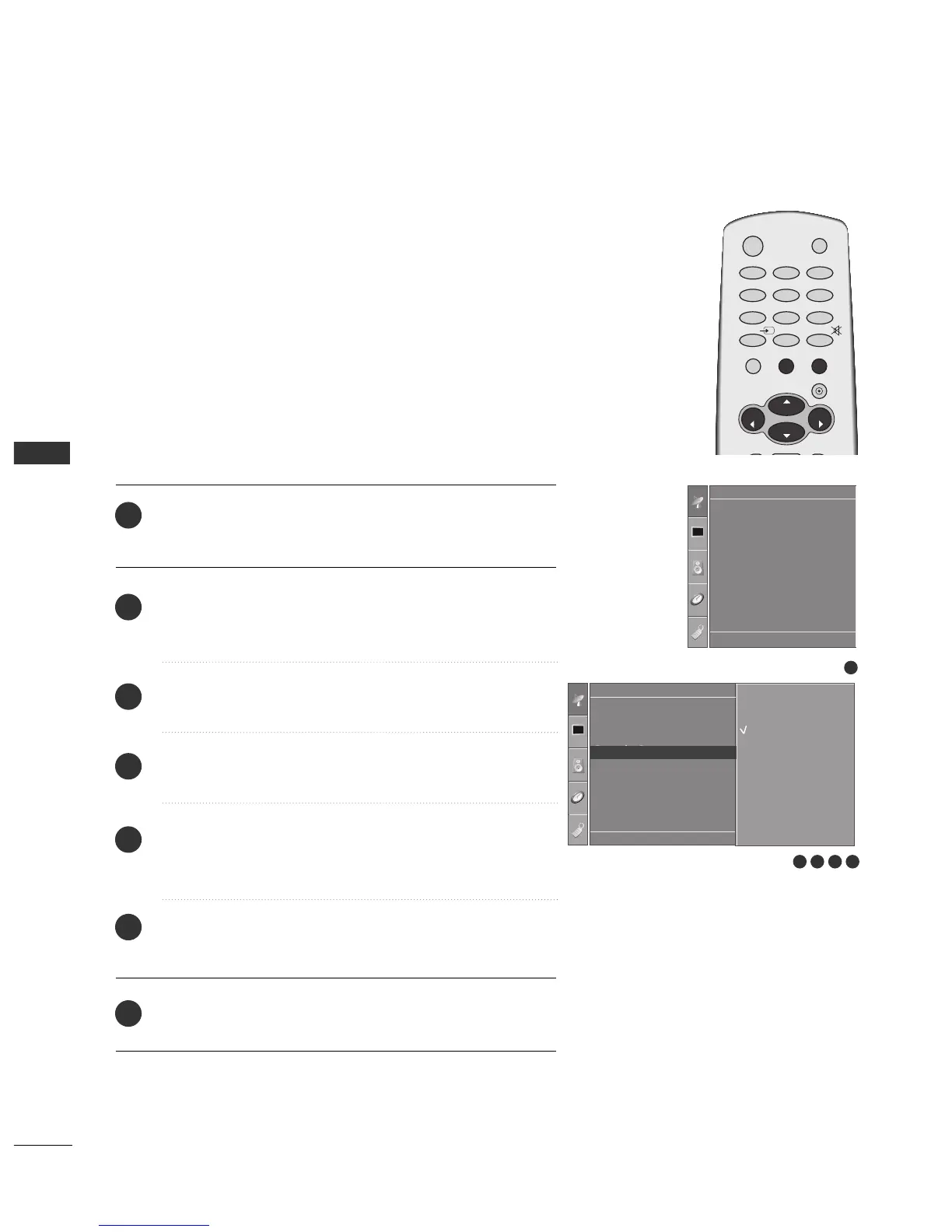
FAVOURITE PROGRAMME
Press the
MMEENNUU
button and then
DD
//
EE
button to select the
Setup menu.
Press the
GG
button and then
DD
//
EE
button to select
Favourite Programme.
Press the
GG
button.
Press the
DD
//
EE
button to select - - - - - - -.
Select a desired programme with the
FF
//
GG
button or NUM-
BER buttons. Any number under 10 is entered with a numeric
‘0’in front of it, i.e.‘
0055
’ for 5.
To store another programme, repeat steps
4 to 5.
You can store up to 8 programmes.
Press the
EEXXIITT
button to return to normal TV viewing.
This function lets you select your favourite programmes directly.
Repeatedly press the FAV button to select stored favourite pro-
grammes.
1
2
3
4
5
6
7
1
Auto Tuning
Manual Tuning
Programme Edit
Favourite Programme
Setup
Setup
Auto Tuning
Manual Tuning
Programme Edit
Favourite Programme
Favourite Programme G
DE F G
OK MENU
-- -----
-- -----
-- -----
-- -----
-- -----
-- -----
-- -----
-- -----
2 3 4 5
DE F G
OK MENU



 To Next Page