EasyManua.ls Logo

LG 32PC51 - Page 17

LG 32PC51
78 pages
Print Icon
To Next Page IconTo Next Page
To Previous Page IconTo Previous Page
Loading...
15
EXTERNAL EQUIPMENT SETUP
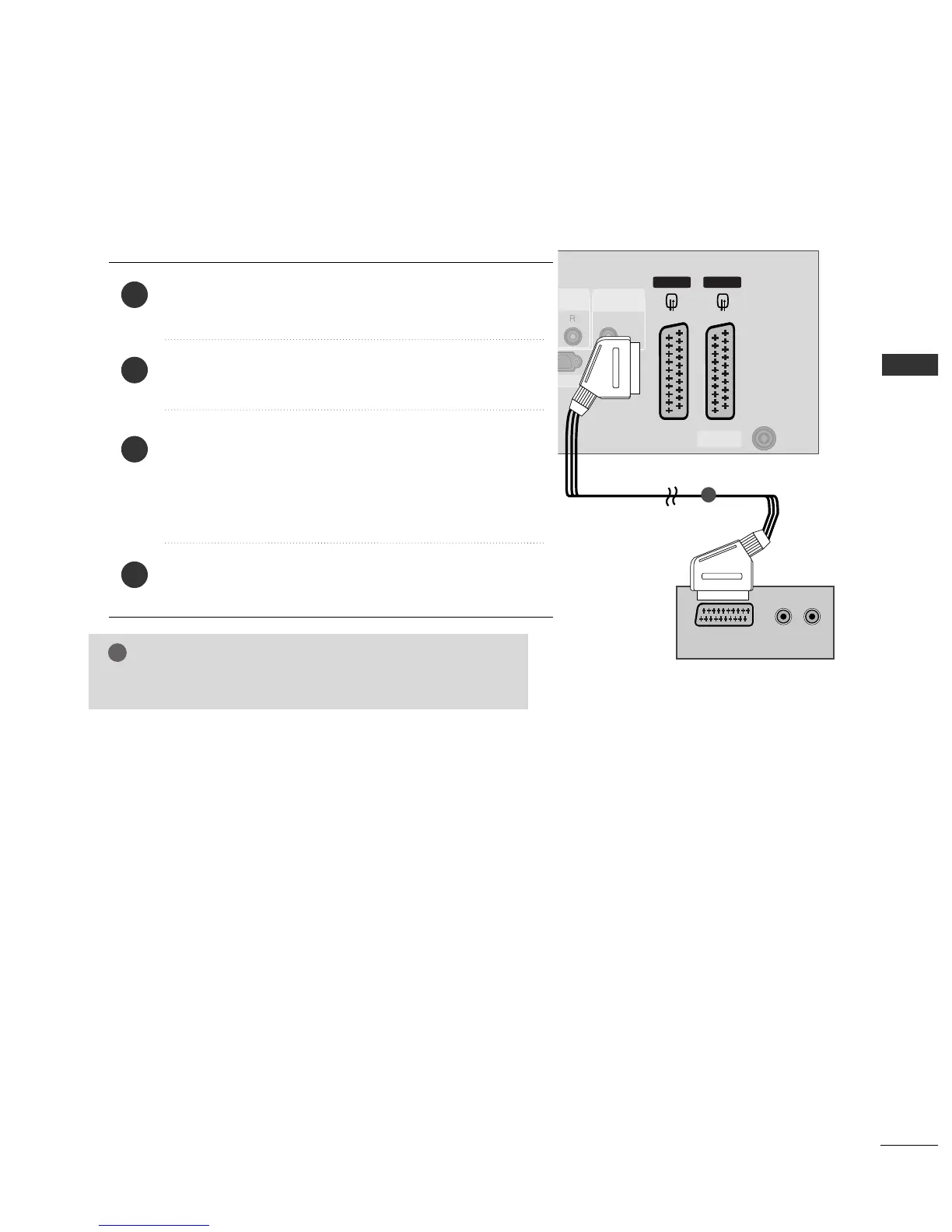
When connecting with a Euro Scart
Connect the Euro scart socket of the DVD to the
AAVV11
Euro
scart socket on the set.
Turn on the DVD player, insert a DVD.
Select
AV 1 input source with using the
IINNPPUUTT
button on
the remote control.
If connected to
AV 2 Euro scart socket, select AV 2 input
source.
Refer to the DVD player's manual for operating instructions.
2
3
4
1

VIDEO
AUDIO
COMPONENT IN
AV 2 AV 1
ANTENNA
IN
HDMI IN
12
RGB IN(PC)
VIDEO
AUDIO
COMPONENT IN
AV 2V 2 AV 1
ANTENNA
IN
HDMI IN
12
AUDIO IN
(RGB/DVI)
IN(PC)
ABLE
UT
(R) AUDIO (L)
AUDIO/
VIDEO
HDMI/DVI IN
1
NOTE
!
GG
Please use the shield scart cable.

Related product manuals