EasyManua.ls Logo

LG 32PC51 - Page 58

LG 32PC51
78 pages
Print Icon
To Next Page IconTo Next Page
To Previous Page IconTo Previous Page
Loading...
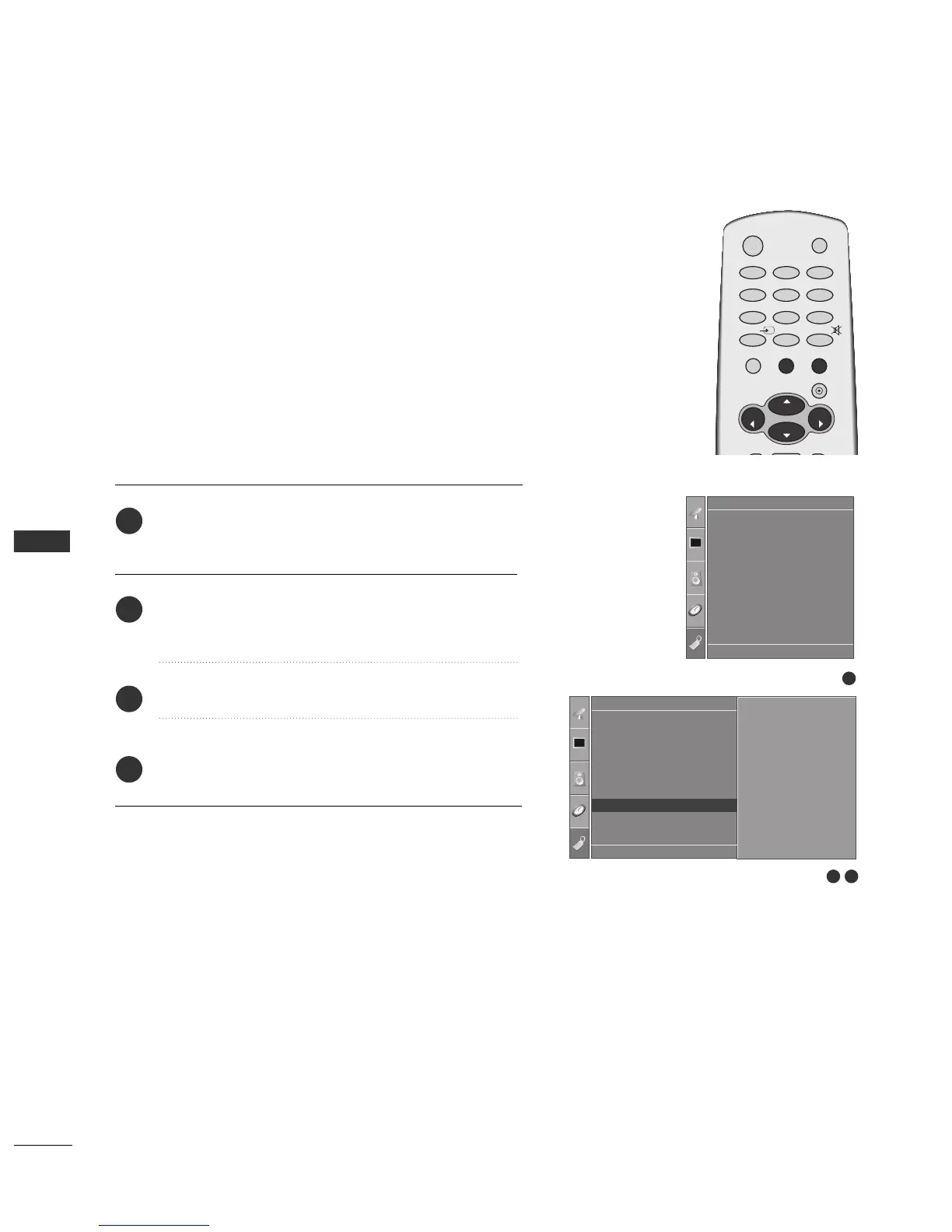
PICTURE CONTROL
56
PICTURE CONTROL
FACTORY RESET
Press the
MMEENNUU
button and then use
DD
or
EE
button
to select the
OOppttiioonn
menu.
Press the
GG
button and then use
DD
or
EE
button to
select
FFaaccttoorryy RReesseett
.
Press the
GG
button.
Press the
EEXXIITT
button to return to normal TV viewing.
2
3
4
1
It initializes the entire OSD (On Screen Display) settings.
The Installation Guide Setup window is displayed again after the
initialization.
1
Language
Country
SIMPLINK
Key Lock
ISM Method
Low Power
Factory Reset
Option
32
Option
Language
Country
SIMPLINK
Key Lock
ISM Method
Low Power
Factory Reset
Factory Reset G
DE F G
OK MENU
To Set
DE F G
OK MENU
OK
VOL
VOL
0
INPUT
MUTE
MENU
1
23
4
56
7
89
POWER
TV
RATIO
EXIT
PR
PR

Related product manuals