24
ENGLISH
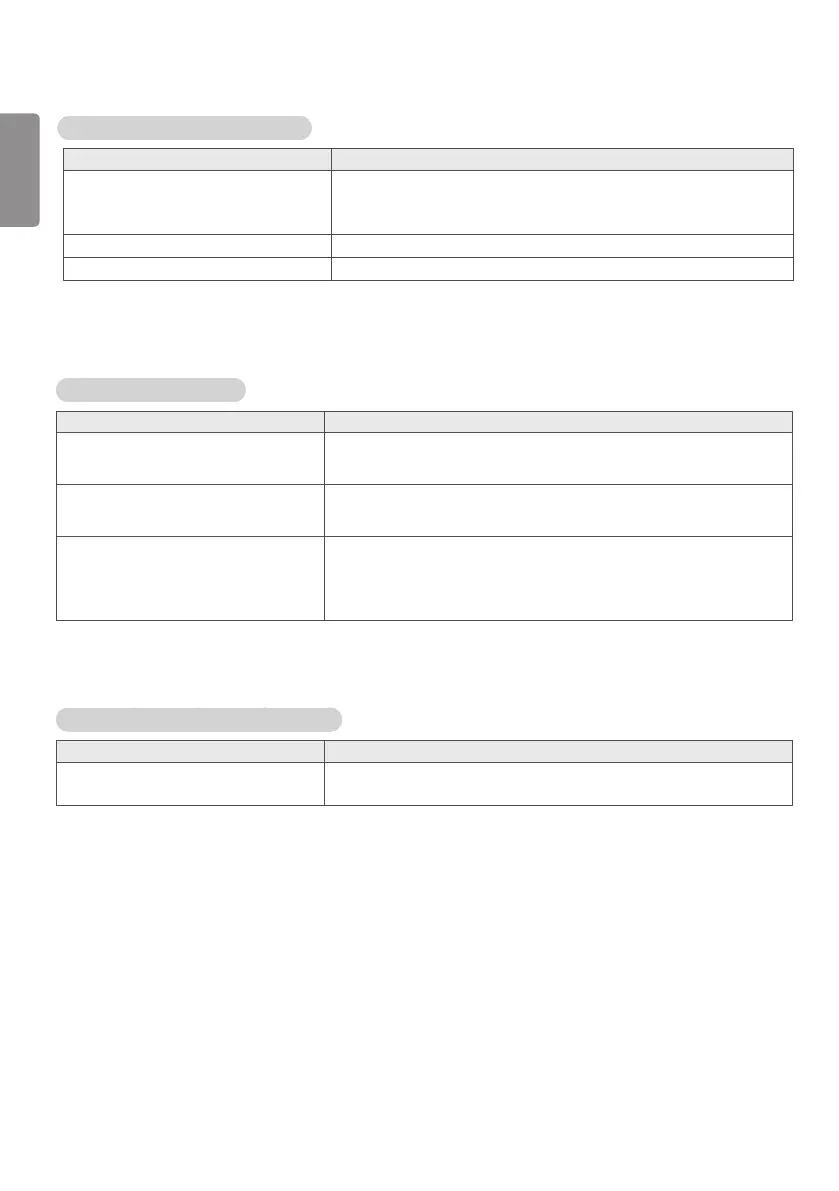
Screen color is abnormal.
Problem Action
Screen has poor color resolution (16
colors).
y Set the number of colors to more than 24 bits (true color). Select
Control Panel - Display - Settings - Color Table menu in Windows.
Screen color is unstable or
mono-colored.
y Check the connection status of the signal cable. Or, re-insert the
PC graphic card.
Do black spots appear on the screen? y Several pixels (red, green, white, or black color) may appear
on the screen, which can be attributable to the unique
characteristics of the LCD panel. This is not a malfunction of the
LCD.
The operation does not work normally.
Problem Action
The power suddenly turned off. y Is the Timer set?
y Check the power control settings. Power interrupted.
The audio function does not work.
Problem Action
No sound? y See if the audio cable is connected properly.
y Adjust the volume.
y See if the sound is set properly.
Sound is too dull. y Select the appropriate equalizer sound.
Sound is too low. y Adjust the volume.


 To Next Page
 Loading...