- 13 -
Copyright © 2007 LG Electronics. Inc. All right reserved.
Only for training and service purposes
LGE Internal Use Only
6.3 Adjustment of RGB
√ Required Equipments
• Remote controller for adjustment
•
MSPG-925FS Pattern Generator (Which has XGA
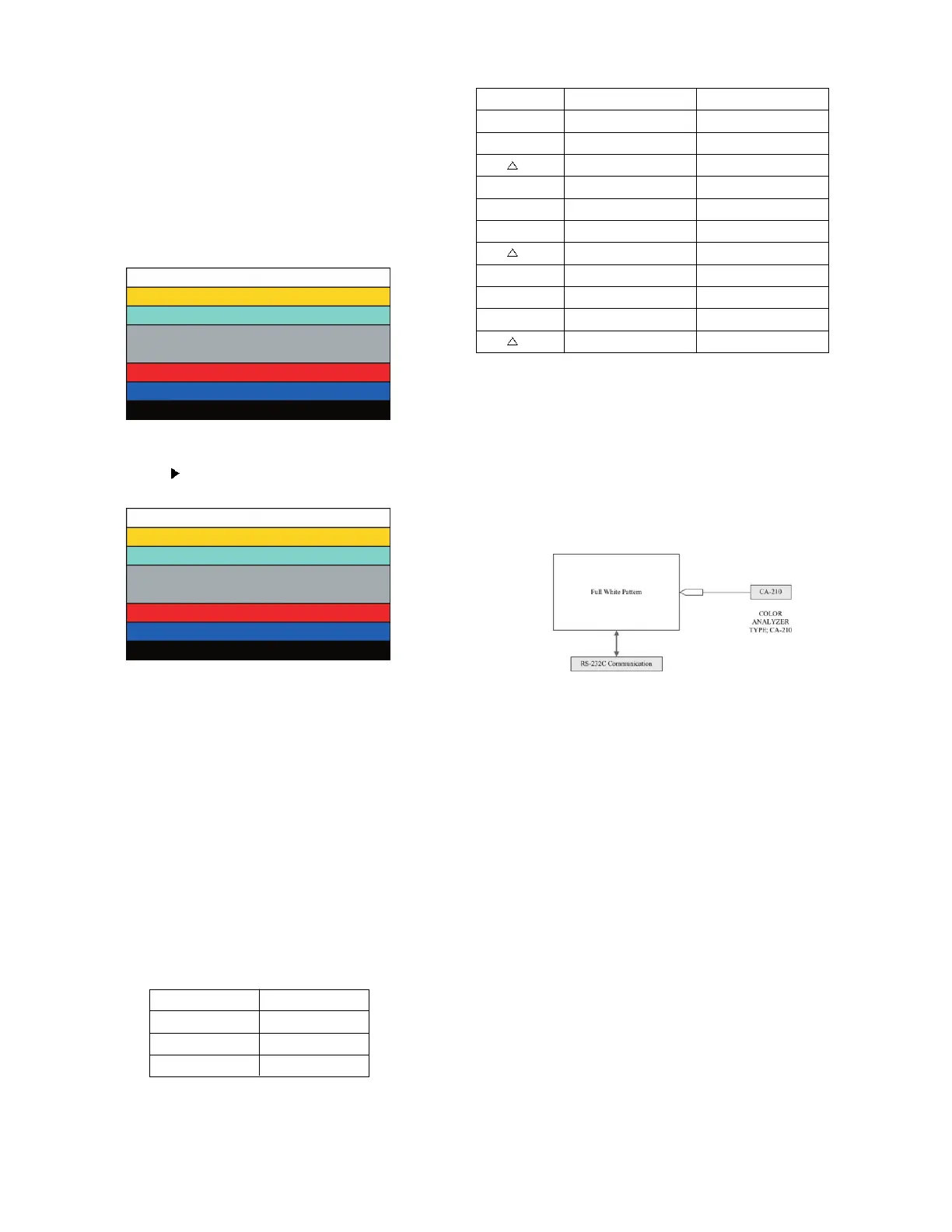
[1024x768] 60Hz 8 color bar 100% pattern shown in Fig. 3 ).
6.3.1 Method of Auto RGB Color Balance
1) Input the PC 1024x768 @ 60Hz 7 Color Bar (MSPG-
925FS model:3, pattern:65) signal into RGB. (using D-sub
to D-sub cable)
2) Set the PSM to Dynamic mode in Picture menu.
3) Press the IN-START key on R/C for adjustment.
[Fig.5 Color Bar Signal]
4) Press the (Vol.+) key operate To set , then it becomes
automatically.
[Fig.6 Color Bar Signal]
5) Auto-RGB OK means adjustment is completed.
Before adjusting White-balance , the AV ADC
should be done.
7. White Balance
√ Test Equipment
• Color Analyzer (CA-210/CH.9)
=> When you adjust LCD color temperature, on Color
analyzer (CA-210), you should use Channel 9 which is
Matrix compensated (White, Red, Green, Blue revised)
by CS-1000 and adjust in accordance with White
balance adjustment coordinate which is specified on
the next..
*Color temperature standards according to CSM and Module
* White balance adjustment coordinate and color temperature.
•
PC (for communication through RS-232C) => UART Baud
rate : 115200 bps
•
Luminance Y AV : upper 200 cd/m
2
(Typ : 350 cd/m
2
) =>
Applying to Cool mode
* Connecting picture of the measuring instrument (On Automatic
control)
Inside PATTERN is used when W/B is controlled. Connect to
auto controller or push control R/C IN-START => Enter the
mode of White-Balance, the pattern will come out.
• Measurement color analyzer : CS1000 or CA210(CH.9)
[Fig.7Connecting Picture (on Automatic Control) ]
* Auto-control interface and directions
1) Adjust in the place where the influx of light like floodlight
around is blocked. (illumination is less than 10ux).
2) In case of PDP: Measure and adjust after sticking the
Color Analyzer (CA-100+, CA210 ) to the side of the
module.
In case of LCD: Adhere closely the Color Analyzer (
CA210 ) to the module less than 10cm distance, keep it
with the surface of the Module and Color Analyzer’s
Prove vertically.(80~100°).
3) Aging time
- After aging start, keep the power on (no suspension of
power supply) and heat-run over 15 minutes.
- In case of PDP, keep white pattern using inside pattern.
- In case of LCD, using ‘no signal’ or ‘full white pattern’ or
the others, check the back light on.
CSM LCD
Cool 11,000k
Medium 9,300k
Warm 6,500k
Cool CS-1000 CA-210(CH 9)
x0.276 0.276±0.002
y0.283 0.283±0.002
uv 0.000 0.000
Medium CS-1000 CA-210(CH 9)
x0.285 0.285±0.002
y0.293 0.293±0.002
uv 0.000 0.000
Warm CS-1000 CA-210(CH 9)
x0.313 0.313±0.002
y0.329 0.329±0.002
uv 0.004 0.004


 To Next Page