18
ENGLISH
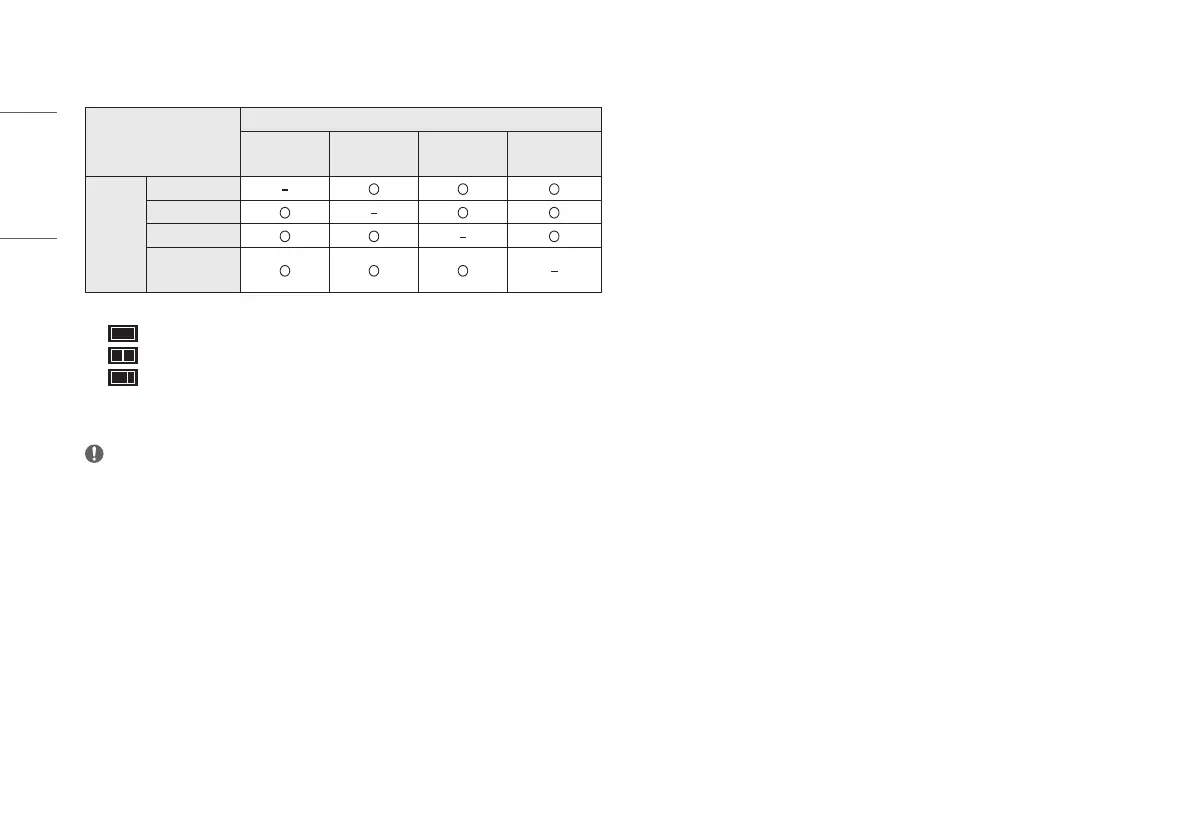
• [PBP]: Displays the screens of two input modes on one monitor.
- [Input List]
PBP Connection
Sub Screen (Right)
HDMI 1 HDMI 2 DP
Thunderbolt
/ USB-C
Main
Screen
(Left)
HDMI 1
HDMI 2
DP
Thunderbolt
/ USB-C
- [Aspect Ratio]: Adjusts the aspect ratio of the main/sub screen.
: Displays 1 input only.
: Displays main screen and sub screen half and half.
: Displays main screen as 16:9, and sub screen as 5:9.
• [Main/Sub Screen Change]: Toggles between the main screen and sub screen in PBP mode.
• [Main/Sub Sound Change]: Toggles between the audio of the main screen and sub screen in PBP mode.
NOTE
• Some features and HDR functions are not supported in PBP mode.
[Picture]
[Settings] > [Picture] > [Picture Mode]
• [Custom]: Allows the user to adjust each element.
• [Vivid]: Heightens contrast, brightness and sharpness to display vivid images.
• [HDR Effect]: Optimizes the screen for high dynamic range.
• [Reader]: Optimizes the screen for reading documents. You can brighten the screen in the OSD menu.
• [Cinema]: Optimizes the screen to improve the visual effects of a video.
• [sRGB]: A standard RGB color space for the monitor and printer.
• [DCI-P3]: Suitable for watching digital videos.
• [FPS]: This mode is optimized for FPS games.
• [RTS]: This mode is optimized for RTS Game.
• [Calibration 1]: Adjusts to the last calibrated screen.
• [Calibration 2]: Adjusts to the previously calibrated screen. Installation of LG Calibration Studio will enable
this menu.


 To Next Page