Using
the
quick
menu
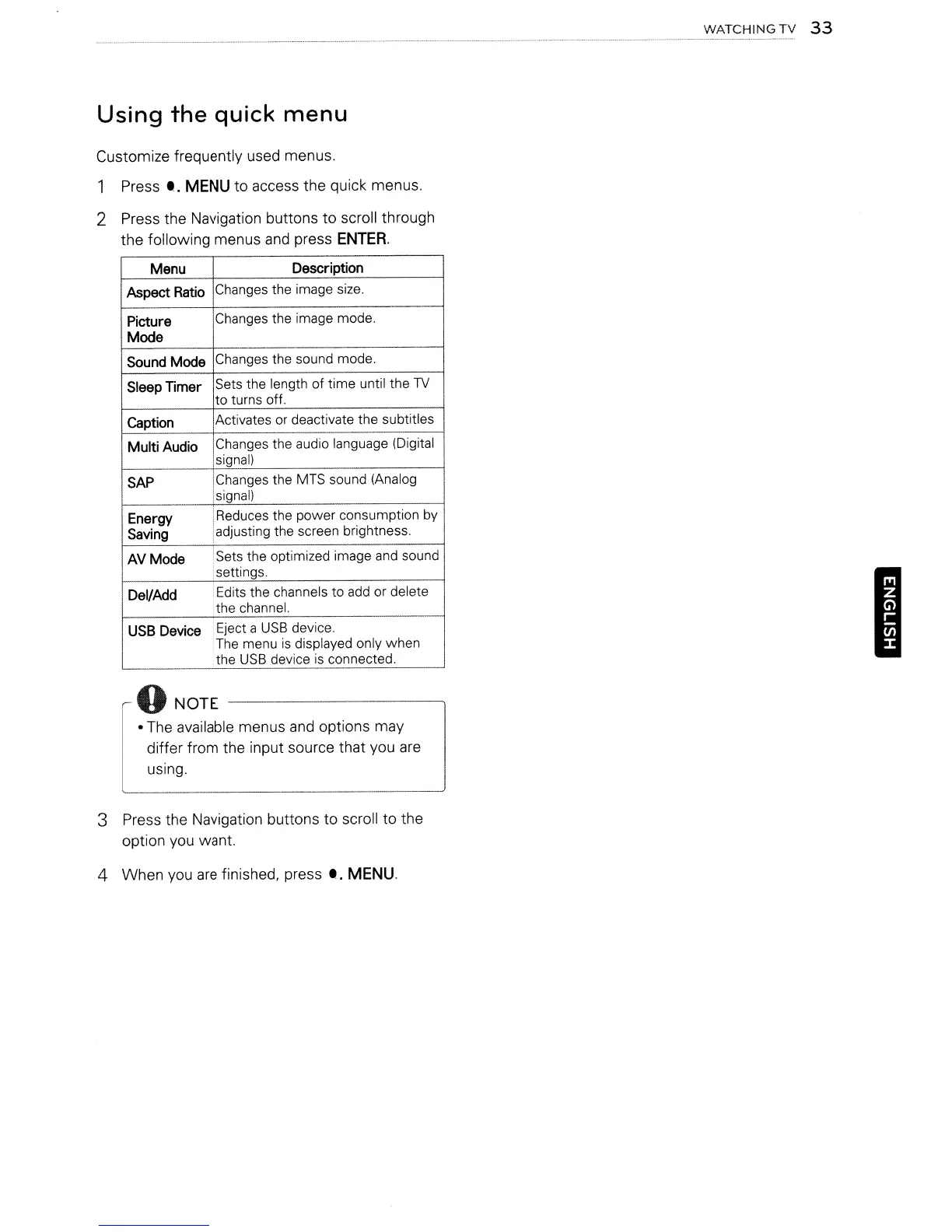
Customize frequently used menus.
1 Press
•.
MENU
to access the quick menus.
2 Press the Navigation buttons to scroll through
the following menus
and
press
ENTER.
Menu
Description
Aspect
Ratio
Changes the image size.
Picture
Changes the image mode.
Mode
Sound
Mode
Changes the sound mode.
Sleep
Timer
Sets the length of
time
until the
TV
to turns off.
Caption
Activates or deactivate the subtitles
Multi Audio
Changes the audio language (Digital
signal)
SAP
Changes the MTS sound (Analog
signal)
Energy
Reduces the power consumption by
Saving
adjusting the screen brightness.
AVMode
Sets the optimized image and sound
settings.
Del/Add
Edits the channels to add or delete
the channel.
USB
Device
Eject a
USB
device.
The menu
is
displayed only when
the
USB
device
is
connected.
10
NOTE
I ·
The
available menus
and
options may
differ from the input source that you
are
using.
3 Press the Navigation buttons to scroll to the
option you want.
4 When
you
are
finished,
press'.
MENU.
WATCHING
TV
33
I
Using
the
quick
menu
Customize frequently used menus.
1 Press
•.
MENU
to access the quick menus.
2 Press the Navigation buttons to scroll through
the following menus
and
press
ENTER.
Menu
Description
Aspect
Ratio
Changes the image size.
Picture
Changes the image mode.
Mode
Sound
Mode
Changes the sound mode.
Sleep
Timer
Sets the length of
time
until the
TV
to turns off.
Caption
Activates or deactivate the subtitles
Multi Audio
Changes the audio language (Digital
signal)
SAP
Changes the MTS sound (Analog
signal)
Energy
Reduces the power consumption by
Saving
adjusting the screen brightness.
AVMode
Sets the optimized image and sound
settings.
Del/Add
Edits the channels to add or delete
the channel.
USB
Device
Eject a
USB
device.
The menu
is
displayed only when
the
USB
device
is
connected.
10
NOTE
I ·
The
available menus
and
options may
differ from the input source that you
are
using.
3 Press the Navigation buttons to scroll to the
option you want.
4 When
you
are
finished,
press'.
MENU.
WATCHING
TV
33
I



 To Next Page