I
40
ENTERTAINMENT
Premium
Account
Function
LG's Premium technology allows you to access
a variety
of
online services or content directly
on
your
TV.
Your
TV
offers instant streaming
of movies, weather, videos,
and
photo album
services with a Premium account
and
an
Internet
connection.
Enjoy entertainment including not only
entertainment content, but also up-to-the minute
news, weather updates, photo management, and
more by simply using the TV's remote control
without a separate Pc.
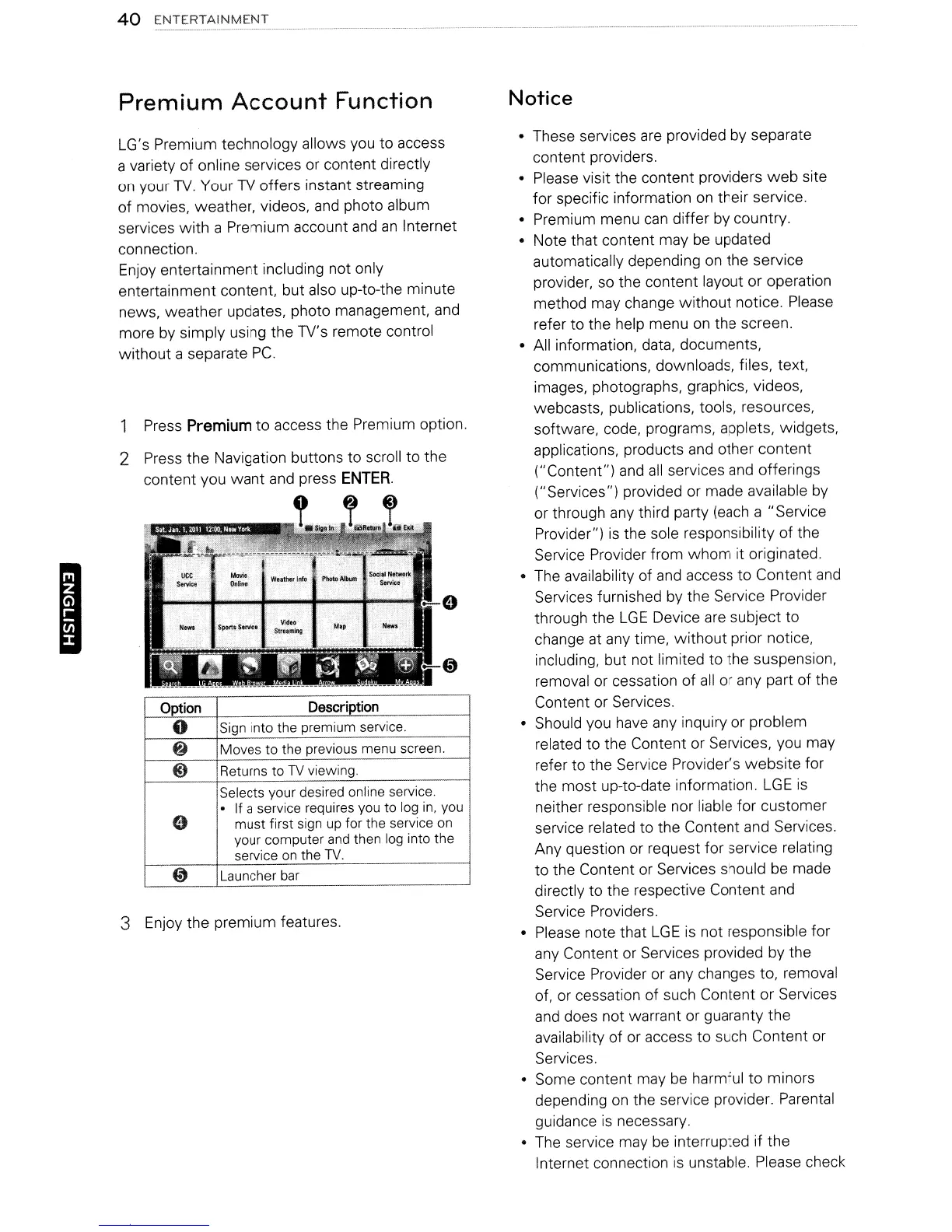
Press
Premium
to
access the Premium option.
2 Press the Navigation buttons to scroll to the
content you want and press
ENTER.
Option
Description
0
Sign into the premium service.
8
Moves to the previous menu screen.
@)
Returns to
TV
viewing.
Selects your desired online service.
.
If a service requires you to log
in,
you
e
must first sign
up
for the service on
your computer
and
then log into the
service on the
TV.
@)
Launcher
bar
--
3 Enjoy the premium features.
Notice
• These services
are
provided by separate
content providers.
• Please visit the content providers
web
site
for specific information
on
their service.
• Premium menu
can
differ by country.
• Note that content may
be
updated
automatically depending
on
the service
provider, so the content layout or operation
method may change
without
notice. Please
refer to the help menu
on
the screen.
• All information, data, documents,
communications, downloads, files, text,
images, photographs, graphics, videos,
webcasts, publications, tools, resources,
software, code, programs, applets, widgets,
applications, products
and
other content
("Content") and
all
services
and
offerings
("Services") provided or made available
by
or through any third party
(each
a "Service
Provider")
is
the sole responsibility of the
Service Provider from
whom
it originated.
• The availability of
and
access to Content
and
Services furnished by the Service Provider
through the
LGE
Device
are
subject to
change at any time, without prior notice,
including, but not limited to the suspension,
removal or cessation of
all
or any part of the
Content or Services.
• Should you
have
any inquiry or problem
related to the Content or Services, you may
refer to the Service Provider's website for
the most up-to-date information.
LGE
is
neither responsible nor liable for customer
service related to the Content and Services.
Any question or request for service relating
to
the Content or Services should
be
made
directly to the respective Content and
Service Providers.
• Please note that
LGE
is
not responsible for
any Content or Services provided by the
Service Provider or any changes to,
removal
of, or cessation of such Content or Services
and
does not warrant or guaranty the
availability of or access to such Content or
Services.
• Some content may
be
harmful
to
minors
depending
on
the service provider. Parental
guidance
is
necessary.
•
The
service may
be
interrupted if the
Internet connection
is
unstable. Please check
I
40
ENTERTAINMENT
Premium
Account
Function
LG's Premium technology allows you to access
a variety
of
online services or content directly
on
your
TV.
Your
TV
offers instant streaming
of movies, weather, videos,
and
photo album
services with a Premium account
and
an
Internet
connection.
Enjoy entertainment including not only
entertainment content, but also up-to-the minute
news, weather updates, photo management, and
more by simply using the TV's remote control
without a separate Pc.
Press
Premium
to
access the Premium option.
2 Press the Navigation buttons to scroll to the
content you want and press
ENTER.
Option
Description
0
Sign into the premium service.
8
Moves to the previous menu screen.
@)
Returns to
TV
viewing.
Selects your desired online service.
.
If a service requires you to log
in,
you
e
must first sign
up
for the service on
your computer
and
then log into the
service on the
TV.
@)
Launcher
bar
--
3 Enjoy the premium features.
Notice
• These services
are
provided by separate
content providers.
• Please visit the content providers
web
site
for specific information
on
their service.
• Premium menu
can
differ by country.
• Note that content may
be
updated
automatically depending
on
the service
provider, so the content layout or operation
method may change
without
notice. Please
refer to the help menu
on
the screen.
• All information, data, documents,
communications, downloads, files, text,
images, photographs, graphics, videos,
webcasts, publications, tools, resources,
software, code, programs, applets, widgets,
applications, products
and
other content
("Content") and
all
services
and
offerings
("Services") provided or made available
by
or through any third party
(each
a "Service
Provider")
is
the sole responsibility of the
Service Provider from
whom
it originated.
• The availability of
and
access to Content
and
Services furnished by the Service Provider
through the
LGE
Device
are
subject to
change at any time, without prior notice,
including, but not limited to the suspension,
removal or cessation of
all
or any part of the
Content or Services.
• Should you
have
any inquiry or problem
related to the Content or Services, you may
refer to the Service Provider's website for
the most up-to-date information.
LGE
is
neither responsible nor liable for customer
service related to the Content and Services.
Any question or request for service relating
to
the Content or Services should
be
made
directly to the respective Content and
Service Providers.
• Please note that
LGE
is
not responsible for
any Content or Services provided by the
Service Provider or any changes to,
removal
of, or cessation of such Content or Services
and
does not warrant or guaranty the
availability of or access to such Content or
Services.
• Some content may
be
harmful
to
minors
depending
on
the service provider. Parental
guidance
is
necessary.
•
The
service may
be
interrupted if the
Internet connection
is
unstable. Please check


 To Next Page
 Loading...