8
ASSEMBLING
AND
PREPARING
ASSEMBLING AND PREPARING
Unpacking
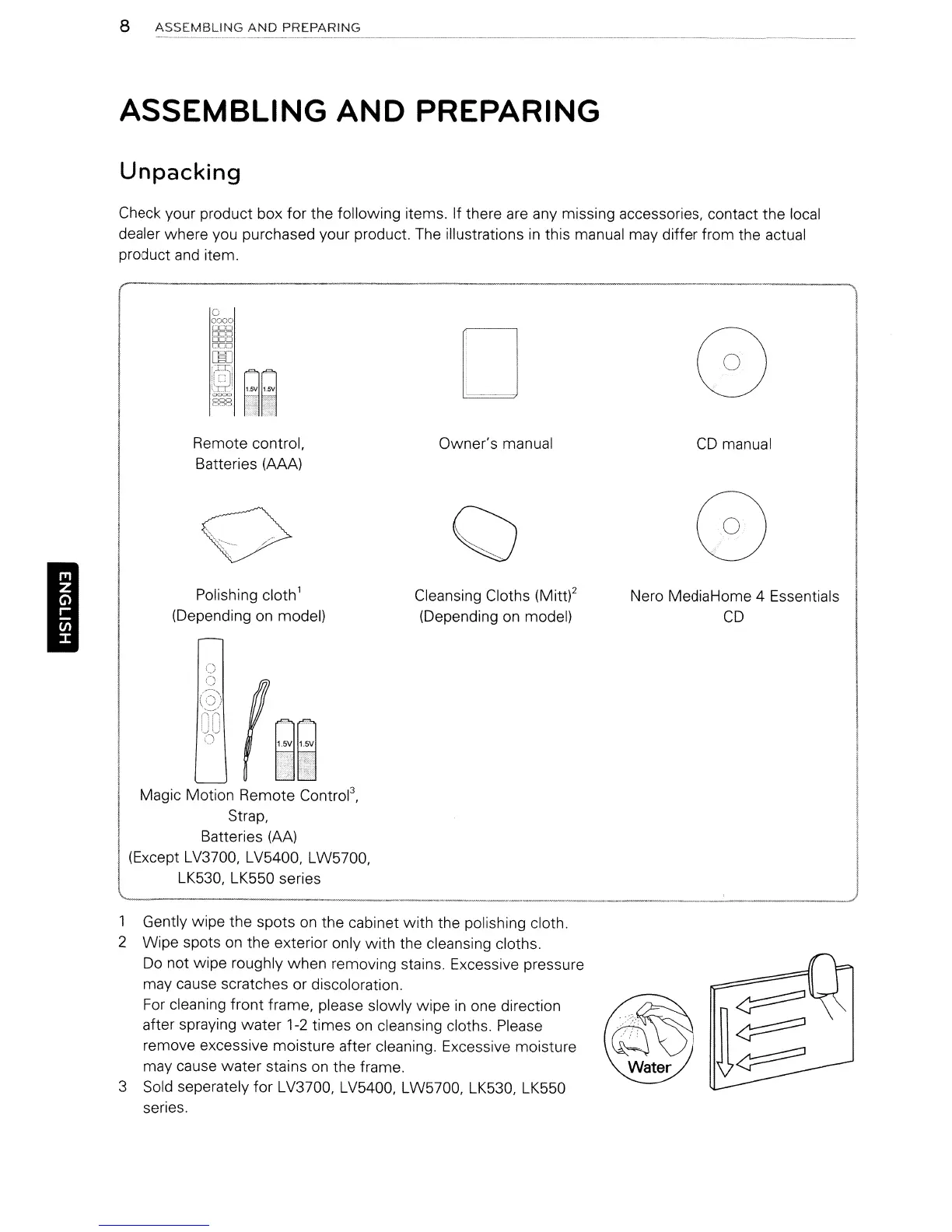
Check your product box for the following items. If there
are
any missing accessories, contact the local
dealer where you purchased your product.
The
illustrations
in
this manual may differ from the actual
product and item.
o
0:>00
oeD
oeD
000
000
rno
:l~1
588
I
Remote control.
Batteries (AAA)
Polishing cloth
1
(Depending on model)
;~"\
'.J
()
Owner's manual
Cleansing Cloths (Mitt)2
(Depending
on
model)
CD
manual
Nero MediaHome 4 Essentials
CD
Magic Motion Remote
Contrd.
Strap,
Batteries
(AA)
(Except LV3700, LV5400. LW5700,
LK530, LK550 series
1 Gently wipe the spots
on
the cabinet with the polishing cloth.
2 Wipe spots
on
the exterior only with the cleansing cloths.
Do
not wipe roughly when removing stains. Excessive pressure
may cause scratches or discoloration.
For
cleaning front frame, please slowly wipe
in
one direction
after spraying
water
1-2 times
on
cleansing cloths. Please
remove excessive moisture after cleaning. Excessive moisture
may cause water stains
on
the frame.
3 Sold seperately for LV3700, LV5400, LW5700. LK530. LK550
series.
8
ASSEMBLING
AND
PREPARING
ASSEMBLING AND PREPARING
Unpacking
Check your product box for the following items. If there
are
any missing accessories, contact the local
dealer where you purchased your product.
The
illustrations
in
this manual may differ from the actual
product and item.
o
0:>00
oeD
oeD
000
000
rno
:l~1
588
I
Remote control.
Batteries (AAA)
Polishing cloth
1
(Depending on model)
;~"\
'.J
()
Owner's manual
Cleansing Cloths (Mitt)2
(Depending
on
model)
CD
manual
Nero MediaHome 4 Essentials
CD
Magic Motion Remote
Contrd.
Strap,
Batteries
(AA)
(Except LV3700, LV5400. LW5700,
LK530, LK550 series
1 Gently wipe the spots
on
the cabinet with the polishing cloth.
2 Wipe spots
on
the exterior only with the cleansing cloths.
Do
not wipe roughly when removing stains. Excessive pressure
may cause scratches or discoloration.
For
cleaning front frame, please slowly wipe
in
one direction
after spraying
water
1-2 times
on
cleansing cloths. Please
remove excessive moisture after cleaning. Excessive moisture
may cause water stains
on
the frame.
3 Sold seperately for LV3700, LV5400, LW5700. LK530. LK550
series.



 To Next Page