Need help?
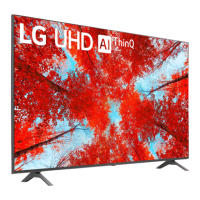
Do you have a question about the LG 50UQ75003LF and is the answer not in the manual?
Details how to connect the TV to a wired or wireless network for internet access.
Instructions for pairing the Magic Remote with the LG webOS TV for control.
Guides on setting up the universal remote control to manage other devices.
Instructions on how to record TV programs using USB storage devices.
Steps to download and install applications from the TV's app store.
General guide to connecting various smart devices to the TV.
How to remotely operate a PC from the TV.
Instructions for watching content saved on a PC on the TV.
Guide to accessing and browsing the internet using the TV's web browser.
Detailed instructions on using the TV's web browser, including settings and features.
Accessing frequently used settings quickly via a dedicated menu.
Features for optimizing gaming experience, including genre and settings check.
Adjusting various picture settings like mode, brightness, and colour.
Options for adjusting sound modes, speaker output, and audio settings.
Managing TV settings, external device connections, and Bluetooth controllers.
Reduces power consumption by adjusting screen brightness and other settings.
Checks for and obtains the latest software version for the TV.
Tests the TV's image signal output to diagnose screen issues.
Tests the TV's sound output to diagnose audio issues.
Uses the Quick Help feature to diagnose and solve TV malfunctions.
Addresses common problems related to TV power and remote control operation.
Solutions for common problems like no signal, cut-off screens, and image shaking.
Addresses problems with sound output, including no sound, unbalanced speakers, and sync issues.
Solves problems related to connecting a PC to the TV, such as blank screens or no sound.
Solutions for issues encountered when playing movie files, like unsupported formats or no audio.
Addresses problems related to recording TV programs, such as signal support and scheduled recording.
Solves problems with connecting the TV to wired or wireless networks.
Helps resolve issues with signing up, logging in, or managing LG accounts on the TV.
Addresses problems related to viewing content, such as not seeing content in HOME or app issues.
Solves problems encountered while using the TV's internet browser.
 General
| Screen Size | 50 inches |
|---|---|
| Resolution | 3840 x 2160 (4K UHD) |
| Display Type | LED |
| Smart TV | Yes |
| HDR | Active HDR |
| Operating System | webOS |
| HDMI Ports | 3 |
| USB Ports | 2 |
| Wi-Fi | Yes |
| Refresh Rate | 60 Hz |
| Bluetooth | Yes |
| Processor | α5 Gen5 AI Processor 4K |
| Audio Output | 20W |
| Weight | 11.3 kg |

 To Next Page