26
ENGLISH
Daisy Chain Monitors
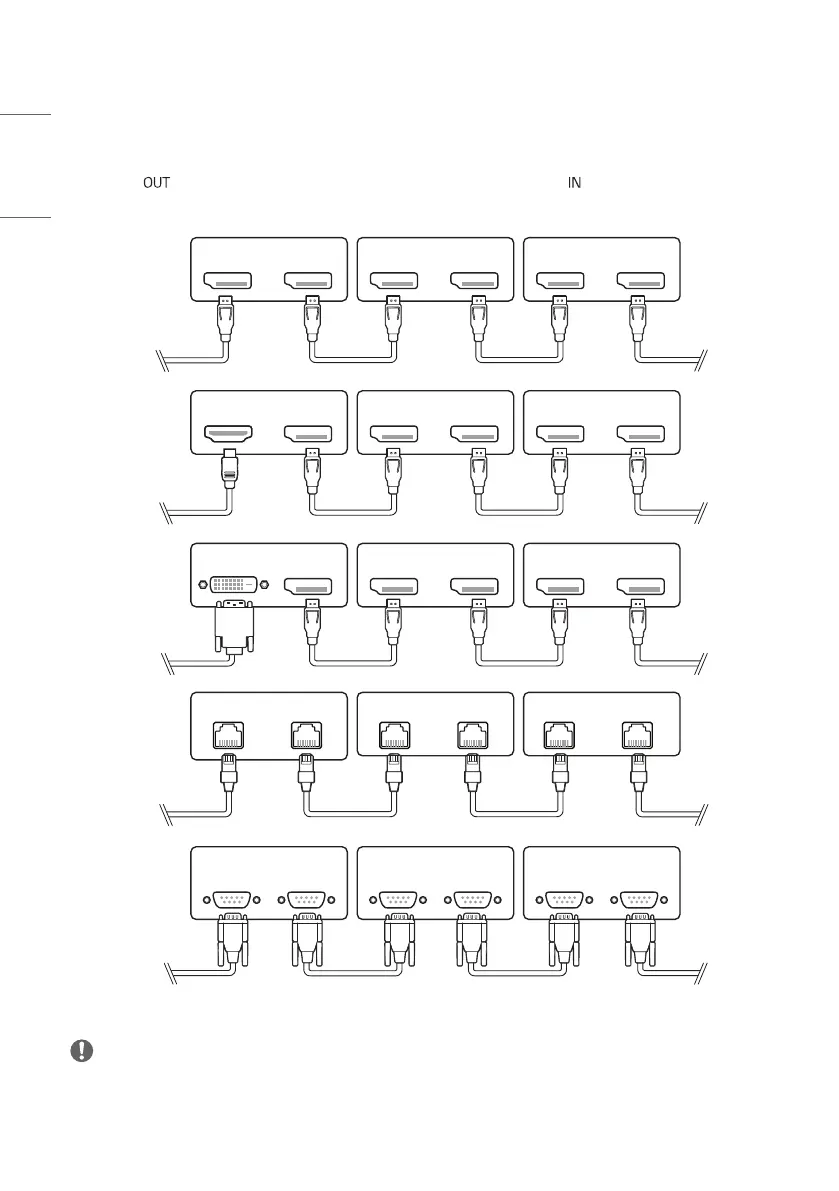
To use multiple products, first connect an external device to the product, connect one end of the supported signal input
cable to the connector of the product, and then connect the other end to the connector of the product you wish
to connect to.
AUDIO OUT AUDIO IN
DVI IN DVI OUT
DVI IN
AUDIO IN
DVI OUT
AUDIO OUT
DP OUTDP IN DP OUTDP IN DP OUTDP IN
RS-232C
IN
RS-232C
OUT
RS-232C
IN
RS-232C
OUT
RS-232C
IN
RS-232C
OUT
DVI IN DP OUT DP OUTDP IN DP OUTDP IN
DP OUT
HDMI IN
DP OUTDP IN DP OUTDP IN
LAN OUT
LAN IN
LAN OUT
LAN IN
LAN OUT
LAN IN
NOTE
• If the signal cable between the product and your PC is too long, make sure to use the Booster or optical cable.
• Daisy chaining the video output may be limited depending on the performance of the input device that supports
HDCP.


 To Next Page