EasyManua.ls Logo

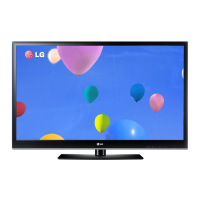
LG 60PM9700 - User Manual

LG 60PM9700
232 pages
Print Icon
To Next Page IconTo Next Page
Loading...
www.lg.com
OWNER’S MANUAL
PLASMA TV
Please read this manual carefully before operating your set and retain it
for future reference.
P/NO : MFL67468602 (1205-REV03)
42PM4700
50PM4700
50PM9700
60PM9700
50PM6700
60PM6700

Other manuals for LG 60PM9700

Questions and Answers

  • W
    washingtonamyAug 16, 2025
    Why does my LG Plasma TV turn off suddenly?
    • R
      rachelgonzalezAug 16, 2025
      If your LG Plasma TV turns off unexpectedly, it could be due to a few reasons. First, examine the power control settings to ensure the power supply isn't being interrupted. Secondly, check if the Auto sleep feature is enabled in the Time settings. Lastly, if the TV doesn't receive a signal while it's on, it will automatically shut down after a period of inactivity.
  • K
    kellygarrettAug 19, 2025
    What to do if my LG Plasma TV has no image and sound?
    • R
      Robert NguyenAug 19, 2025
      If your LG Plasma TV shows no image and produces no sound, start by verifying that the TV is powered on. Next, confirm that the power cord is securely connected to a working wall outlet. To ensure the wall outlet is functioning correctly, try plugging in another device.
  • J
    Justin GarciaAug 22, 2025
    Why does my LG 60PM9700 turn off by itself?
    • C
      Christopher PageAug 22, 2025
      Your LG Plasma TV might be turning off suddenly due to power control settings, an activated Auto sleep feature, or automatic shutdown after 15 minutes of inactivity when there is no signal. Check these settings to resolve the issue.
  • T
    tbondAug 25, 2025
    How to fix no signal on LG 60PM9700 Plasma TV when connecting to PC RGB HDMI?
    • S
      Sue BakerAug 26, 2025
      If you're encountering a 'no signal' or 'invalid format' message when connecting your PC to your LG Plasma TV via RGB HDMI, try these steps: Turn off the TV, then reconnect the RGB HDMI cable. After that, restart your PC while the TV is powered on.
  • K
    Kimberly KimAug 28, 2025
    How to fix LG Plasma TV screen when Pentouch doesn’t look normal?
    • R
      Ryan BrownAug 28, 2025
      If the image on your LG Plasma TV screen doesn't look normal when using Pentouch, ensure that the computer is correctly connected to the TV and that you're using the optimal resolution. Also, set the aspect ratio on the TV to Just Scan.
  • A
    Anthony PowellAug 31, 2025
    Why is my LG Plasma TV remote not working?
    • L
      lmckinneyAug 31, 2025
      If your LG Plasma TV isn't responding to the remote, first, ensure there's nothing blocking the sensor on the TV itself. Then, check for any obstructions between the remote and the TV. Finally, make sure the remote batteries are working and correctly installed.
  • K
    Katrina BarajasSep 3, 2025
    How to fix LG 60PM9700 remote control not working?
    • J
      Jessica GreenSep 3, 2025
      There are a few things to check if your LG Plasma TV remote isn't working. First, ensure there are no obstacles blocking the path between the remote and the TV's sensor. Then, check the batteries in the remote to make sure they are properly installed and still have power. Finally, check the remote control sensor on the product and try again.
  • K
    Katherine HoltSep 6, 2025
    What to do if the touch pen does not work with my LG 60PM9700?
    • P
      pcurtisSep 6, 2025
      If the touch pen isn't working with your LG Plasma TV, first ensure you've entered Pentouch mode using the remote. Check that the Pentouch dongle is connected to the computer and the red LED is on. Also, verify the touch pen is powered on by pressing the power button, and that it's paired for use. Finally, set the computer screen to display only on the TV.
  • J
    John SchultzSep 9, 2025
    What to do if the touch pen is touched on wrong positions on my LG Plasma TV?
    • S
      Steve TurnerSep 9, 2025
      If the touch pen is touched on wrong positions on your LG Plasma TV, set the computer screen to display only on the TV. If the point you touch on the TV screen using the touch pen and the point indicated as touched on the computer screen do not match when the computer and the TV are connected by a PC signal (RGB) cable, use the TV remote control to select [SETTINGS] ? [Picture] ? [Screen] (RGB-PC), then select [Auto Config.] to adjust the screen.
  • B
    Benjamin FloresSep 12, 2025
    How to improve touch pen movement smoothness on LG Plasma TV?
    • D
      Donald LopezSep 12, 2025
      If the touch pen movement isn't smooth on your LG Plasma TV, check if the computer and the TV are too far apart or if there are obstructions between them. Also, avoid running too many applications on the computer while using the Pentouch program.

LG 60PM9700 Specifications

General IconGeneral
Screen Size60 inches
Display TypePlasma
Resolution1920 x 1080
HDMI Ports4
USB Ports2
Wi-FiYes
Weight99.2 lbs
3DYes
Refresh Rate600 Hz
Contrast Ratio5, 000, 000:1
Smart TVYes
3D CapableYes
Built-in Wi-FiYes

Related product manuals