A10
On Screen Display(OSD) Selection and Adjustment
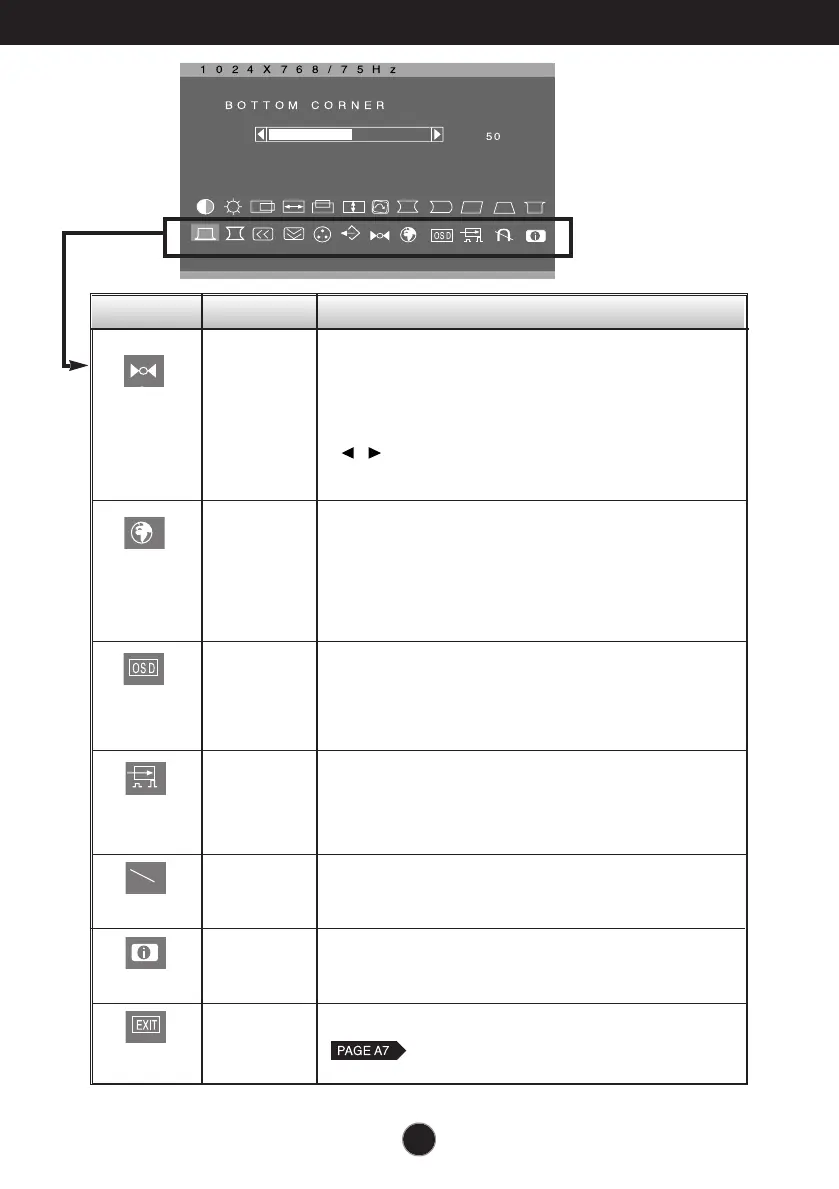
Icon Sub menu Description
RESET
Return to all factory default settings except "LANGUAGE":
Brightness, Contrast, Tilt, Color 9300, Video Level, OSD
Time, Moire (These reset options may differ depending on
the mode selected: Preset, User, or New).
If you don’t want to reset the monitor, use the
button to select CANCEL and then press
the SELECT button.
OSD TIME
• 5
• 10
• 20
• 30
• 60
Set the OSD time, i.e. the length of time a menu
will remain on-screen before it shuts off
automatically. Adjust the time to 5, 10, 20, 30 or 60
seconds.
LANGUAGE
To choose the language in which the control names
are displayed.
OSD Menus are available in 12 languages: English,
German, French, Spanish, Italian, Swedish, Finnish,
Portuguese, Korean, Chinese , Russian and Polish.
This item is used to select the monitor's input signal
level. The normal level used for most PCs is 0.7V.
If the screen becomes suddenly washed-out or
blurred, please select 1.0V and try again.
To manually demagnetize the screen to avoid
showing incorrect images or colors.
To inform users of preset and user mode data.
VIDEO LEVEL
DEGAUSS
INFORMATION
•
OK
•
CANCEL
•
0.7V
•
1.0V
• PRESET MODE
• USER MODE
EXIT *
To exit from current OSD menu.






 To Next Page