A8
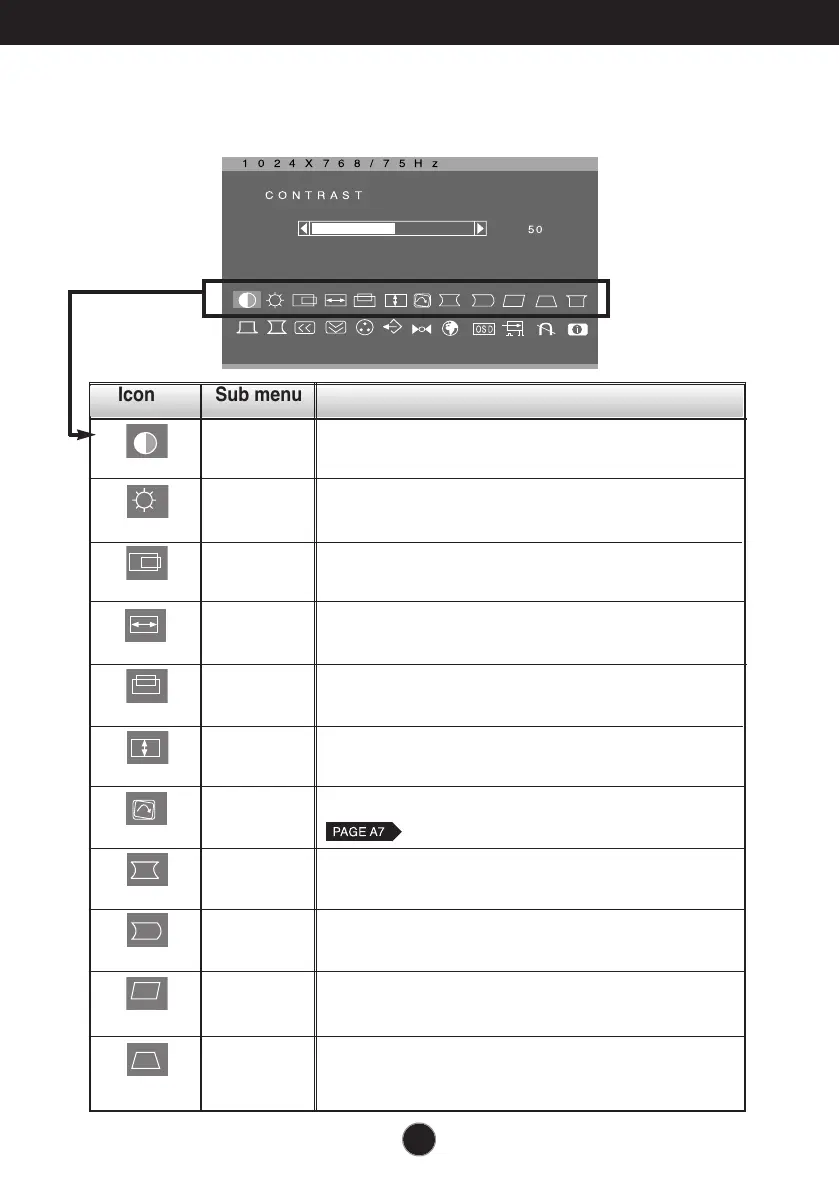
On Screen Display(OSD) Selection and Adjustment
You were introduced to the procedure of selecting and adjusting an item
using the OSD system. Listed below are the icons, icon names, and icon
descriptions of the all items shown on the Menu.
Icon Sub menu Description
CONTRAST
To adjust the contrast of the screen.
BRIGHTNESS
H POSITION
H SIZE
V POSITION
V SIZE
TILT
*
PINCUSHION
PIN BALANCE
PARALLELOGRAM
TRAPEZOID
To adjust the brightness of the screen.
To move image left and right.
To adjust image width.
To move image up and down.
To adjust image height.
To correct image rotation.
To correct a concave or convex bowing of the
image.
To correct the balance of both sides bowing.
To correctly adjust the skew of the image.
To correct geometric distortion.



 To Next Page