ENG
ENGLISH
16
ASSEMBLING AND PREPARING
1
2
Setting up the TV
You can mount your TV to a wall or attach the stand if you wish to place the TV on an entertainment
center or other furniture.
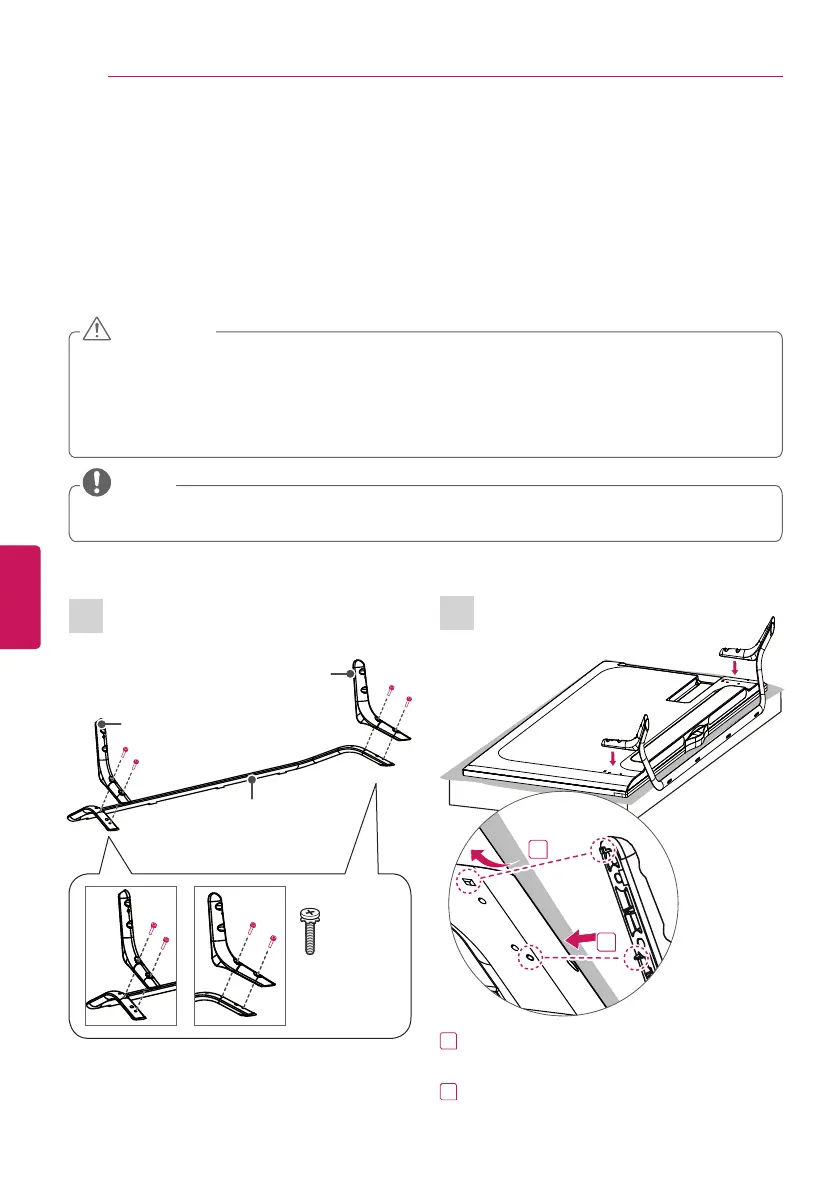
Attaching the Stand
If you are not mounting the TV to a wall, use the following instructions to attach the stand.
y
When attaching the stand to the TV set, place the screen facing down on a cushioned table or
flat surface to protect the screen from scratches.
y
Make sure that the screws are fastened tightly. (If they are not fastened securely enough, the
TV may tilt forward after being installed.)
y
Do not tighten the screws with too much force; otherwise they may be damaged and come
loose later.
CAUTION
y
Remove the stand before installing the TV on a wall mount by performing the stand attachment
in reverse.
NOTE
(For 49/55/60UB850T, 65UB930T,
65UB950T, 55/65UC970T)
Stand Body (R)
Stand Base
4 EA
M4 x L20
(For 49/55/60UB850T)
1
Attach the stand to the TV using the upper
mounting hole on the back of the TV.
2
Attach the stand to the TV using the lower
connection on the back of the TV.
1
2
Stand Body (L)


 To Next Page