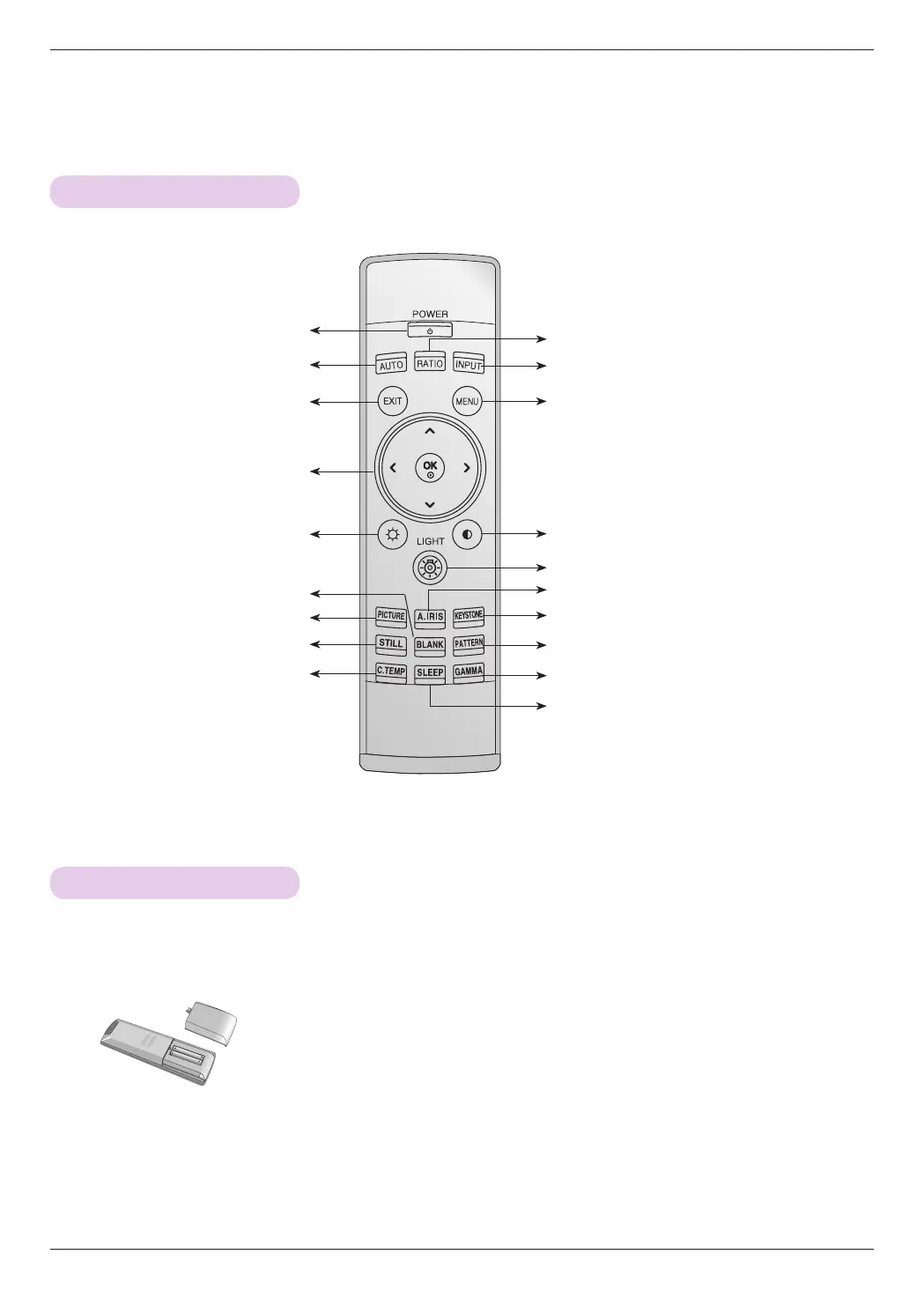
POWER Button
INPUT Button
MENU Button
KEYSTONE Button
PATTERN Button
GAMMA Button
PICTURE Button
ꔉOK, ∧/∨/</> Button
• Open the battery compartment cover on the back of the remote control.
• Insert the specified type of batteries with correct polarity, match “+” with “+”, and
match “-” with “-”.
• Install two 1.5V AAA batteries. Don’t mix used batteries with new batteries.
AUTO Button
CAUTION
RISK OF EXPLOSION IF BATTERY IS REPLACED WITH AN INCORRECT TYPE.
DISPOSE OF USED BATTERIES ACCORDING TO THE INSTRUCTIONS.
STILL Button
RATIO Button
EXIT Button
SLEEP Button
A.IRIS Button
C.TEMP Button
BLANK Button
Contrast Button
Brightness Button
LIGHT Button
Names of parts
10
Remote Control
Installing Batteries


 To Next Page