29
Application Guidelines
Due to our policy of continuous product innovation, some specications may change without notication.
© LG Electronics U.S.A., Inc., Englewood Cliffs, NJ. All rights reserved. “LG” is a registered trademark of LG Corp.
DIGITAL DISPLAY
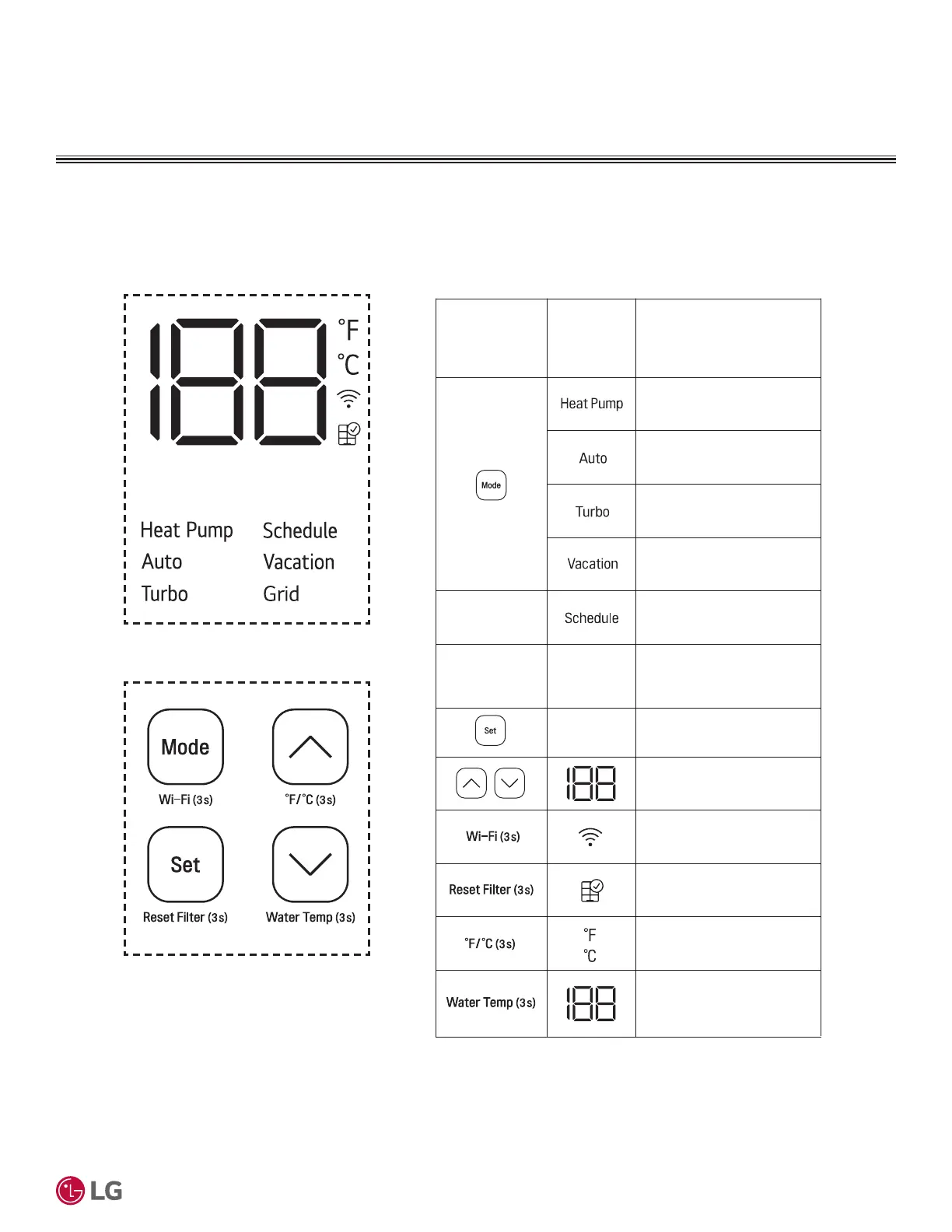
Digital Display
Display Screen - Basic Control
Figure 15: Display Screen and Button Legend.
Buttons
Display
Screen
Description
Selects Heat Pump Mode.
Selects Auto Mode.
Selects Turbo Mode.
Select Vacation Mode.
-
Sets Schedule Mode (only
in LG ThinQ application).
-
Sets the Desired Water
Temperature.
Adjusts the Desired
Water Temperature.
Enables Wi-Fi Paring.
Resets the Filter Alarm.
Switches the Unit
Between °F and °C.
Displays the Current
Water Temperature for
five (5) seconds.
Grid
Grid Will Turn On When
the Utility Company Has
Control of the Unit.
-
Display Screen
Buttons


 To Next Page