Adjusting the [Digital Option]
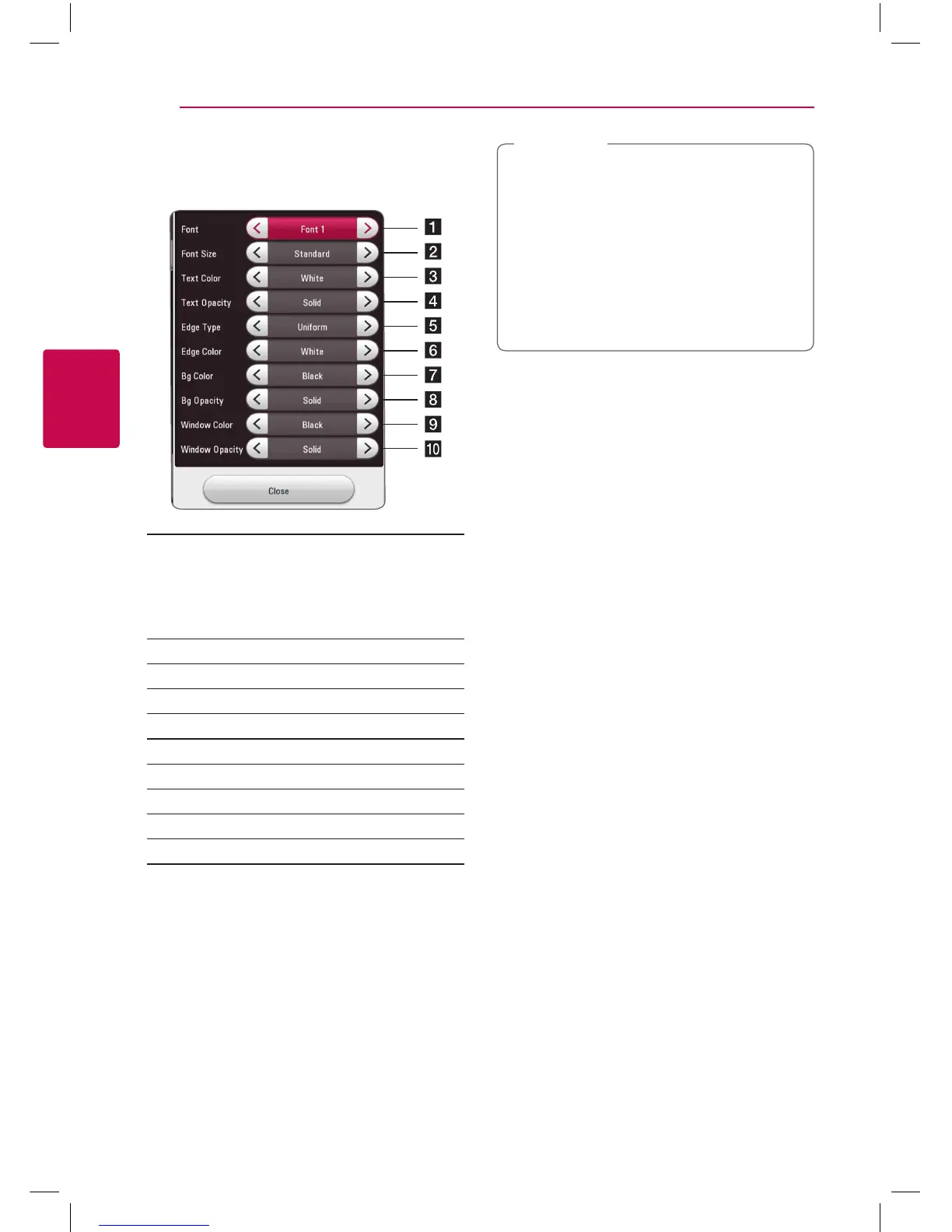
When [CC Mode] is selected to [Custom], you can
adjust detail settings of closed caption.
a
Selects a typeface for the text.
Font1 : Default / Font2 : Courier
Font3 : TimesNewRoman / Font4 : Helvetica
Font5 : Arial / Font6 : Casual
Font7 : Cursive / Font8 : SmallCapital
b
Selects the font size.
c
Selects a color for the text.
d
Adjusts the opacity for the text color.
e
Selects an edge type.
f
Selects a color for the edges.
g
Selects a background color.
h
Adjusts the opacity for the background color.
i
Selects a window color.
j
Adjusts the opacity for the window color.
y
On disc jacket or description page, a CC
logo will appear if closed captioning is
supported.
y
If online contents include closed caption of
its own, this setting may not work.
y
Some disc and online content support
closed caption function, if you want to use
closed caption, go to [Settings] > [OTHERS]
> [Closed Caption].
,
Note
BP250-N_MFL68903011_USA_ENG_1.0.indd 22 2015-08-11 11:49:26



 To Next Page