D
D
D
L
L
L
P
P
P
P
P
P
r
r
r
o
o
o
j
j
j
e
e
e
c
c
c
t
t
t
o
o
o
r
r
r
—
—
—
U
U
U
s
s
s
e
e
e
r
r
r
’
’
’
s
s
s
M
M
M
a
a
a
n
n
n
u
u
u
a
a
a
l
l
l
– 4 –
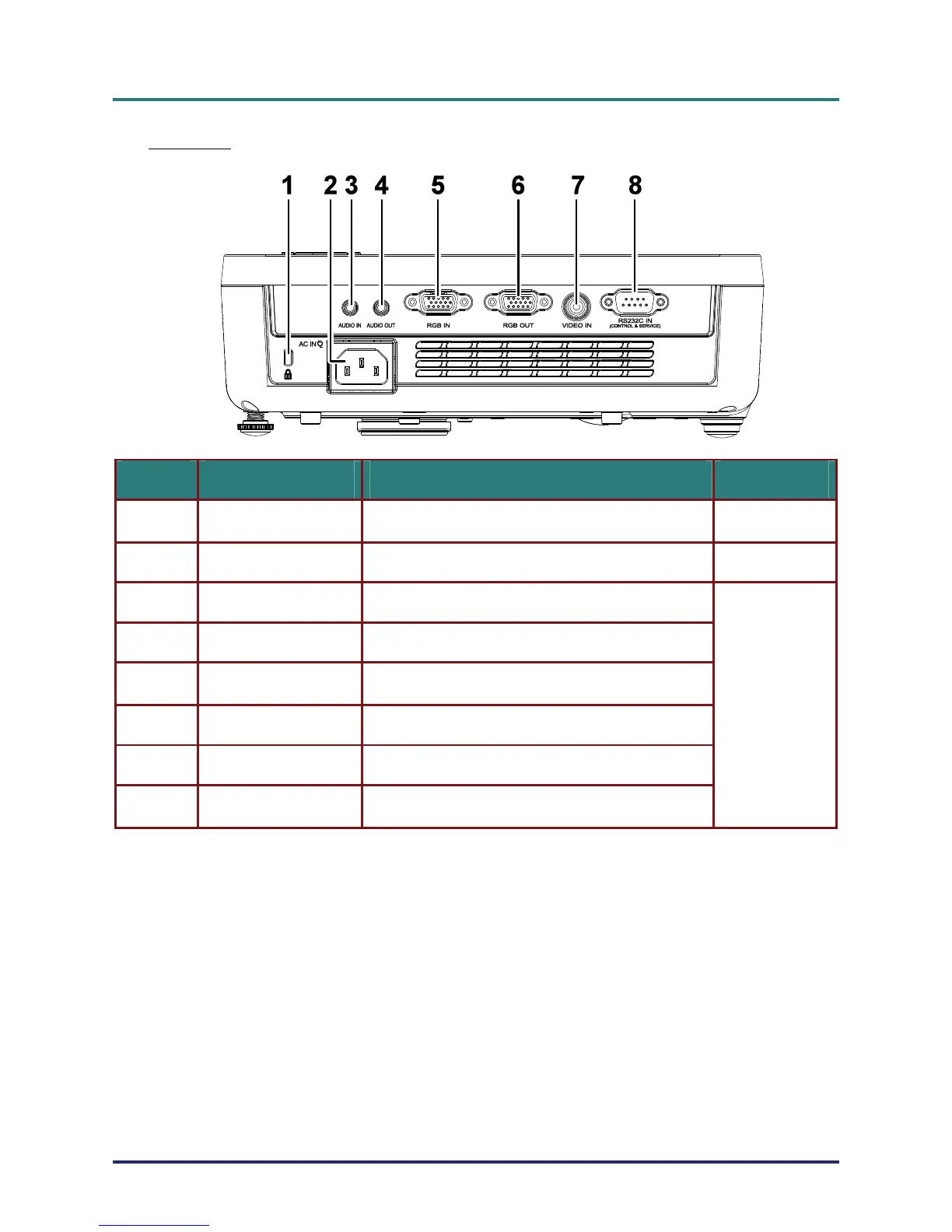
Rear view
ITEM LABEL DESCRIPTION SEE PAGE:
1.
Kensington Lock
Secure to permanent object with a Kensington® Lock
system
39
2.
AC IN Connect the POWER CABLE
11
3.
AUDIO IN Connect the AUDIO CABLE from the input device
4.
AUDIO OUT Connect an AUDIO cable for audio loop through
5.
RGB IN
Connect the RGB CABLE from a computer or compo-
nents
6.
RGB OUT Connect the RGB CABLE to a display
7.
VIDEO IN Connect the VIDEO CABLE from a video device
8.
RS-232C IN
Connect the RS-232C CABLE from a computer
(CONTROL & SERVICE)
10



 To Next Page