5
ENG
English
ASSEMBLING AND PREPARING
Product Installation
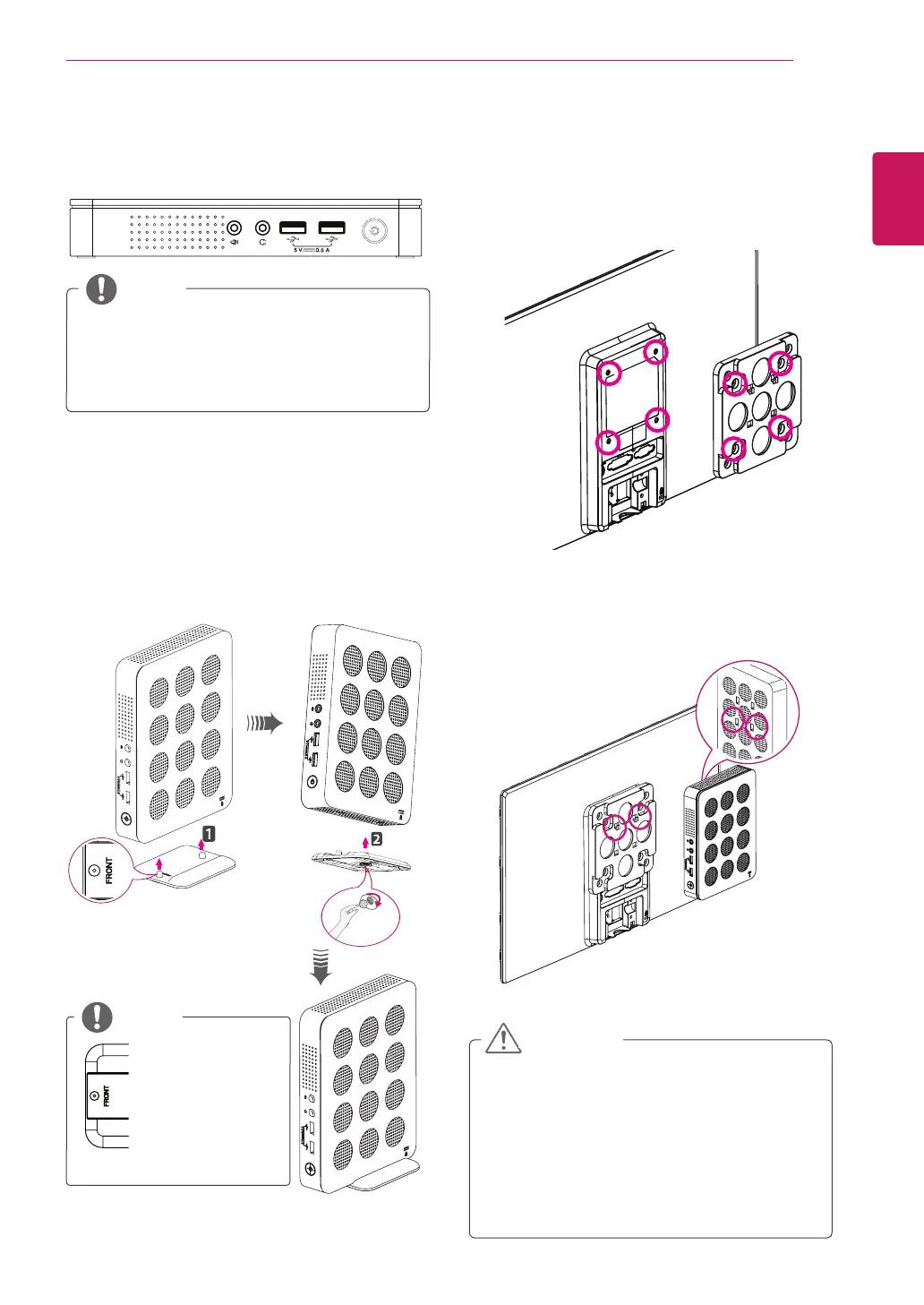
Using in Horizontal Position
Using in Vertical Position
1
Firmly attach the stand on the bottom of the
product as illustrated below.
2
Using a coin, turn the screw clockwise to
secure the stand base.
Mounting on the Back of the
Monitor
1
Fix the mount bracket on the back of the
monitor with 4 screws as illustrated below.
2
Put the product on the two latches as illustrated
below.
Assemble the product by aligning the below
two holes out of 4 holes on the product.
y
Attach the stand
base to the
stand hinge with
its front part fac-
ing forward.
y
If this product is used with upside down, it
may not work properly.
y
Use the product with the Kensington lock
facing upward.
NOTE
y
The product may not be mounted on some
monitors with mount bracket.
- In this case, use the product in horizontal
or vertical position.
y
When connecting the peripherals after
mounting the product on the monitor, be
sure to hold the product.
CAUTION
NOTE



 To Next Page