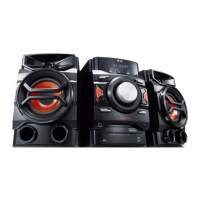
Getting Started12
Getting Started
1
a
Disc tray
Roads a disc.
b
AUTO DJ
Selects the AUTO DJ mode.
(For more informaion refer to the page 20)
c
TIMER
Uses your unit as an alarm clock.
d Y
(Skip/Search)
- Searches forward.
- Skips to the previous track/le.
e
BASS BLAST
Reinforces the treble, bass and surround eect.
f I
(Stop)
Stops playback or recording.
g
SET
Conrms the setting.
h 1
/
!
(Power)
Switches the unit ON or OFF.
i
Display window
j
USB 1/ USB 2
Plays the audio les by connecting the USB
device.
USB REC.
Records music to USB.
k
FUNC.
Selects the function or input source.
l
DEMO
Demonstrates each of functions.
m T
ST./MO.
- Starts or pauses playback.
- Selects Stereo/Mono.
n
Volume knob
Adjusts volume of speaker.
o
LATIN EQ
Chooses Local Specialization equalizer.
p U
(Skip/Search)
- Searches backward.
- Skips to the next track/le.
q
CLOCK
Sets the clock and checks the time.
r R
(Open/Close)
Opens and closes the disc tray.
CM4530-AB_DUSALLK_ENG_7506.indd 12 2013-01-25 3:59:40



 To Next Page