EasyManua.ls Logo

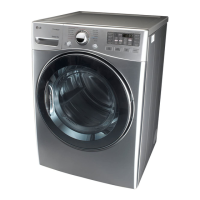
LG DLEX3470 Series - User Manual

LG DLEX3470 Series
43 pages
Print Icon
To Next Page IconTo Next Page
Loading...
OWNER’S MANUAL
DRYER
DLEX3470*
DLEX3070*
DLGX3471*
DLGX3071*
Before beginning installation, read these instructions carefully. This
will simplify installation and ensure that the dryer is installed correctly
and safely. Leave these instructions near the dryer after installation
for future reference.
P/No.: MFL67408117
www.lg.com
ENGLISH FRANÇAIS

Questions and Answers

  • M
    Michael MartinAug 16, 2025
    How to fix an LG Dryer that will not turn on?
    • F
      fadkinsAug 16, 2025
      If your LG Dryer isn't turning on, ensure the power cord is securely plugged into a grounded outlet matching the dryer's rating. Also, check your house fuse or circuit breaker; reset the breaker or replace the fuse if necessary. If a circuit overload is the issue, have it fixed by a qualified electrician.
  • P
    Paula RodriguezAug 19, 2025
    Why is my LG DLEX3470 Dryer not heating up?
    • C
      callenAug 19, 2025
      If your LG Dryer isn't heating, first, check your home's fuse or circuit breaker and reset it or replace the fuse if needed. If it's a gas model, ensure both the house and dryer gas shutoffs are fully open. If a circuit overload is the issue, have it fixed by a qualified electrician.
  • E
    ethan18Aug 22, 2025
    Why do clothes take so long to dry in my LG Dryer?
    • J
      Jill GayAug 22, 2025
      If your LG Dryer takes too long to dry clothes, try these steps: * Separate heavy and lightweight items. * Use appropriate control settings. * Ensure the lint filter is clean before each load; clean during the cycle if needed. * Check that exhaust ducts are clear of obstructions and properly configured. * Reset the circuit breaker or replace the fuse, and consult an electrician if the circuit is overloaded. * Avoid overloading or underloading the dryer; adjust load size as needed.
  • L
    Luis HensonAug 26, 2025
    How to prevent lint on clothes in LG DLEX3470?
    • M
      Matthew GonzalesAug 26, 2025
      To prevent lint on clothes when using your LG Dryer: * Clean the lint filter before every load, and possibly during the cycle for lint-heavy loads. * Dry lint-producing fabrics separately from lint-trapping fabrics. * Avoid overloading the dryer by dividing large loads. * Always check pockets for tissues or paper before washing and drying.
  • M
    Mr. Dennis PerezAug 28, 2025
    How to reduce static in clothes in LG DLEX3470?
    • E
      Erin SmithAug 28, 2025
      To reduce static in clothes after drying in your LG Dryer: * Use fabric softener correctly. * Avoid overdrying clothes by adjusting settings or using sensor dry cycles. * Be aware that synthetic materials can cause static buildup; try using a fabric softener with these.
  • M
    Matthew PadillaAug 31, 2025
    What to do if LG DLEX3470 leaves clothes wrinkled?
    • A
      Alicia OdonnellAug 31, 2025
      To avoid wrinkles when drying clothes in your LG Dryer, try reducing the drying time to prevent overdrying. Remove clothes immediately after the cycle ends, or use the WRINKLE CARE option to continue tumbling the clothes.
  • C
    Chase Powell MDSep 3, 2025
    How to stop clothes from shrinking in LG DLEX3470 Dryer?
    • J
      Jordan MartinezSep 3, 2025
      To prevent clothes from shrinking in your LG Dryer, always follow the garment care instructions. Some fabrics naturally shrink when washed or dried; use a low or no heat setting to minimize shrinkage.
  • J
    jvalentineSep 6, 2025
    Why does my LG DLEX3470 leave greasy spots on clothes?
    • D
      Dr. Elizabeth MillerSep 6, 2025
      To address greasy or dirty spots on clothes after drying in your LG Dryer, ensure you are using fabric softener correctly according to the instructions. Only dry clean items together, and ensure clothes are thoroughly cleaned during washing to remove stains before drying.
  • J
    Jacob DuncanSep 9, 2025
    What does error code tE1 or tE2 mean on my LG Dryer?
    • A
      Ashley HessSep 9, 2025
      If the display on your LG Dryer shows error code tE1 or tE2, turn off the dryer and call for service, as this indicates a thermistor malfunction.
  • R
    riddlesharonSep 12, 2025
    Why is drying time not consistent on my LG DLEX3470 Dryer?
    • J
      John HarringtonSep 12, 2025
      The drying time in your LG Dryer can vary depending on the heat setting, the type of heat used (electric, natural gas, or LP gas), the load size, the fabric types, the wetness of the clothes, and the condition of the exhaust ducts and lint filter.

Summary

LG Dryer Special Features

Important Safety Instructions

General Safety Precautions

Covers essential safety rules for operation, grounding, and installation, including gas safety.

Specific Hazard Warnings

Details risks and precautions related to steam functions, electrical connections, and installation.

LG Dryer Installation Instructions

Venting and Connections

Instructions for venting, ductwork, and connecting gas or electric power to the dryer.

How to Use Your LG Dryer

Dryer Maintenance

Troubleshooting Your Dryer

Before Calling for Service

Guides on common dryer problems and checks to perform before contacting customer support.

LG DLEX3470 Series Specifications

General IconGeneral
TypeElectric
Capacity7.4 cu. ft.
Steam TechnologyYes
Energy Star CertifiedYes
Number of Options5
Temperature Settings5
Sensor DryYes
ColorWhite
Reversible DoorYes
SmartDiagnosisYes
Number of Drying Racks1
Height39 inches
Dryer Vent Type4-way venting

Related product manuals