Troubleshooting 31
Troubleshooting
5
Troubleshooting
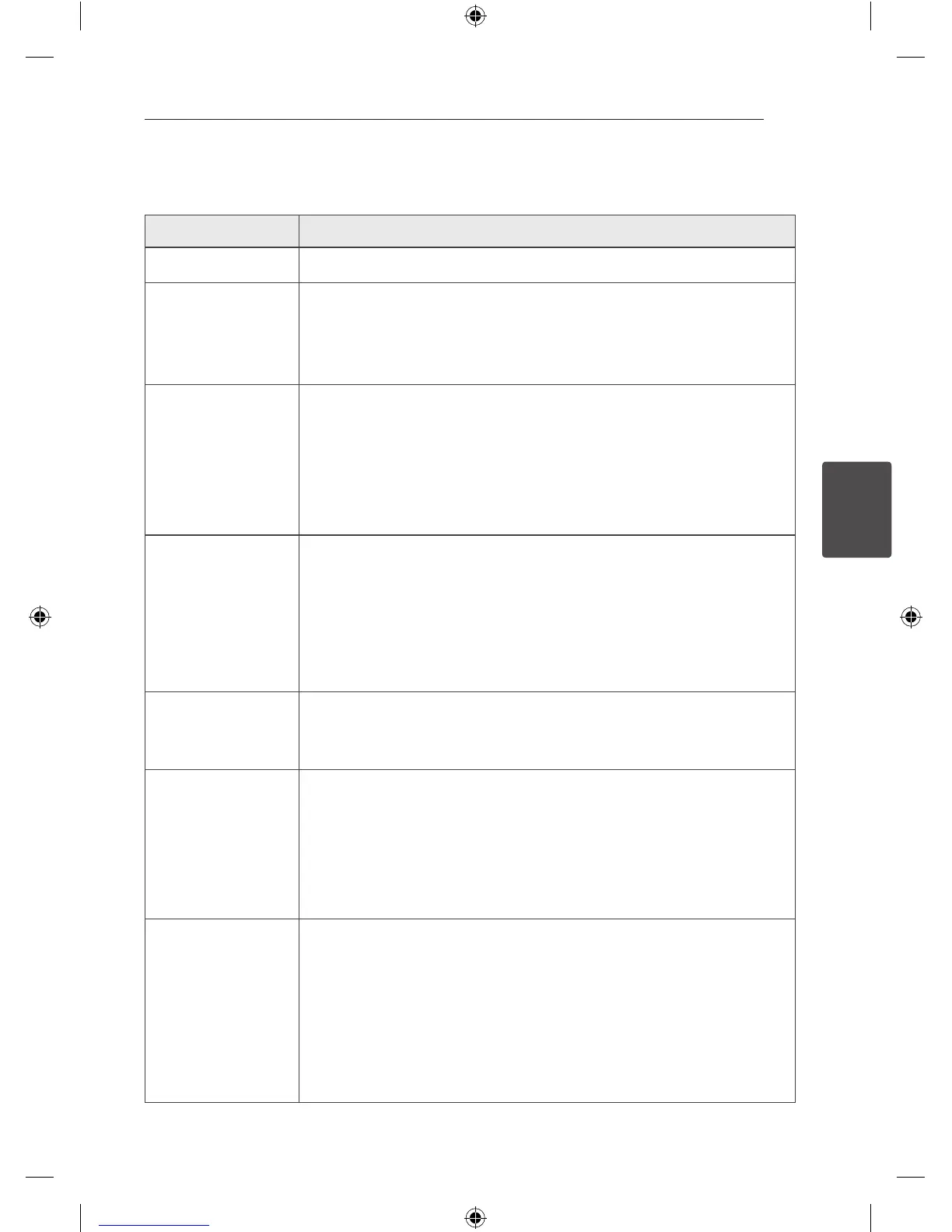
Problem Correction
No Power.
Plug the power cord into the wall outlet securely.
No picture.
y
Select the appropriate video input mode on the TV so the picture from the
unit appears on the TV screen.
y
Connect the video cables securely to both the TV and unit.
There is little or no
sound.
y
Select the correct input mode of the unit so you can hear the sound from
the unit.
y
Connect the audio cables into the connection terminals correctly.
y
Repalce with new audio cable.
A DVD/CD will not play.
y
Insert a playable disc.(check the disc type, colour system and regional
code)
y
Insert a disc.
y
Place the disc with the label or printed side facing upwards.
y
Enter your password or change the rating level.
Humming noise heard
while a DVD or CD is
playing.
y
Clean the disc using a soft cloth with outward strokes.
y
Move unit and audio components further away from your TV.
Radio stations cannot
be tuned in properly.
y
Check the antenna connection and adjust its position.
y
Tune to the station manually.
y
Preset some radio stations, see page 28 for details.
The remote control
does not work properly.
y
The remote control is not pointed at the remote sensor of the unit. Point
the remote control at the remote sensor of the unit.
y
The remote control is too far from the unit. Operate the remote control
within about 23 ft (7 m).
y
There is an obstacle in the path of the remote control and the unit. Remove
the obstacle.
y
The battery in the remote control is exhausted. Replace the battery with
new one.
DM2520-FP_AIDNLLK__ENG.indd 31 2013-04-17 3:15:55



 To Next Page