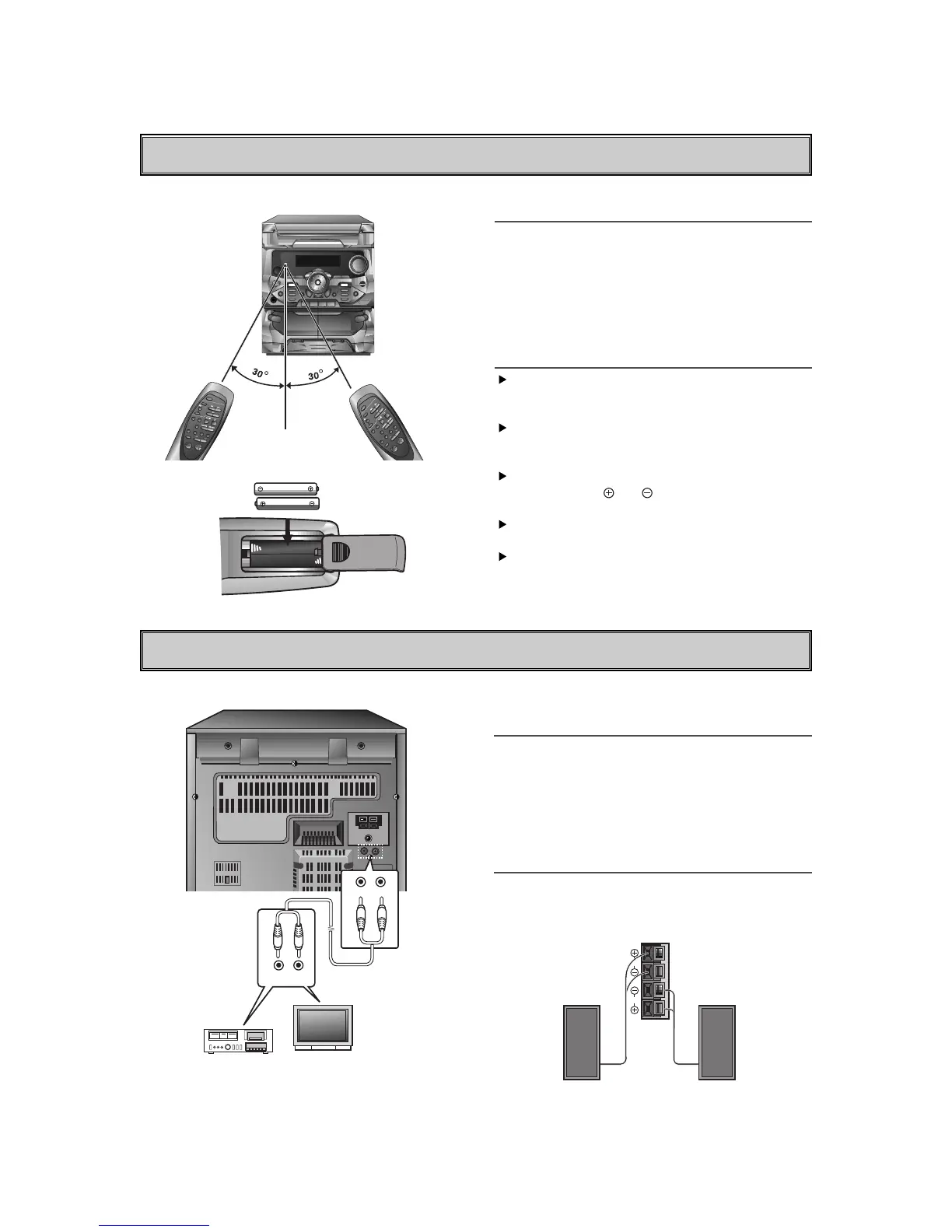
REMOTE CONTROL
CONNECTIONS
Connection the AUX or PHONO
Sockets
Two phono sockets marked ÔAUXÕ are provided on the
back of the unit for connecting other units (for
example, a record player with a pre amplifier, video
recorders or tape recorders.)
But if your system has the ÔPHONO R/LÕ sockets, you
can play by connecting the external recordplayer.
Connection the Loud Speakers
Insert the red wire of the right/left hand speaker into
the red terminal marked(+) at the back of the unit.
Insert the black wire into the black terminal marked(-).
Control Range
The remote control device is designed for the range
shown in the illustration.
NOTE
Strong light or obstacles between the remote control
device and the stereo system may interfere with the
functioning of the remote control.
Notes on Batteries
Your remote control comes with batteries.
Use two ÒAAA(UM-4. IEC R03)Ó type high quality
batteries.
When the remote control fails to operate accurately
at maximum distance from the unit. Replace the
worn out batteries with new ones.
Install two ÒAAAÓ type batteries, observing correct
battery polarity( and ). Reversed battery polarity
might damage the unit.
Do not use different types of batteries together, or
an old ones with new one.
When you are not going to use the unit for a long
time, remove the batteries to prevent possible
electrolyte leakage.



 To Next Page