9
CLOCK SETTING
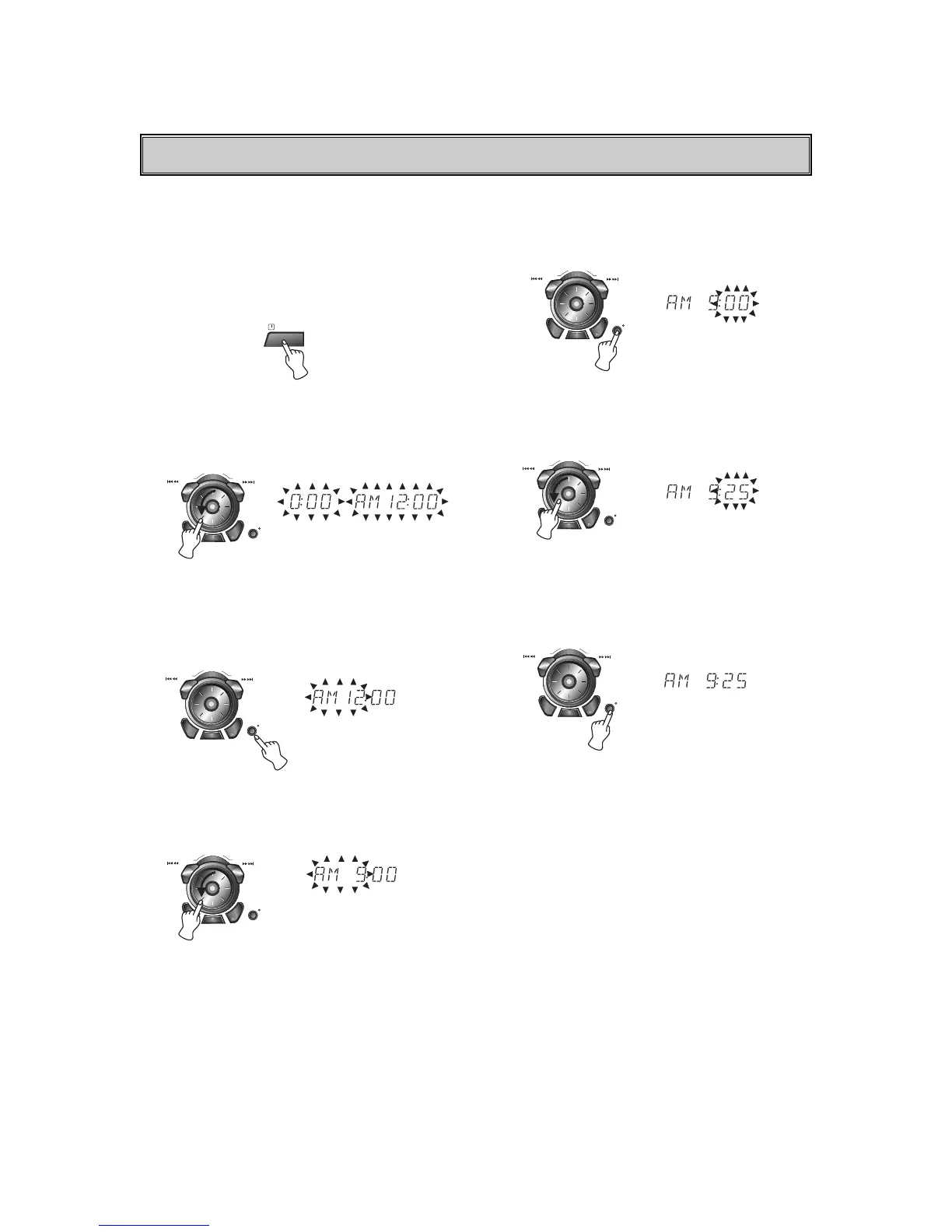
Example : Set to 9:25 in the morning
1. Press the CLOCK button. (If the clock is already
set, press and hold the CLOCK button for more
than 1.5 seconds)
- The hours begin to blink.
2. Select a 24 hour cycle or 12 hour cycle by
pressing PRESET DOWN or UP button (or
turning the JOG DIAL).
(24HR) or (12HR)
3. Press the CDII/SET/COUNTER RESET button.
4. Set the hour with PRESET DOWN or UP
button (or turn the JOG DIAL).
5. Press the CDII/SET/COUNTER RESET button.
6. Set the minute with PRESET DOWN or UP
button (or turn the JOG DIAL).
7. Press the CDII/SET/COUNTER RESET button.
The clock starts operating.
Information on the time
AM 12:00 = midnight
PM 12:00 = noon
NOTE:
When a power interruption has occurred for more
than 10 seconds.
The clock setting is erased, and Ò-- : --Ó will flash on the
display.



 To Next Page