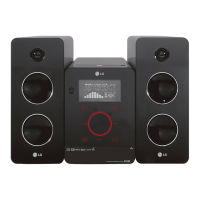
Getting Started 15
Getting Started
1
a
Disc slot
b
iPod dock
c
1/!
(POWER)
Switches the unit ON or OFF.
d
Display window
Shows the current status of the unit.
e
FUNC. (FUNCTION)
Changes the input source or function.
f
USB Port
g
EQ
You can choose xed sound impression.
SET, DEMO
Conrms the setting.
Press DEMO in power o state to demonstrate
the function on display window. To cancel it,
press DEMO again.
TIMER
With the TIMER function, you can have the
radio reception, CD play and USB play turned
on and o at the desired time.
CLOCK
For setting the clock and checking the time.
h
B
(OPEN/CLOSE)
Insert or release a disc.
i
C
/
V
(Skip/Search):
Goes to next or previous le/track/chapter.
Searches backward or forward (Press and hold)
Tunes in the desired radio station.
d
/
M
(PLAY / PAUSE)
Starts playback.
Pauses playback temporarily, press again to exit
pause mode.
j
-/+ (VOLUME)
Adjusts speaker volume.
Z
(STOP)
Stops playback.
k
USB REC.
Recoding to USB.
l
PORT. IN
Connects to a portable player with audio
outputs.
PHONES
Headphone jack



 To Next Page
 Loading...