EasyManua.ls Logo

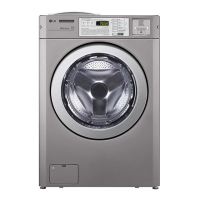
LG GCW1069QD - User Manual

LG GCW1069QD
72 pages
Print Icon
To Next Page IconTo Next Page
Loading...
OWNER’S MANUAL
COMMERCIAL WASHER
MODEL
GCW1069CS/GCW1069QS/GCW1069LS
GCW1069CD/GCW1069QD/GCW1069LD
www.lg.com
Before beginning installation, read these instructions carefully. This will simplify
installation and ensure that the washer is installed correctly and safely.
Leave these instructions near the washer after installation for future reference.
P/No.: MFL67360455

Table of Contents

Other manuals for LG GCW1069QD

Questions and Answers

  • J
    Jason MooreAug 15, 2025
    Why is my LG GCW1069QD Washer showing a drain error?
    • K
      Kevin TorresAug 15, 2025
      The LG Washer may display a drain error because it has not fully drained within 3 minutes. To resolve this, examine the drainage system for any obstructions.
  • C
    Cynthia BoydAug 18, 2025
    What to do if my LG GCW1069QD Washer displays an imbalance error?
    • C
      Christopher MendezAug 18, 2025
      If your LG Washer shows an imbalance error, it could be due to several reasons: the load is too small, the appliance is tilted, laundry is gathered to one side, or non-distributable items are in the drum. The suggested solution is to redistribute the load evenly inside the drum.
  • D
    David WhiteAug 22, 2025
    How to fix a water inlet error on my LG GCW1069QD?
    • C
      crystal85Aug 22, 2025
      A water inlet error on your LG Washer occurs when the correct water level is not reached within 10 minutes after water is supplied, or if it doesn't reach the preset level within 12 minutes. Check if water is being supplied properly to resolve this issue.
  • P
    Patrick BellAug 25, 2025
    What to do if my LG GCW1069QD has a door open error?
    • A
      adrianguerreroAug 26, 2025
      If your LG Washer displays a door open error, it could be due to the door not being fully closed, loose electrical connections at the door switch and PWB Assembly, or a faulty DOOR SWITCH ASSEMBLY. Make sure the door is fully closed and check the electrical connections.
  • G
    Gina RichardsonAug 28, 2025
    How to troubleshoot a locked motor error on an LG GCW1069QD Washer?
    • C
      Charles DanielAug 28, 2025
      A locked motor error on your LG Washer can be caused by several issues: * The MOTOR HARNESS connector is disconnected from the STATOR ASSEMBLY connector. * Poor electrical contact between the MOTOR HARNESS connectors and the MAIN PWB ASSEMBLY connector. * A cut in the MOTOR HARNESS between the STATOR ASSEMBLY and MAIN PWB ASSEMBLY. * A defective hall sensor. Check the connections and integrity of the MOTOR HARNESS to troubleshoot this error.
  • J
    James LopezSep 1, 2025
    What causes an overflow error on my LG GCW1069QD?
    • N
      nicole33Sep 1, 2025
      An overflow error on your LG Washer indicates that the water level frequency is too high. Check for issues causing water overflow. If the error is displayed, the drain pump will automatically activate to drain the water.
  • K
    Kevin Johnson Jr.Sep 4, 2025
    What does a pressure sensor error mean on my LG Washer?
    • C
      christina12Sep 4, 2025
      A pressure sensor error on your LG Washer indicates that the SENSOR SWITCH ASSEMBLY is out of order. You should inspect and replace the SENSOR SWITCH ASSEMBLY if necessary.
  • C
    cohencourtneySep 8, 2025
    What does EEPROM error mean on LG Washer?
    • A
      Allison GreenSep 8, 2025
      An EEPROM error on your LG Washer indicates that the EEPROM is out of order. Replace the EEPROM to resolve this issue.
  • R
    Robert ComptonSep 12, 2025
    What to do if my LG GCW1069QD shows a card reader error?
    • W
      Wendy StanleySep 12, 2025
      A card reader error on your LG Washer means that there is a disconnection of the Card Reader Wire. Reconnect the Card Reader Wire.

LG GCW1069QD Specifications

General IconGeneral
Capacity10.5 kg
Spin Speed1400 RPM
Drying Capacity7 kg
Steam FunctionYes
Inverter MotorYes
Child LockYes
MotorDirect Drive
Programs14
DisplayLED
Delay StartYes

Related product manuals