48
Camera and Video
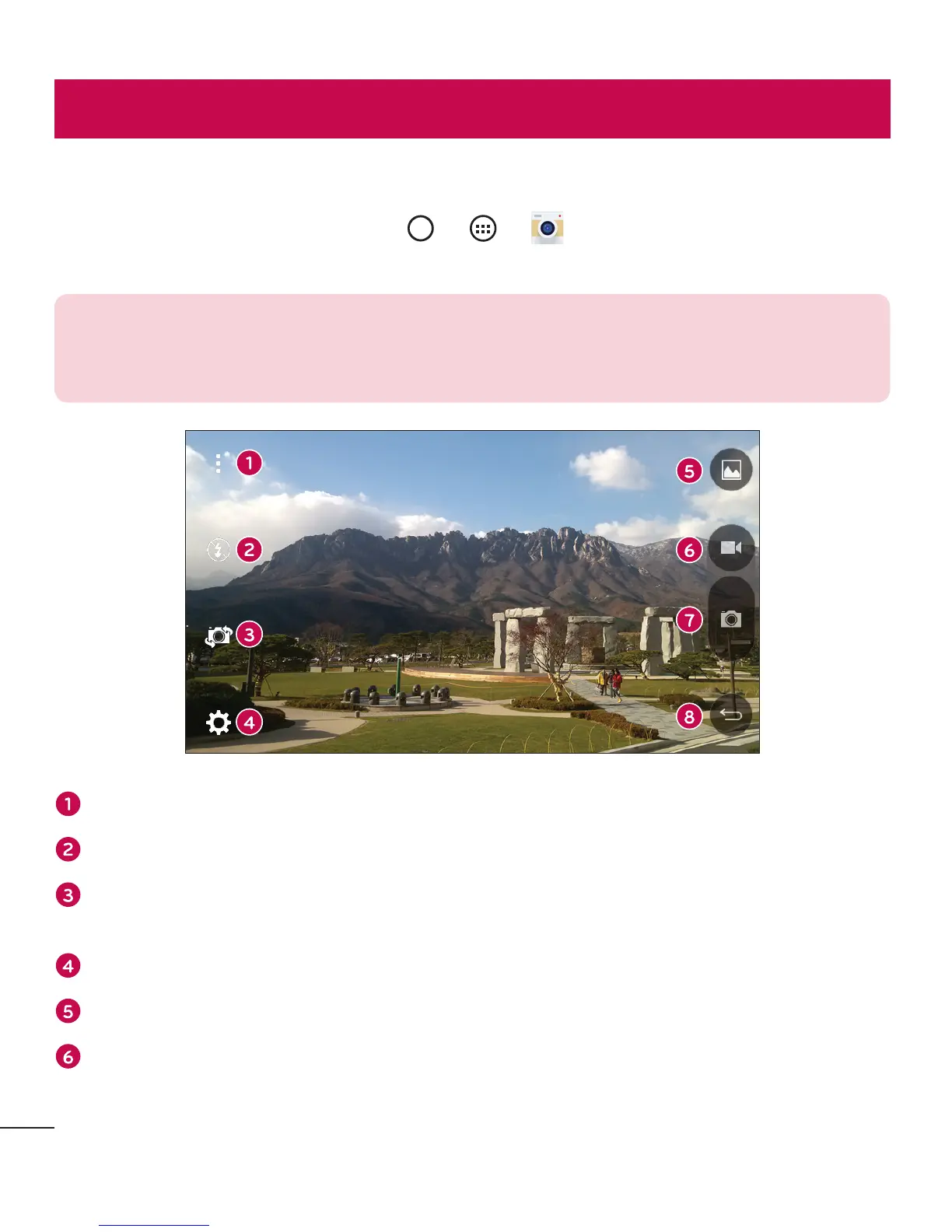
Camera options on the viewfinder
ToopentheCameraapplication,tap > > .
Youcanusethecameraorcamcordertotakeandsharepicturesandvideos.
NOTE: Be sure to clean the protective lens cover with a microfiber cloth
before taking pictures. A lens cover with smudges from fingers can cause
blurry pictures with a "halo" effect.
Hide/Display Options–Taptohide/displaythecameraoptionsontheviewfinder.
Flash–Allowsyoutomanagethecamera'sflash.
Swap camera–Taptoswapbetweentherearcameralensandthefrontcamera
lens.
Settings–Tapthisicontoopenthecamerasettingsmenu.
Gallery–Taptoviewthelastphotoorvideoyoucaptured.
Record–Taptostartrecording.
Camera and Video



 To Next Page