EasyManua.ls Logo

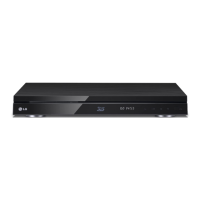
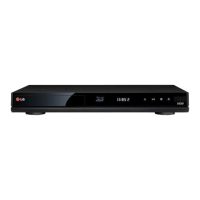
LG HR720T - User Manual

LG HR720T
72 pages
Print Icon
To Next Page IconTo Next Page
Loading...
OWNER’S MANUAL
Blu-ray Disc
/ DVD Player
with HD Tuner
HR720T
www.lg.com
Please read this manual carefully before operating
your set and retain it for future reference..

Table of Contents

Questions and Answers

  • E
    edward77Aug 18, 2025
    Why is there no picture on my LG HR720T Blu-ray Player?
    • C
      Craig SmithAug 18, 2025
      If there is no picture from your LG Blu-ray Player, ensure you've selected the correct video input mode on your TV. Also, verify the video connections are secure. Check the HDMI Color Setting in the Setup menu to ensure it matches your video connection. If the issue persists, your TV might not support the current resolution; try changing it to a supported resolution. The player’s HDMI OUT jack may be connected to a DVI device that does not support copyright protection.
  • B
    boyermaryAug 21, 2025
    What to do if the LG HR720T Blu-ray Player remote control does not work properly?
    • M
      Melanie WigginsAug 21, 2025
      If the remote control for your LG Blu-ray Player isn't working, several factors could be the cause: - Ensure the remote is pointed directly at the unit's remote sensor. - Make sure you're not too far from the unit. - Remove any obstacles between the remote and the unit. - Replace the batteries in the remote control, as they may be exhausted.
  • A
    Amber MartinAug 23, 2025
    What to do if my LG Blu-ray Player does not start playback?
    • V
      Victor HicksAug 23, 2025
      If your LG Blu-ray Player won't start playback, try these steps: - Ensure you've inserted a playable disc. - Place the disc with the playback side facing down. - Position the disc correctly on the disc tray, within the guide. - Clean the disc if it's dirty. - Cancel the Rating function or adjust the rating level if it's interfering.
  • K
    kevinguzmanAug 26, 2025
    Why can't my LG HR720T play movie, photo or audio files?
    • E
      erika51Aug 26, 2025
      Your LG Blu-ray Player might not be able to play certain movie, photo, or audio files if they are not recorded in a compatible format, or if the unit does not support the movie file's codec.
  • M
    Marc Murray Jr.Aug 28, 2025
    Why is there no sound or distorted sound from my LG HR720T?
    • B
      Brandon AndersonAug 28, 2025
      If you're experiencing no sound or distorted sound from your LG Blu-ray Player, check the following: - Ensure the audio connections are securely connected. - Verify the input source setting on the amplifier or its connection is correct. - Confirm the unit isn't in scan, slow motion, or pause mode. - Check the sound volume level. - Ensure the connected amplifier is compatible with the audio format output from the player. - If using HDMI, note that a DVI jack does not accept audio signal. Also ensure that the device connected to the player’s HDMI OUT jack is compatible with the audio format output from the unit.
  • L
    Lauren AlvarezAug 30, 2025
    How to fix LG HR720T BD-LIVE feature that does not work?
    • P
      Phillip DanielAug 31, 2025
      If the BD-LIVE feature on your LG Blu-ray Player isn't working, consider these solutions: - Connect a USB storage device with at least 1GB of free space. - Ensure the unit is properly connected to your local area network and has internet access. - If your broadband speed is insufficient, contact your ISP to increase it. - Verify that the [BD-LIVE connection] option in the [Setup] menu is set to [Permitted].
  • C
    Cynthia DillonSep 2, 2025
    Why won't my LG HR720T Blu-ray Player record, or records unsuccessfully?
    • P
      Peter LeeSep 2, 2025
      If your LG Blu-ray Player cannot record or is not recording successfully, check the remaining space on the HDD. Also, if the source is copy-protected, it cannot be recorded. Finally, if a DTV rating is set for the recorder and higher-rated digital programs are received, change the DTV rating level to allow recording.
  • M
    melissagomezSep 4, 2025
    What to do if picture noise appears on my LG HR720T Blu-ray Player?
    • B
      barbaraolsonSep 5, 2025
      If picture noise appears on your LG Blu-ray Player, it could be because you are playing a disc recorded in a colour system that is different from your TV. Also, try setting the resolution to one that your TV accepts.
  • T
    Teresa MitchellSep 7, 2025
    How to fix LG HR720T timer record that does not record successfully?
    • A
      annarussoSep 7, 2025
      If the timer record on your LG Blu-ray Player is not recording successfully, it may be due to: the clock is not set to correct time; the start time of the timer recording is past; when setting the recording programme, make sure you set the recorder’s built-in tuner, not the TV’s built-in tuner; if the HDD is damaged, the recording may not complete successfully.
  • T
    Thomas CraigSep 9, 2025
    Why I cannot enter a timer programme when using my LG HR720T Blu-ray Player?
    • T
      Timothy LongSep 10, 2025
      You may not be able to enter a timer program on your LG Blu-ray Player if the time you’re trying to set has already passed, or if you have already set 32 timer programs.

Summary

Getting Started

Safety Information

Covers electrical, fire, laser, installation, and environmental safety guidelines.

Playback Media and File Compatibility

Details supported disc types and compatible file formats for media playback.

Connecting

TV Connection Options

Overview of connecting the player to a TV via antenna, HDMI, or composite connections.

Amplifier and Network Connections

Guides for connecting audio to amplifiers and setting up network communication.

System Setting

Initial Setup and Basic Navigation

Guides through the initial setup process and explains basic menu navigation.

Troubleshooting

General Troubleshooting Issues

Solutions for common issues like power, playback errors, remote control problems, and picture quality.

LG HR720T Specifications

General IconGeneral
BD-ROM PlaybackYes
DVD PlaybackYes
HDMI OutputYes
USB PortYes
Output Resolution1080p
Ethernet PortYes
Blu-ray ProfileBlu-ray Profile 2.0
Disc PlaybackCD

Related product manuals