EasyManua.ls Logo

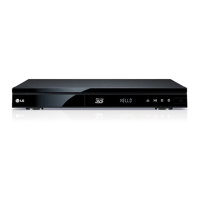
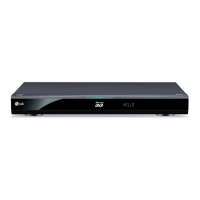
LG HR925D - User Manual

LG HR925D
94 pages
Print Icon
To Next Page IconTo Next Page
Loading...
OWNER’S MANUAL
Blu-ray Disc
/DVD Player
with built-in HDD & HD
Tuner
HR925D/HR929D
www.lg.com
Please read this manual carefully before operating
your set and retain it for future reference.
ENGLISH

Table of Contents

Questions and Answers

  • J
    Joshua HawkinsAug 18, 2025
    How to fix LG HR925D Blu-ray Player if the power does not turn on?
    • J
      joshua72Aug 18, 2025
      To potentially resolve the issue of your LG Blu-ray Player not turning on, ensure the power cord is securely plugged into the wall outlet.
  • A
    Amber PerkinsAug 21, 2025
    Why my LG HR925D Blu-ray Player cannot play movie, photo or audio files?
    • P
      Peter MyersAug 21, 2025
      If your LG Blu-ray Player isn't playing movies, photos, or audio files, it could be due to the files being in an unsupported format or the unit not supporting the specific codec of the movie file.
  • J
    Juan HerreraAug 23, 2025
    Why is my LG HR925D Blu-ray Player remote control not working?
    • T
      Thomas PorterAug 23, 2025
      If your LG Blu-ray Player remote control isn't working properly, it could be due to several reasons: * The remote control is not pointed at the remote sensor of the unit. * The remote control is too far from the unit. * There is an obstacle in the path between the remote control and the unit. * The batteries in the remote control are exhausted.
  • E
    emcdonaldAug 26, 2025
    What to do if my LG HR925D does not start playback?
    • E
      Erica JimenezAug 26, 2025
      If your LG Blu-ray Player is not starting playback, try these steps: * Insert a playable disc. (Check the disc type, color system, and regional code.) * Insert the disc with the playback side down. * Clean the disc. * Cancel the Rating function or change the rating level.
  • B
    Brian HamiltonAug 28, 2025
    Why does my LG HR925D Blu-ray Player keep buffering when streaming video?
    • A
      amyrichardsAug 28, 2025
      If streaming video services like YouTube™ often stop or buffer during playback on your LG Blu-ray Player, it might be because your broadband service speed is insufficient. Contacting your Internet Service Provider (ISP) to increase your broadband speed is recommended.
  • H
    Holly LinAug 30, 2025
    What to do if there is no picture on my LG HR925D?
    • S
      Shirley StokesAug 30, 2025
      If you're not getting a picture on your LG Blu-ray Player, try the following: 1. Select the appropriate video input mode on the TV so the picture from the unit appears on the TV screen. 2. Connect the video connection securely. 3. Check the [HDMI Color Setting] in the [Setup] menu is set to the appropriate item that conforms to your video connection. 4. Change the resolution to one that your TV accepts if your TV may not support the resolution you have set on the unit. 5. The player’s HDMI OUT jack is connected to a DVI device that does not support copyright protection.
  • M
    Melanie PattersonSep 2, 2025
    How to fix BD-LIVE feature on my LG HR925D?
    • T
      Thomas GilesSep 2, 2025
      If the BD-LIVE feature isn't working on your LG Blu-ray Player, here are a few things to check: * Connect the USB storage with at least 1GB free space, as the connected USB storage may not have enough space. * Ensure that the unit is correctly connected to the local area network and can access the internet. * Contact your Internet Service Provider (ISP) and increase the broadband speed to suit the unit’s requirements, because your broadband speed may not be fast enough to use the BD-Live features. * Set the [BD-LIVE connection] option in the [Setup] menu to [Permitted], because it may be set to [Prohibited].
  • O
    operezSep 4, 2025
    Why does picture noise appear on my LG Blu-ray Player?
    • B
      bridgeskevinSep 5, 2025
      If you're experiencing picture noise with your LG Blu-ray Player, it could be because you are playing a disc recorded in a color system that is different from your TV. Also, set the resolution to one that your TV accepts.
  • M
    Meredith BenderSep 7, 2025
    Why aren't shared folders showing on my LG HR925D?
    • K
      Kelly ReevesSep 7, 2025
      If shared folders or files from your PC or a media server are not displayed on the [Home Link] menu of your LG Blu-ray Player, try turning off the firewall or anti-virus software running on your PC or media server.
  • A
    ashleystewartSep 10, 2025
    Why my LG HR925D Blu-ray Player cannot record or does not record successfully?
    • M
      Michaela WeaverSep 10, 2025
      If you cannot record or the recording is unsuccessful on your LG Blu-ray Player, check the remaining space on the HDD. Also, if you set a DTV rating for the recorder and higher rated digital programs are received, the programme cannot be recorded: change the DTV rating level in order to record it.

Summary

Getting Started

Safety Information

Essential safety warnings and precautions for operating the player, covering electric shock, laser, and power cord.

Remote Control Functions

Detailed description and function of each button on the supplied remote control.

Main Unit Ports and Controls

Identification and description of the player's physical ports and front/rear panel controls.

Connecting Your Player

HDMI Connection Guide

Detailed steps for connecting the player to a TV or monitor via HDMI for optimal audio/video.

Audio Output Connections

Methods for connecting the player to an amplifier via HDMI or digital audio outputs for enhanced sound.

System Settings Configuration

Initial Setup and Basic Configuration

Guide to initial setup, language selection, time setting, and basic menu navigation.

Operating Your Player

Digital TV Operations

Watching, recording, and managing digital TV programs and the program guide.

Playback Features and Controls

General playback operations for discs, including navigation, playback controls, and disc menus.

Troubleshooting Common Issues

Recording and Timer Issues

Addressing problems with recording, timer setup, and program overlaps.

LG HR925D Specifications

General IconGeneral
TypeBlu-ray Player
3D PlaybackYes
Weight3.3 kg
DVD Region CodeRegion 2
Hard Drive Capacity500 GB
Disc PlaybackBlu-ray, DVD, CD
Region CodeRegion B
Internet ConnectivityEthernet, Wi-Fi
Dimensions430 x 54 x 219 mm
Video UpscalingYes
ConnectivityHDMI, USB, Ethernet

Related product manuals